
Picture this: It’s midnight before your child’s school admission deadline, and you suddenly realize the NADRA B-Form is missing from the required documents. Your heart races as you remember the long queues, the confusing paperwork, and the endless waiting at government offices. This scenario plays out in thousands of Pakistani households every year, turning what should be a simple documentation task into a source of tremendous stress.
The good news is that 2026 brings revolutionary changes to how parents can obtain their child’s Child Registration Certificate, commonly known as the B-Form. The National Database and Registration Authority has transformed its services, making digital applications the new normal and reducing processing times dramatically.
This comprehensive guide walks you through every aspect of NADRA B-Form registration—from understanding what this document truly means for your child’s future to navigating the online application process, handling special circumstances, and resolving common issues that arise during applications.
Key Takeaways
- Digital transformation now covers 70% of applications – NADRA reports that online applications through the Pak ID app now account for the majority of child registrations, with processing times reduced by 60% compared to traditional methods.
- Registration within 60 days ensures automatic processing – Children registered within two months of birth receive streamlined verification, while delayed registrations face additional scrutiny and documentation requirements.
- Executive service guarantees 24-hour processing – For parents facing urgent school admissions or passport applications, the Rs. 500 executive fee ensures your child’s B-Form is ready within one working day.
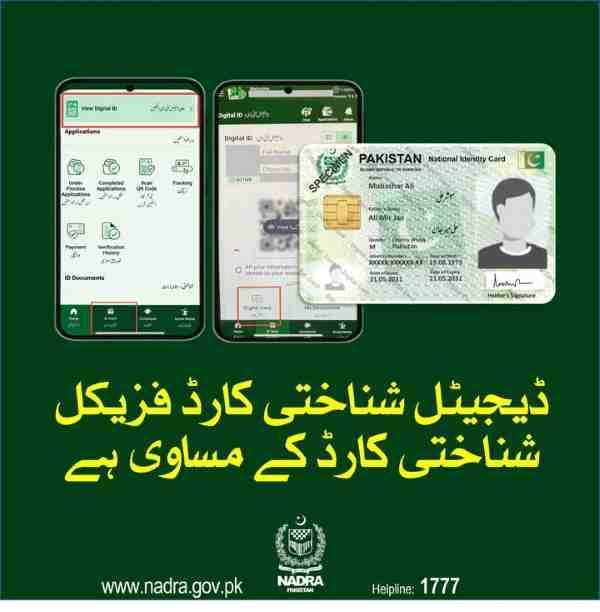
- Digital B-Form carries full legal authority – The digital version stored in your Pak ID app’s ID Vault is legally equivalent to the physical laminated card for all official transactions including school admissions and passport applications.
- Biometric requirements phase in with age – Children under 3 need no biometrics, ages 3-10 require photographs only, and ages 10-18 must provide complete fingerprints and iris scans at NADRA centers.
- Family tree verification prevents future complications – The B-Form application automatically updates the NADRA family tree, ensuring your child’s identity is properly linked to parents for all future transactions.
- Read More: NADRA Birth Certificate: How To Apply Online (Fee & Home Delivery)
- Read More: NADRA B Form Fee Update (Track & Apply Online)
- Read More: B Form Registration Process (NADRA Pak Identity App)
NADRA B Form Online Apply | NADRA B Form Requirements
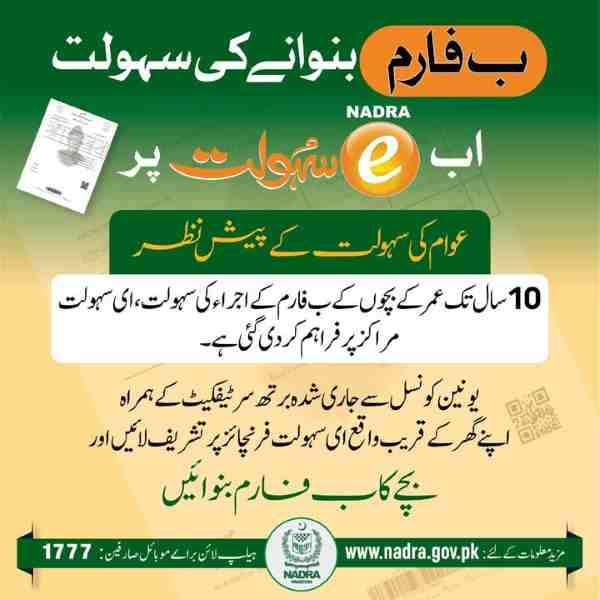
Table of Contents
Understanding the NADRA B-Form: Your Child’s Foundation Document
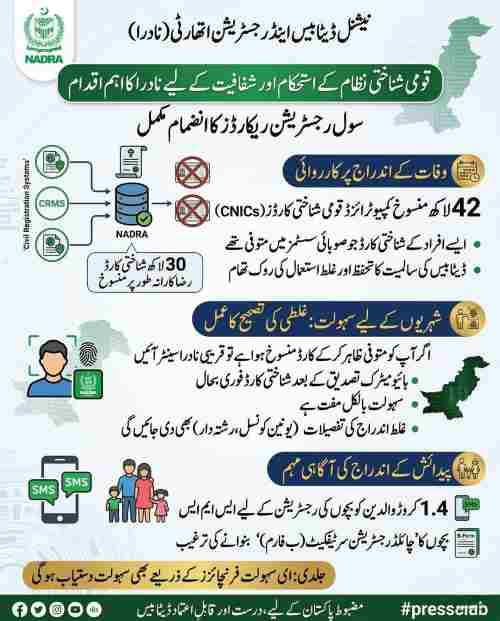
The NADRA B-Form serves as the official recognition of your child’s existence as a Pakistani citizen within the national database. Think of it as the first brick in the foundation of your child’s official identity—a document that will remain relevant throughout their entire life.
The Legal Definition and Purpose
The Child Registration Certificate functions as the official identity document for all Pakistani citizens under 18 years of age. It establishes:
- The child’s name and parentage within government records
- The date and place of birth for legal purposes
- Pakistani citizenship status for all official transactions
- A unique 13-digit identity number reserved for the child’s lifetime
Why the B-Form Matters More Than You Think
Beyond being just another piece of government paperwork, the B-Form serves critical functions:
Educational Requirements
Every school in Pakistan, whether public or private, mandates the B-Form for admission. Schools use this document to:
- Verify the child’s age for appropriate grade placement
- Confirm Pakistani citizenship for enrollment records
- Maintain accurate student records in education department databases
- Issue transfer certificates when children change schools
- Register students for board examinations at matriculation level
Healthcare Access
Many healthcare facilities now require the B-Form for:
- Registering children in government vaccination programs
- Enrolling in the Sehat Sahulat Program health insurance
- Accessing specialized pediatric care at public hospitals
- Maintaining accurate medical records across facilities
Travel Documentation
Without a B-Form, your child cannot obtain:
- A Pakistani passport for international travel
- A child travel document for specific destinations
- Visa applications that require family relationship proof
Financial Inclusion
Banks and financial institutions require the B-Form when:
- Opening minor savings accounts for children
- Registering for education savings schemes
- Applying for government scholarships or stipends
The 13-Digit Number: Your Child’s Lifetime Identity
The number printed on your child’s B-Form is permanently reserved in the NADRA database. This same number will appear on:
- The Juvenile Card issued at age 10 if requested
- The Computerized National Identity Card at age 18
- The Pakistani passport throughout adulthood
- The voter registration record upon turning 18
- Property records and inheritance documents
This continuity eliminates the need for re-registration and ensures your child’s records remain consistent across all government systems throughout their lifetime.
Read More: NADRA B Form Requirements (Fee Update & Apply Process)
B-Form Versus Birth Certificate: Clearing the Confusion
Many parents mistakenly believe these documents serve the same purpose. Understanding the distinction saves time and prevents documentation gaps:
Union Council Birth Certificate
- Issued by local government authorities
- Documents the factual event of birth
- Contains basic information: date, place, parents’ names
- Required to obtain the B-Form
- Valid for local record-keeping only
NADRA B-Form (CRC)
- Issued by federal government authority
- Creates official citizenship record
- Assigns permanent identity number
- Links child to parents in national database
- Required for all official transactions
The Family Tree Connection
When NADRA issues a B-Form, the system automatically updates the Family Tree record. This database links all family members together and serves as the reference point for:
- Inheritance and succession certificates
- Family pension claims after a parent’s death
- Guardian verification for minors
- Immigration and visa relationship proofs
- Government benefit program eligibility
A properly linked B-Form ensures your child appears correctly in this family tree, preventing future complications when they need to prove their relationship to parents or siblings.
Complete Eligibility Criteria for NADRA B-Form Registration

Understanding who qualifies for a B-Form and under what circumstances prevents wasted time on ineligible applications. The criteria vary based on citizenship, age, and family situation.
Basic Citizenship Requirements
The child must qualify as a Pakistani citizen under one of these categories:
- Born in Pakistan to Pakistani parents holding valid CNICs
- Born abroad to Pakistani parents who maintain valid NICOPs
- Born to a Pakistani mother and foreign father with special provisions
- Foundlings discovered in Pakistan with unknown parentage
- Children of refugees with specific documentation status
Age-Based Application Categories
Newborns (Birth to 60 Days)
- Fastest processing with minimal documentation
- Automatic verification through hospital records
- Birth registration at Union Council still required
- Parents’ biometrics sufficient for verification
- Digital photographs accepted via Pak ID app
Infants (61 Days to 12 Months)
- Online application still available
- Additional verification steps may apply
- Photograph required through app
- Parents must appear for biometrics
- Birth certificate mandatory
Toddlers and Young Children (1 to 10 Years)
- Online application not available
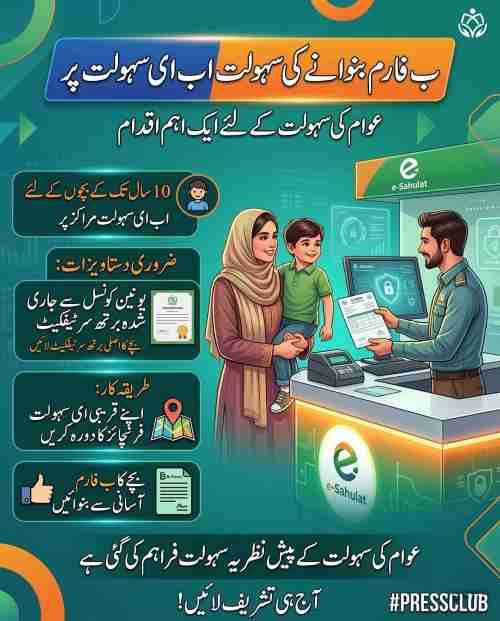
- Must visit NADRA center or e-Sahulat facility
- Photograph capture at center required
- Parents must appear in person
- Additional verification for late registration
Adolescents (10 to 18 Years)
- Mandatory in-person appearance at NADRA center
- Full biometric collection including all fingerprints
- Iris scan for enhanced security
- Photograph with facial recognition standards
- Signature capture for database
- May require Juvenile Card issuance simultaneously
Special Circumstances Eligibility
Single Parent Applications
Single mothers and fathers can apply with:
- Valid CNIC of the applying parent
- Child’s birth certificate showing parent’s name
- Affidavit explaining the other parent’s absence
- Death certificate if parent deceased
- Court order if custody granted to one parent
Parents Living Abroad
When parents reside outside Pakistan:
- NICOP required for both parents
- Child’s foreign birth certificate attested by Pakistani embassy
- Application through Pakistani mission or online portal
- Video verification possible through consular services
- Digital biometrics accepted in some cases
Divorced Parents
The parent with custody applies with:
- Valid divorce decree from family court
- Custody order specifying authority
- CNICs of both parents if available
- Child’s birth certificate
- Affidavit confirming custody arrangements
Deceased Parents
Surviving parent or guardian applies with:
- Death certificate of deceased parent
- CNIC of surviving parent
- Birth certificate showing both parents
- Guardian appointment documents if applicable
- Witness affidavits from family members
Ineligibility Situations
Certain situations prevent B-Form issuance:
- Child over 18 years (must apply directly for CNIC)
- Parents without valid CNICs (renew first)
- Missing birth certificate (obtain from Union Council first)
- Foreign citizens without proper residency status
- Disputed parentage without court resolution
Essential Documents Required for B-Form Application
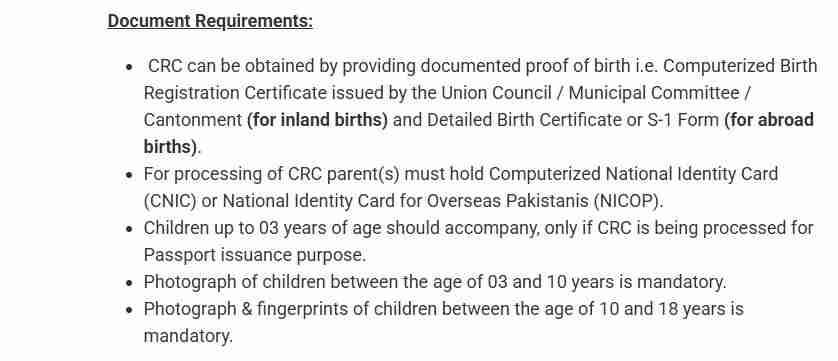
Proper documentation forms the backbone of successful B-Form applications. Organizing these documents before starting saves time and prevents rejections.
Primary Documents for All Applications
Computerized Birth Certificate
This document from the Union Council serves as the foundation document. Requirements include:
- Issuance within 60 days of birth for automatic processing
- Complete names matching parents’ CNICs exactly
- Date of birth clearly stated in Gregorian format
- Place of birth with complete address
- Registration number from Union Council records
- Official stamp and signature of registering authority
- Issuance date within reasonable timeframe
Parents’ Valid CNICs
Both parents must provide current identity documents:
- Original CNICs for in-person verification
- Clear scanned copies for online applications
- NICOP for overseas Pakistani parents
- Expired cards not acceptable (renew first)
- Addresses should match or be explained
Nikkah Nama or Marriage Certificate
While not always explicitly requested, this document proves essential when:
- Parents’ CNICs show different family names
- Father’s CNIC indicates unmarried status
- Family tree verification requires marriage proof
- Conservative districts request additional verification
- One parent’s CNIC shows different marital status
Age-Specific Document Requirements
Newborns Under 60 Days
- Hospital birth slip (if available)
- Discharge summary from maternity facility
- Parents’ CNICs
- Nikkah Nama (recommended)
- Vaccination card (if available)
Children 1 to 10 Years
- School leaving certificate (if enrolled)
- Previous educational records
- Immunization records
- Passport-sized photographs (2 copies)
- B-Form of siblings (if available for family tree linking)
Children 10 to 18 Years
- School certificate with photograph
- Previous B-Form if any (lost cases)
- Educational records from all schools attended
- Character certificate from current institution
- Additional photographs as specified
Special Situation Document Requirements
Home Birth Cases
For children born at home without hospital documentation:
- Affidavit on Rs. 50 stamp paper from both parents
- Statement from lady health visitor or midwife
- Two witness affidavits from neighbors
- Union Council verification of home birth
- Medical officer verification if available
Overseas Births
Children born to Pakistani parents abroad require:
- Foreign birth certificate with English translation
- Attestation from Pakistani embassy in country of birth
- Parents’ NICOPs or valid Pakistani passports
- Proof of parents’ legal status abroad
- Child’s foreign passport (if issued)
Adopted Children
Complete documentation package includes:
- Court adoption decree with all case details
- Modified birth certificate showing adoptive parents
- Affidavit of adoption from both adoptive parents
- No-objection certificate from biological parents (if available)
- Social welfare department report (if applicable)
Foundlings and Abandoned Children
Special documentation pathway:
- Police report documenting discovery
- Child Protection Bureau involvement records
- Court order for temporary custody
- Medical examination and age assessment report
- Photographs at time of discovery
Document Format Specifications
For Online Applications
- File format: JPG, PNG, or PDF accepted
- Maximum file size: 5 MB per document
- Minimum resolution: 300 DPI for clarity
- Color scans required (black and white rejected)
- All four corners visible in frame
- No shadows or glare on text areas
- Text clearly readable without magnification
For In-Person Applications
- Original documents for verification
- Photocopies for submission (2 sets recommended)
- Passport-sized photographs (white background)
- Photographs with name and date written on back
- Additional copies for your records
Common Document Mistakes to Avoid
Name Discrepancies
Even minor spelling differences cause rejections:
- Muhammad versus Mohammad
- Fatima versus Fatimah
- Ali versus Aly
- Missing middle names or initials
Expired Documents
Always verify validity dates:
- Parents’ CNICs must be current
- Birth certificate issuance date recent
- Nikkah Nama should be registered
- All signatures and stamps present
Quality Issues
Poor quality submissions fail:
- Blurry photographs rejected
- Dark scans unreadable
- Cropped documents missing information
- Glare hiding critical details
- Folded or damaged originals
Online Application Process Through Pak ID App
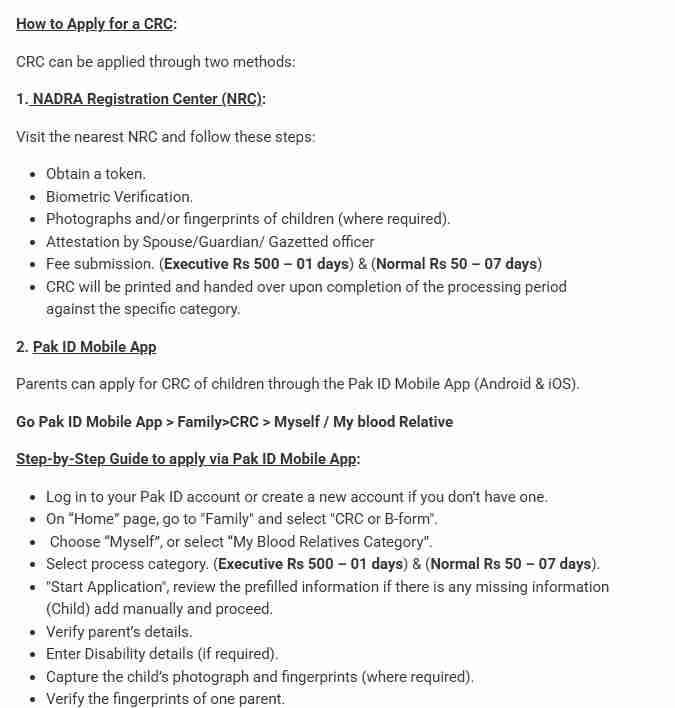
The Pak ID mobile application represents the most convenient method for eligible families to register their children. This digital platform eliminates travel time, reduces waiting periods, and provides real-time application tracking.
Determining Online Application Eligibility
Before starting, confirm your situation qualifies:
- Child under 12 months of age
- Both parents possess valid CNICs
- Birth certificate already obtained from Union Council
- Smartphone with camera and adequate storage
- Stable internet connection available
- Parents comfortable with mobile applications
Step-by-Step Pak ID Application Guide
Downloading the Official App
Begin by installing the correct application:
- Open Google Play Store for Android devices
- Open Apple App Store for iOS devices
- Search for “Pak ID” by NADRA Technologies
- Verify developer name and download count
- Check for minimum 4-star rating
- Install and wait for completion
- Grant required permissions when prompted
Creating Your Account
Set up your profile correctly:
- Launch the app after installation
- Select “New User Registration” option
- Enter full name exactly as on CNIC
- Provide active mobile number
- Create strong password with mix of characters
- Set up security questions for recovery
CNIC Verification Process
Link your identity to the app:
- Enter 13-digit CNIC number without dashes
- Capture live photo of CNIC front side
- Capture live photo of CNIC back side
- Review automatically extracted information
- Confirm all details match your card
- Submit for initial verification
Biometric Verification
Complete fingerprint authentication:
- Place thumb on scanner area as directed
- Hold steady until capture completes
- Repeat for index finger if required
- Complete facial recognition scan
- Ensure good lighting for face capture
- Wait for verification success message
Navigating to B-Form Service
Find the correct application section:
- Log in to your Pak ID account
- View main dashboard with all services
- Select “Family” or “My Family” section
- Locate “ID Documents” menu option
- Choose “Child Registration Certificate”
- Read information screen carefully
- Click “Start New Application”
Entering Child Information Accurately
Personal Details Section
Fill in basic information with care:
- Child’s full name as on birth certificate
- Select gender from available options
- Enter date of birth in DD-MM-YYYY format
- Select place of birth district and city
- Enter birth registration number from certificate
- Verify all information before proceeding
Parent Information Section
Complete parent details accurately:
- Father’s name automatically populates
- Verify father’s CNIC number is correct
- Enter mother’s full name exactly as on her CNIC
- Provide mother’s CNIC number
- Confirm both parents listed correctly
- Add step-parent information if applicable
Address Information
Provide complete location details:
- Current residential address with street and house number
- Permanent address if different from current
- District and tehsil of residence
- Nearest landmark for verification
- Postal code for courier delivery
- Mobile number for SMS updates
Document Upload Process
Birth Certificate Upload
Submit the foundation document:
- Tap on “Upload Birth Certificate”
- Take live photo or select from gallery
- Ensure all four corners visible
- Verify text clearly readable
- Check for proper lighting and focus
- Submit and wait for processing
Parents’ CNIC Uploads
Complete identity document submission:
- Upload father’s CNIC front image
- Upload father’s CNIC back image
- Upload mother’s CNIC front image
- Upload mother’s CNIC back image
- Verify all numbers clearly visible
- Ensure no glare on critical information
Additional Document Uploads
Submit supporting documents as needed:
- Upload Nikkah Nama if system requests
- Provide death certificate if applicable
- Submit custody papers if divorced
- Upload guardian documents when relevant
- Add any other requested documents
Biometric Verification Steps
Parent Fingerprint Capture
Complete your biometric verification:
- Place thumb on designated scanner area
- Hold steady until capture completes
- Reposition if first attempt fails
- Complete second fingerprint if required
- Wait for system verification
Child Photograph Capture
Take your child’s picture correctly:
- Position child against white background
- Ensure adequate lighting on face
- Hold child steady facing camera
- Capture when child is still and eyes open
- Review image quality immediately
- Retake if necessary before proceeding
Fee Payment Process
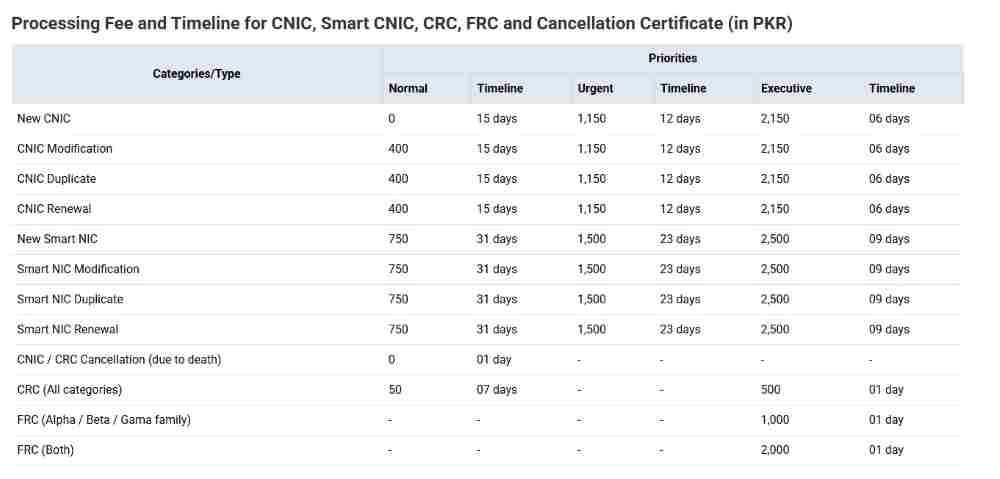
Available Payment Methods
Choose your preferred option:
- Credit cards from all major issuers
- Debit cards with online capability
- Raast instant bank transfer
- Easypaisa mobile account
- JazzCash wallet balance
- Bank Alfalah digital payment
Completing Payment
Follow these steps carefully:
- Review application summary and fee amount
- Select “Proceed to Payment” button
- Choose preferred payment method
- Enter payment details accurately
- Confirm transaction amount matches
- Wait for processing confirmation
- Save payment receipt screenshot
- Note transaction ID for reference
Application Submission and Tracking
Final Review Before Submission
Check everything one last time:
- Verify all entered information accuracy
- Confirm uploaded documents correct
- Check photographs meet specifications
- Ensure payment method selected
- Review terms and conditions
- Accept all declarations
Submission Confirmation
Complete the application process:
- Click “Submit Application” button
- Wait for processing confirmation
- Note your 14-digit tracking ID
- Save tracking ID in multiple places
- Check email for confirmation message
- Enable push notifications for updates
Tracking Your Application
Monitor progress regularly:
- Return to Pak ID main dashboard
- Select “My Applications” section
- View current status of all submissions
- Check for additional information requests
- Monitor processing progress daily
- Respond promptly to any queries
Alternative Application Methods When Online Isn’t Possible
Not everyone qualifies for or prefers online application. Understanding alternative methods ensures you can complete registration regardless of circumstances.
NADRA Registration Center Application
Finding Your Nearest Center
Locate the most convenient facility:
- Visit NADRA official website
- Use the center locator tool
- Enter your city or district name
- View all nearby centers with addresses
- Check operating hours before visiting
- Note which centers handle child registration
- Call ahead to confirm service availability
Preparing for Your Visit
Organize everything before going:
- Gather all original documents
- Make photocopies of everything (2 sets)
- Take passport-sized photographs (4 copies)
- Keep fees ready in exact change
- Bring water and snacks for waiting
- Arrive early before crowds form
- Dress comfortably for waiting
Token System Navigation
Understand the queue process:
- Visit information desk upon arrival
- Request token for child registration
- Note your token number carefully
- Check estimated wait time on display
- Find seating in waiting area
- Listen for announcements regularly
- Watch digital display for your number
Counter Submission Process
Complete application at designated counter:
- Proceed when your token called
- Submit all original documents
- Provide photocopies for records
- Answer officer questions completely
- Provide child photographs as required
- Verify information entered correctly
- Confirm application acceptance
Biometric Collection at Center
Complete required biometrics:
- Parent fingerprints captured on scanner
- Child photograph taken professionally
- Child fingerprints for those over 10
- Signature capture for older children
- Iris scan when applicable
- Verify all data captured correctly
Fee Payment at Center
Complete financial transaction:
- Receive payment challan from officer
- Proceed to designated payment counter
- Pay applicable fees in cash or card
- Obtain official receipt with tracking ID
- Return to original counter for confirmation
- Keep all receipts for your records
e-Sahulat Center Application
Services Available at e-Sahulat
Understand what these centers offer:
- B-Form applications for children under 10
- Fee collection for all NADRA services
- Application form filling assistance
- Document scanning and uploading
- Tracking ID generation and printing
- Status inquiry and updates
Finding Authorized e-Sahulat Centers
Locate a reliable facility:
- Look for e-Sahulat signage in your area
- Ask at local grocery stores or shops
- Check NADRA website for authorized list
- Verify franchise currently active
- Confirm they offer NADRA services
- Call ahead to confirm operating hours
Application Process at e-Sahulat
Complete your registration:
- Visit center during business hours
- Inform staff you need B-Form service
- Provide all required original documents
- Staff assist with online form filling
- Photographs taken at center if needed
- Review all information before submission
- Confirm application entered correctly
Fees and Payment
Understand the cost structure:
- Standard NADRA fees apply
- Additional service charge for assistance
- Cash payment only at most centers
- Receive printed receipt with tracking ID
- Keep receipt for future reference
- Note tracking ID for online tracking
Union Council Registration Pathway
Birth Registration First
Begin at your local Union Council:
- Visit Union Council where birth occurred
- Register birth within 60 days for standard processing
- Provide hospital slip or home birth affidavit
- Receive computerized birth certificate
- Verify all information before leaving
NADRA Coordination Services
Some Union Councils offer integrated services:
- B-Form can be initiated at Union Council
- Basic information entered into NADRA system
- Application forwarded to NADRA for processing
- Biometrics still required at NADRA center
- Reduced waiting time with pre-submitted data
Mobile Registration Vans for Rural Areas
Services for Remote Communities
NADRA reaches underserved areas:
- Mobile vans operate on scheduled routes
- Services announced through local authorities
- All registration services available on board
- Biometric equipment installed in vans
- Staff trained for all application types
Planning for Mobile Van Visit
Make the most of this service:
- Check schedule with union council
- Arrive early on service day
- Bring complete documentation
- Prepare for possible crowds
- Bring snacks and water for waiting
- Complete process same day
Executive Centers for Premium Service
When to Choose Executive Center
Consider premium service when:
- Urgent processing absolutely necessary
- Complicated case requires personal attention
- Weekday appointments preferred
- Willing to pay higher fees for convenience
- Previous applications faced issues
Executive Center Benefits
Premium service advantages include:
- Appointments available by phone or online
- Dedicated counters with minimal waiting
- Personalized assistance throughout process
- Faster processing within 1-2 days
- Extended operating hours for convenience
- Comfortable waiting areas with amenities
NADRA B-Form Fees and Processing Times for 2026
Understanding the complete cost structure and expected timeframes helps you plan effectively and choose the right service level for your situation.
Standard Fee Structure Breakdown
Normal Processing Fee – Rs. 50
This economy option includes:
- Basic application processing through standard queue
- Regular verification procedures
- Digital record creation in central database
- SMS notifications at each milestone
- Digital copy availability in Pak ID app
- Physical card delivery within 7-10 days
Executive Processing Fee – Rs. 500
The premium service provides:
- Priority processing throughout all stages
- Dedicated verification team assignment
- 24-hour turnaround guarantee
- Expedited database entry
- Priority handling for any corrections
- Enhanced customer support access
- Immediate digital copy upon approval
Additional Charges to Consider
Home Delivery Fees
Physical card shipping costs:
- Standard courier within city: Rs. 150
- Standard courier other cities: Rs. 200
- Express courier anywhere: Rs. 350
- International courier: Rs. 1500-2500
- Tracking included in all options
Duplicate B-Form Charges
Replacement document fees:
- First duplicate request: Rs. 100 processing
- Additional copies same time: Rs. 50 each
- Urgent duplicate service: Rs. 500 executive fee
- Digital copy only: Free through ID Vault
Correction Fees
Making changes to existing B-Forms:
- Minor spelling corrections: Rs. 100 per error
- Name additions or removals: Rs. 150
- Date of birth corrections with court order: Court fee plus Rs. 200
- Parent information updates: Rs. 200
- Gender correction: Rs. 100 with medical certificate
Payment Methods Accepted
Digital Payment Options
Online payment convenience:
- Credit cards (Visa, Mastercard, Union Pay)
- Debit cards with 3D Secure authentication
- Raast instant bank transfer from all major banks
- Easypaisa mobile account balance
- JazzCash wallet transfer
- Bank Alfalah digital banking
- HBL Konnect
In-Person Payment Methods
Traditional payment options:
- Cash at NADRA center counters
- Debit cards at centers with POS machines
- Bank challan deposit at designated banks
- e-Sahulat center cash payments
- Money order for remote areas
Processing Timeframes Explained
Normal Processing Timeline
Day-by-day breakdown:
- Day 1-2: Application received and queued
- Day 3-4: Document verification by NADRA team
- Day 5: Database checks and family tree verification
- Day 6: Approval and digital certificate generation
- Day 7: SMS notification sent to applicant
- Day 8-10: Physical card dispatched and delivered
Executive Processing Timeline
Accelerated schedule:
- Within 4 hours: Priority tagging and initial review
- Within 8 hours: All verifications completed
- Within 12 hours: Approval granted
- Within 24 hours: Digital certificate available
- Day 2: Physical card dispatched
- Day 3: Delivery to your address
Factors Affecting Processing Speed
Application Completeness Impact
Complete applications process fastest:
- All required documents provided
- No missing information fields
- Clear, readable document scans
- Correct photograph specifications
- Accurate fee payment
Database Verification Requirements
Existing records affect speed:
- Parents’ records must be current
- Family tree may need updating
- Previous children linked properly
- Marriage status verified
- Address confirmed in system
Biometric Quality Considerations
Good quality biometrics speed processing:
- Clear fingerprint captures
- Well-lit photographs
- Steady hand during scanning
- Clean scanner surface
- Proper finger placement
Peak Season Variations
Processing times vary by season:
- January-February: Moderate volume
- March-April: High volume (school admissions)
- May-July: Moderate volume
- August-September: Very high volume
- October-December: Lower volume
Tracking Your B-Form Application Status
Once you’ve submitted your application, knowing how to monitor progress provides peace of mind and allows you to respond quickly to any issues.
Multiple Tracking Methods Available
Pak ID App Tracking
The most comprehensive option:
- Open Pak ID app and log in
- Tap on “My Applications” from main menu
- View list of all active applications
- Each shows current status with date
- Color coding indicates progress
- Yellow: Pending initial review
- Blue: Processing actively
- Green: Completed and approved
- Red: Issue requiring attention
- Tap any application for detailed breakdown
SMS Tracking System
Simple tracking from any phone:
- Compose new SMS message
- Type your 14-digit tracking ID
- Send to 8400 (NADRA’s official short code)
- Receive automated response within seconds
- Response includes current status
- Estimated completion time provided
- Save this number for future updates
Website Tracking Portal
For computer users:
- Visit NADRA official website
- Navigate to “Track Application” section
- Enter your tracking ID
- Enter applicant CNIC number
- Complete CAPTCHA verification
- View detailed application status
- Print status page for records
Email Notifications
Automatic updates to your inbox:
- Check email regularly for updates
- Add nadra@nadra.gov.pk to safe senders
- Check spam folder if emails missing
- Each milestone triggers notification
- Save confirmation emails for records
- Forward to family members if needed
Understanding Status Messages
Application Received
Your application has entered the NADRA system. Basic information verified, pending detailed document review. No action required at this stage.
Under Verification
Documents being checked against databases. This stage typically takes 2-3 days for normal processing. Respond immediately if contacted for additional information.
Biometric Verification Pending
Your biometrics being processed against NADRA records. This stage completes within 24 hours usually. Ensure you remain available if re-verification needed.
Additional Information Required
System detected missing or unclear information. Check messages for specific requirements. Submit requested documents promptly to avoid delays.
Approved – Printing
Application approved. Digital certificate being generated. Physical card printing initiated. Congratulations, your child’s B-Form is almost ready.
Dispatched
Physical B-Form card sent to courier service. Tracking number for courier included in status. You can now track delivery separately.
Delivered
Confirmation that physical card delivered to your address. Keep this status as proof of delivery. Check card details for accuracy upon receipt.
On Hold
Application temporarily paused. Reason provided in status message. Follow instructions to resolve the hold. Contact helpline if clarification needed.
Rejected
Application could not be processed. Rejection reason clearly stated. Instructions for reapplication included. Review and correct before reapplying.
Accessing Your Digital B-Form
ID Vault Feature
Secure storage within Pak ID app:
- Log in to Pak ID app
- Locate “ID Vault” or “My Documents”
- Find “Child Registration Certificate”
- Tap to view digital B-Form
- Document appears with all details
- QR code embedded for verification
- Share or download as needed
Downloading PDF Copy
Save for offline use:
- From ID Vault, select download option
- Choose PDF format for printing
- File saves to your device storage
- PDF includes official NADRA watermark
- QR code allows instant verification
- Password protection optional
- Email copy to yourself for backup
Physical Card Delivery Tracking
Courier Tracking Integration
Monitor delivery progress:
- When card dispatches, tracking number provided
- Use tracking number on courier website
- Track package in real-time
- Estimated delivery date shown
- Sign for delivery upon receipt
- Check package contents immediately
Delivery Issues Resolution
If not home at delivery time:
- Courier will attempt redelivery next day
- Notice left with pickup instructions
- Contact courier company directly
- Provide alternate delivery instructions
- Pick up from local courier office
If card not received within stated time:
- Check tracking status first
- Verify delivery address was correct
- Contact NADRA helpline at 1777
- Provide tracking ID and CNIC
- Request investigation into missing delivery
- File for re-issuance if confirmed lost
Common B-Form Problems and Practical Solutions
Even with careful preparation, issues can arise. Knowing how to resolve common problems saves time and reduces frustration.
Application Rejection Reasons
Document Discrepancies
Names on birth certificate differ from parents’ CNICs:
- Return to Union Council for correction
- Submit corrected certificate with new application
- Provide affidavit explaining minor variations
- Ensure all documents match before reapplying
Missing Official Stamps
Birth certificate lacking required stamps:
- Return to issuing Union Council
- Request proper attestation with stamps
- Verify all signatures present
- Ensure registration number visible
- Resubmit with properly stamped document
Unreadable Uploads
Scanned documents unclear:
- Rescan at higher resolution (300 DPI minimum)
- Ensure good lighting without glare
- Use flatbed scanner instead of phone camera
- Check all text readable before uploading
- Resubmit with clear document images
Biometric Verification Failure
Parent fingerprints not matching database:
- Visit NADRA center to update biometrics
- Clean fingerprints and try again
- Update fingerprints in system before reapplying
- Consider in-person application instead
Expired CNIC Detected
Parent’s identity card expired:
- Renew CNIC immediately at NADRA center
- Wait for new card to arrive
- Update Pak ID app with new CNIC
- Reapply after renewal complete
Incomplete Application
Required fields left blank:
- Review application carefully
- Fill all mandatory fields
- Provide complete information
- Double-check before resubmitting
Name Correction Procedures
Minor Spelling Errors
Simple mistakes in spelling:
- Submit correction application through Pak ID
- Select “Correction” service type
- Pay Rs. 100 correction fee
- Upload document showing correct spelling
- Processing takes 3-5 days
- New B-Form issued with corrected name
Major Name Changes
Complete name change required:
- Obtain court order for name change
- Submit court decree with application
- Pay standard correction fees
- Provide explanation affidavit
- New B-Form issued with updated name
Adding Missing Names
If child’s full name not initially recorded:
- Provide birth certificate with complete name
- Submit affidavit explaining omission
- Pay Rs. 150 for name addition
- Verification takes 5-7 days
- Updated B-Form issued
Date of Birth Corrections
Allowable Corrections
When changes are permitted:
- Obvious typographical errors
- Mathematical errors in date calculation
- Hospital records supporting different date
- School records showing different date
- Medical records indicating correct age
Required Documentation Package
Support your correction request:
- Original birth certificate with correct date
- Hospital birth slip if available
- School leaving certificate
- Medical examination records
- Affidavit explaining discrepancy
- Two witness statements if applicable
Court Order Requirement
For significant date changes:
- File petition in family court
- Provide medical evidence supporting correct date
- Obtain court decree ordering correction
- Submit certified copy to NADRA
- NADRA implements court order
- New B-Form issued with corrected date
Duplicate B-Form Issuance
When Duplicate Needed
Common situations requiring replacement:
- Original card lost or misplaced
- Card damaged beyond use
- Multiple copies needed for different purposes
- Original destroyed in fire or flood
- Card stolen with other documents
Application Process
Steps to obtain duplicate:
- Apply through Pak ID or NADRA center
- Select “Duplicate B-Form” option
- Pay Rs. 100 duplicate fee
- Provide police report if stolen
- Submit affidavit if lost
- Explain circumstances in writing
Processing Timeframe
How long duplicate takes:
- Normal duplicate: 5-7 days
- Executive duplicate: 1-2 days
- Digital copy available immediately
- Physical card delivered separately
- Tracking available through app
Family Tree Issues
Child Missing from Family Tree
When child not linked to parents:
- Visit NADRA center for family tree correction
- Provide all children’s B-Forms
- Parents’ CNICs required
- Family tree correction application
- Processing within 7 days
- Child appears correctly after update
Incorrect Parent Linkages
Child linked to wrong parents:
- Requires DNA test in disputed cases
- Family tree correction application
- Witness statements may be required
- Court order if dispute arises
- Correction processed after verification
Marital Status Problems
Father listed as unmarried:
- Submit Nikkah Nama for verification
- Update marital status at NADRA
- Complete family tree correction
- Reapply for child’s B-Form after update
- All future children will link correctly
School Admission Issues
School Refuses Digital Copy
When educational institution insists on physical card:
- Show school NADRA’s policy on digital documents
- Provide printout with QR code for scanning
- School can verify online through NADRA portal
- Contact NADRA helpline for support letter
- Request expedited physical card delivery
Admission Deadline Approaching
When time is critical:
- Use executive processing for urgent cases
- Request expedited digital copy immediately
- School may accept pending application proof
- Obtain confirmation letter from NADRA
- Explain situation to school administration
Name Mismatch with School Records
When documents don’t match:
- Correct B-Form first through NADRA
- School must update records to match
- Affidavit may bridge gap temporarily
- Both documents must eventually match
- Plan correction before board examinations
Frequently Asked Questions About NADRA B-Form
Basic Information Questions
What is the minimum age for B-Form application?
No minimum age exists. Applications can be submitted immediately after birth once the Union Council birth certificate is obtained. Many parents apply within the first week.
Can grandparents apply for a child’s B-Form?
Grandparents can apply only if they have legal guardianship documents or if both parents are deceased. Otherwise, parents must apply. Grandparents accompanying parents to centers is helpful but not sufficient.
Is the B-Form required for routine vaccinations?
Most vaccination centers do not require B-Form, but some maintain records using the child’s identity number. The Expanded Program on Immunization typically uses vaccination cards rather than B-Forms.
Can we travel internationally with just the B-Form?
No. International travel requires a valid passport. The B-Form is needed to obtain the passport but cannot replace it for travel. Always apply for passport well before travel dates.
How many children can be on one B-Form?
Each child requires a separate B-Form with their unique 13-digit identity number. There is no combined form for multiple children. Each sibling receives their own document.
Technical Questions
What if the Pak ID app crashes during application?
Saved progress is typically retained in draft form. Reopen app and check “My Applications” or “Drafts” for partial submissions. Complete the application when app stabilizes.
Can I apply without owning a smartphone?
Yes, through NADRA centers, e-Sahulat facilities, or using a family member’s smartphone with their assistance. Many families successfully apply using trusted relative’s devices.
Is internet connection required throughout the application?
Internet is needed for submission and uploads. The app can work offline for data entry but requires connection for document uploads and final submission. Complete data entry offline then connect for submission.
What happens if I lose my tracking ID?
Recover through Pak ID app under “My Applications” section. Alternatively, contact NADRA helpline with your CNIC for retrieval. Keep tracking ID saved in multiple places.
Financial Questions
Can I get a fee refund if application is rejected?
Fees are non-refundable as they cover processing costs regardless of outcome. Rejection reasons are provided so you can correct issues and reapply with new fee.
Is there any discount for low-income families?
Some welfare programs cover B-Form fees for eligible beneficiaries. Check with Benazir Income Support Programme or social welfare department in your area for assistance programs.
Can fees be paid in installments?
No, full payment is required at time of application submission. The fee is nominal enough that most families pay in full without difficulty.
Processing Questions
Can I change my application after submission?
Minor corrections may be possible before processing begins. Contact NADRA helpline immediately with your tracking ID. Major changes require new application with corrected information.
Does weekend count in processing time?
Processing days exclude Sundays and government holidays. Only weekdays count toward advertised processing timeframes. Plan accordingly for applications near weekends.
Can I track without installing the app?
Yes, via SMS to 8400 or NADRA website tracking portal. Both methods work without app installation for those preferring alternative tracking.
Special Case Questions
What if parents are separated but not divorced?
Both parents still required for application by law. If one parent unavailable, provide affidavit explaining circumstances. Court orders help if custody disputes exist.
Can a child get B-Form if father is imprisoned?
Yes, with father’s CNIC and prison verification documents. Mother can apply with additional verification from prison authorities. Include prison release date if known.
What about children born through surrogacy?
Pakistan currently has no clear surrogacy laws. Each case handled individually through court orders. Consult family lawyer for guidance specific to your situation.
How to register twins or triplets?
Each child requires separate application with individual birth certificates. Submit simultaneously for coordinated processing. Fees apply per child. All can be tracked separately.
Expert Tips for Successful B-Form Application
Drawing from thousands of successful applications, these insider tips increase your chances of first-time approval.
Preparation Tips
Verify Documents Before Starting
Check everything before beginning:
- Compare names across all documents
- Ensure CNICs valid for both parents
- Confirm birth certificate properly stamped
- Check photographs meet specifications
- Have payment method ready
Complete Family Tree Updates First
Resolve family tree issues beforehand:
- Check parents appear correctly married
- Verify previous children listed
- Update any changed information
- Correct address discrepancies
- Ensure all records current
Application Tips
Apply During Off-Peak Times
Timing affects processing speed:
- Submit Tuesday through Thursday
- Avoid Monday rushes
- Skip Friday afternoons
- Apply early in month
- Avoid school admission seasons
Double-Check Before Submitting
Review thoroughly:
- Read all entered information
- Verify names spelled correctly
- Check dates accurate
- Confirm documents uploaded
- Review payment amount
Follow-Up Tips
Track Regularly
Monitor progress consistently:
- Check status every 2-3 days
- Respond quickly to requests
- Note expected completion dates
- Follow up if delayed
- Keep records of all communication
Save Everything
Maintain complete records:
- Keep tracking ID accessible
- Save confirmation screenshots
- Store receipts digitally
- Note helpline reference numbers
- Backup all documents
Real-Life Scenarios and Case Studies
Learning from others’ experiences helps you navigate your own application more smoothly.
Case Study 1: Newborn Registration Success
Situation
Ahmed and Fatima welcomed their first child in Lahore. They wanted to complete all documentation before the baby was one month old.
Approach
- Obtained birth certificate from Union Council within 10 days
- Downloaded Pak ID app on father’s smartphone
- Completed application in one evening
- Paid Rs. 50 normal fee
- Received digital B-Form in 6 days
Outcome
Baby registered before one month. Physical card arrived within 10 days. School admission later processed smoothly.
Case Study 2: Late Registration Challenge
Situation
The Khan family realized their 14-year-old daughter never received a B-Form. Passport application deadline approaching for family trip.
Approach
- Gathered all educational records
- Obtained affidavits from school
- Visited NADRA center in person
- Paid executive fee of Rs. 500
- Completed biometrics same day
Outcome
B-Form approved within 24 hours. Passport application submitted next week. Family traveled as planned.
Case Study 3: Correction Nightmare Resolved
Situation
The Patel family discovered their son’s B-Form had incorrect spelling of his name. School refused admission with mismatch.
Approach
- Gathered original birth certificate showing correct spelling
- Submitted correction application online
- Paid Rs. 100 correction fee
- Provided explanation affidavit
- Followed up through tracking system
Outcome
Corrected B-Form received within 5 days. School admission granted. Lesson learned about verifying documents immediately upon receipt.
Myths and Misconceptions About NADRA B-Form
Clearing up common misunderstandings saves time and prevents incorrect assumptions.
Myth 1: B-Form and Birth Certificate Are the Same
Reality
These are completely different documents serving different purposes. Birth certificate proves birth event occurred. B-Form establishes citizenship and provides national identity number. Both are necessary but not interchangeable.
Myth 2: Only Fathers Can Apply
Reality
Either parent can apply. Mothers have equal rights to register children. Single mothers apply regularly without issues. The system recognizes both parents equally.
Myth 3: Digital B-Form Isn’t Valid
Reality
Digital B-Form from Pak ID app carries full legal validity. NADRA explicitly states digital versions are acceptable for all official purposes. Schools and government offices must accept them.
Myth 4: You Must Apply Within 30 Days
Reality
While 30 days is recommended, applications accepted at any age under 18. Late registration requires additional documentation but is always possible. No child is ever too old for registration.
Myth 5: B-Form Expires
Reality
B-Form remains valid until child turns 18. It does not expire annually or require renewal. The same document serves from issuance until CNIC eligibility.
Myth 6: Both Parents Must Visit Center Together
Reality
For online applications, neither parent needs to visit. For center applications, both parents present helps but isn’t always mandatory. Special circumstances allow single parent applications.
Myth 7: Fees Are Higher Than Stated
Reality
Official fees are fixed at Rs. 50 and Rs. 500. Additional charges only apply for optional services like courier delivery. NADRA centers charge exactly the published rates.
Conclusion
Obtaining your child’s NADRA B-Form represents one of the most important documentation tasks you will complete as a parent. This small card carries immense significance—it establishes your child’s identity as a Pakistani citizen, provides their lifetime national identity number, and unlocks access to education, healthcare, travel, and government services throughout their childhood and beyond.
The process in 2026 offers unprecedented convenience through the Pak ID mobile application, which puts the entire registration process in your pocket. For eligible families with infants under 12 months, the online journey takes less than an hour and delivers results within days. For those with older children or special circumstances, NADRA centers and e-Sahulat facilities across the country provide in-person assistance with trained staff ready to guide you through every step.
Remember the key requirements that ensure success:
- Obtain the computerized birth certificate from your Union Council first
- Verify both parents hold valid CNICs with current information
- Prepare all documents according to the specifications in this guide
- Choose the processing option that matches your urgency
- Track your application regularly through available channels
The investment of minimal time and the nominal fee of Rs. 50 secures your child’s place in Pakistan’s national database, protects their identity, and ensures they can access every right and service available to Pakistani citizens. It connects them to your family tree, simplifies countless future transactions, and provides peace of mind knowing their official identity is properly established.
Whether you’re applying for a newborn, registering an older child for the first time, correcting an existing B-Form, or replacing a lost document, the information in this comprehensive guide equips you with everything needed for a successful application. Start your child’s official identity journey today—their future self will thank you for this foundational step.

Add a Comment