
You have just welcomed a new baby into your family. Amidst the sleepless nights and endless nappy changes, there is a critical task that cannot wait: registering your child with NADRA. Without a Child Registration Certificate, commonly known as the B-Form, your child does not officially exist in Pakistan’s national database. This absence creates significant problems later—school admissions become hurdles, passport applications face rejection, and obtaining a CNIC at age 18 becomes a legal nightmare. The good news is that the process in 2026 has been streamlined dramatically.
You can now apply for your child’s B-Form entirely online through the Pak ID mobile app, track its status in real-time, and even have the physical certificate delivered to your home. This guide covers everything you need to know about the Child Registration Certificate, from eligibility and documents to fees and special cases.
Key Takeaways
- Online Application is Now Standard: The Pak ID mobile app allows parents to apply for the B-Form from home, with digital verification and document upload features that eliminate most physical visits.
- Two Clear Service Tiers Exist: Choose between Normal service at Rs. 50 with 7-day processing, or Executive service at Rs. 500 for urgent 24-hour issuance.
- Biometrics Depend on Child’s Age: Children under 3 require no photograph; ages 3-10 need a live photograph; ages 10-18 must provide both photograph and fingerprints.
- Union Council Certificate is Mandatory: The computerized birth certificate from your local Union Council remains the essential prerequisite before NADRA registration can proceed.
- Special CNIC Scheme for Adults Expires Soon: Adults without birth certificates can obtain their first CNIC without one under a special scheme, but this opportunity ends on December 31, 2026.
- Home Delivery is Available Nationwide: Once processed, you can receive the physical B-Form at your doorstep for a nominal fee, or simply download the digital PDF from the app.
- Read More: NADRA B Form Fee Update (Track & Apply Online)
- Read More: B Form Registration Process (NADRA Pak Identity App)
- Read More: NADRA B Form Requirements (Fee Update & Apply Process)
Understanding the NADRA Birth Certificate: Your Child’s First Identity Document
Table of Contents
What is the Child Registration Certificate (B-Form)?
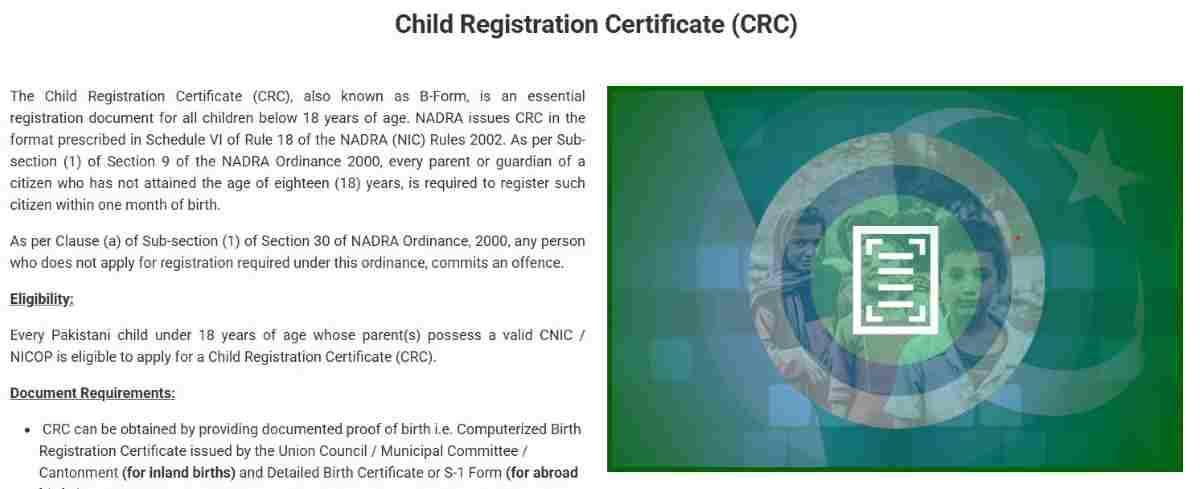
The Child Registration Certificate, universally referred to as the B-Form, is the official identity document issued by the National Database and Registration Authority for all Pakistani citizens under 18 years of age. This certificate serves as conclusive proof of the child’s citizenship, age, and parentage within Pakistan’s legal framework. The B-Form contains several critical pieces of information:
- Child’s full name as per official records
- Date and place of birth
- Parent’s names and their CNIC numbers
- Unique identification number that will become the child’s future CNIC number
- QR code for instant digital verification
- NADRA’s official seal and authorized signature
The legal basis for the B-Form comes from the NADRA Ordinance 2000, which explicitly requires parents or guardians to register any citizen under 18 years of age. This registration must occur within one month of birth according to the law, though practical allowances exist for late registration. The certificate follows the format prescribed in Schedule VI of the NADRA Rules 2002, ensuring standardization across all issuing offices.
Why is the B-Form Considered Mandatory?
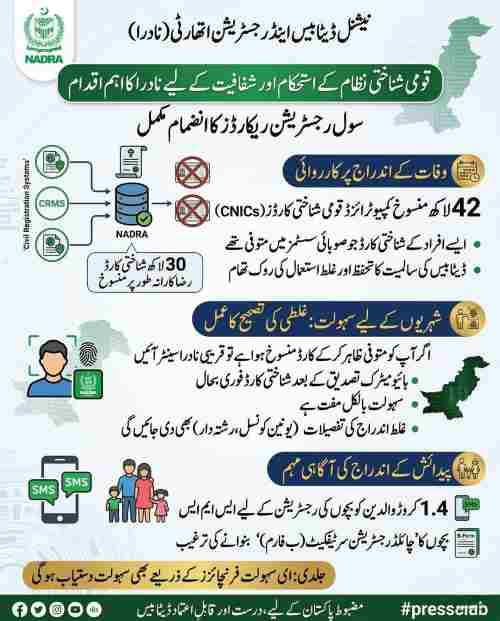
The B-Form is not optional—it is a legally mandated document with serious implications for non-compliance. Parents who fail to register their child commit an offense under Section 30 of the NADRA Ordinance 2000. Beyond the legal requirement, the B-Form serves as the gateway document for all future official procedures:
- School Admissions: All educational institutions require the B-Form for enrollment
- Passport Applications: The Directorate General of Immigration & Passports mandates the B-Form for all minors
- Healthcare Access: Many hospitals and health facilities require it for patient registration
- Bank Account Opening: Minors need a B-Form to open savings accounts
- Inheritance Claims: The document establishes legal parentage for future property matters
- CNIC Issuance: At age 18, the B-Form number becomes the foundation for the adult CNIC
Without this document, your child remains invisible to the state, unable to access fundamental rights and services that require identity verification.
What is the Difference Between a Birth Certificate and the B-Form?
This confusion trips up countless parents. The two documents are related but serve entirely different purposes:
| Document Type | Issuing Authority | Purpose | Legal Status |
|---|---|---|---|
| Union Council Birth Certificate | Local Union Council, Municipal Committee, or Cantonment Board | Records the birth event (date, time, place) | Local record of occurrence |
| NADRA B-Form (CRC) | National Database and Registration Authority | Registers the child as a citizen in the national database | National identity document |
Think of the Union Council certificate as the raw evidence that a birth happened. The B-Form is the processed, verified identity document that proves the child is a Pakistani citizen. You must obtain the Union Council certificate first, then use it to apply for the B-Form. No exceptions exist to this sequence.
Eligibility and Prerequisites for the Child Registration Certificate

Who Can Apply for a Child Registration Certificate?
The eligibility criteria for the B-Form are straightforward but strict:
- The child must be a Pakistani citizen under 18 years of age
- At least one parent must hold a valid Computerized National Identity Card (CNIC)
- For overseas parents, a valid National Identity Card for Overseas Pakistanis (NICOP) is acceptable
- Legal guardians may apply with proper court-appointed guardianship documents
The application can be submitted by either parent, or by a legal guardian in cases where parents are deceased, incapacitated, or otherwise unable to apply. In guardian cases, additional documentation proving legal guardianship becomes mandatory.
What Documents Are Required for B-Form Application?
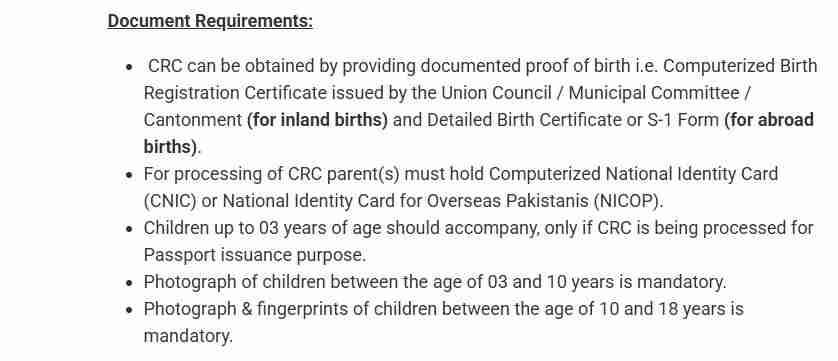
Gathering the correct documents before starting your application prevents frustrating delays. The required documentation package includes:
Mandatory Documents:
- Original Computerized Birth Registration Certificate from the Union Council where the birth occurred
- Original CNICs of both parents (or NICOPs for overseas Pakistanis)
- Child’s photograph (for ages 3 and above)
- Child’s fingerprints (for ages 10 and above)
Situational Documents:
- Death certificate of deceased parent (if applicable)
- Divorce decree or separation papers (for single parents)
- Court-appointed guardianship certificate (for guardian applications)
- Nikah Nama (for married women applying under the special CNIC scheme)
- Adoption papers with court orders (for adopted children)
Is a Hospital Birth Slip Sufficient for B-Form Application?
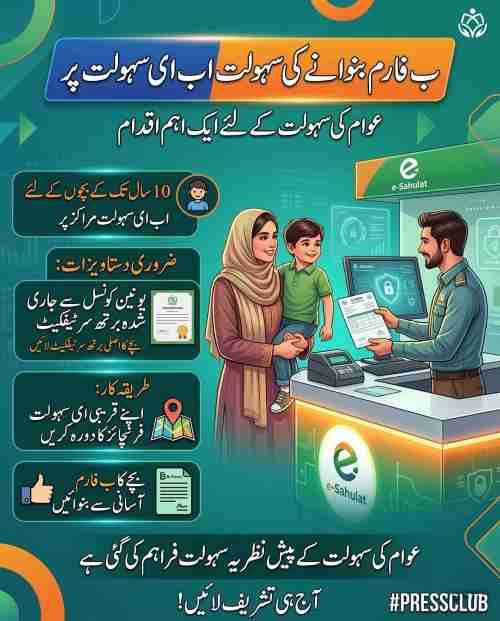
No, absolutely not. A hospital birth slip is an informal document issued by the healthcare facility where the delivery occurred. It records basic information about the birth but carries no legal weight for identity purposes. This slip must first be submitted to your local Union Council, which will verify the information and issue an official computerized birth certificate. Only this computerized certificate from the Union Council is acceptable to NADRA.
Can Single Mothers Apply Without the Father’s CNIC?
Yes, single mothers can successfully apply for their child’s B-Form. The required documentation varies based on the specific situation:
- Divorced mothers: Must provide the divorce decree along with their own CNIC and the child’s Union Council certificate
- Widowed mothers: Must provide the father’s death certificate along with their CNIC and the child’s Union Council certificate
- Unmarried mothers: Should consult with a NADRA official, as additional verification steps may apply, including potential requirement of a court order
The key principle is that NADRA must verify the child’s lineage. When one parent is absent, alternative documentation establishes that verification.
Can Grandparents or Guardians Apply for a Grandchild’s B-Form?
Yes, grandparents or legal guardians can apply, but the process involves additional verification steps:
- The guardian must present valid CNIC
- Court-appointed guardianship certificates are required
- Both parents’ death certificates (if applicable) must be provided
- Additional attestation from a gazetted officer may be required
- The application may face longer processing times due to enhanced verification
Guardian applications receive extra scrutiny because NADRA must ensure the child’s identity and lineage are correctly established without parental involvement.
Step-by-Step B-Form Application Process Through Pak ID App
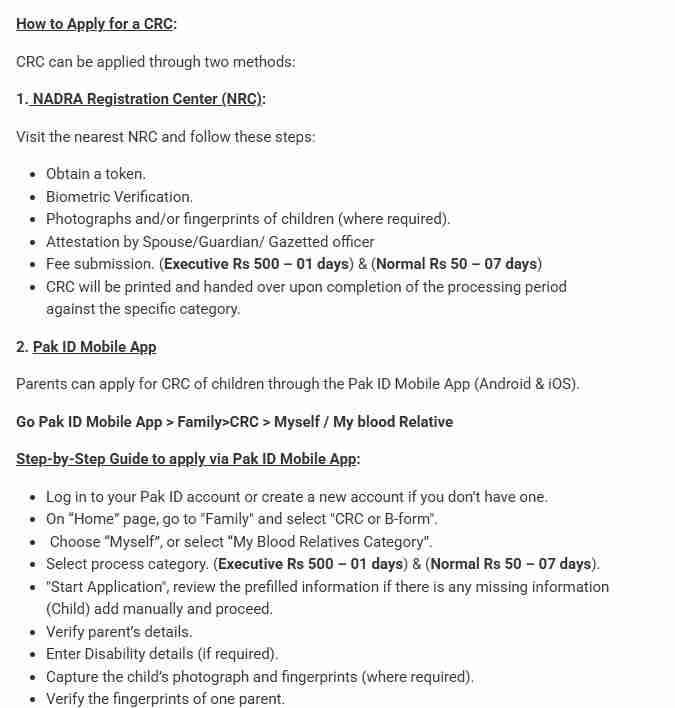
How to Download and Set Up the Pak ID App?
The Pak ID mobile app serves as NADRA’s primary digital platform for identity-related services. Setting it up correctly ensures smooth application processing:
- Open Google Play Store (Android) or Apple App Store (iOS)
- Search for “Pak ID” and download the official app
- Install the app and grant requested permissions (camera, location, storage)
- Open the app and select “Create New Account”
- Enter your CNIC number and mobile number
- Complete biometric verification using your phone’s fingerprint sensor
- Create a secure password for future logins
- Verify your email address (optional but recommended)
Once your account is active, you can access all NADRA services including B-Form applications, FRC requests, and CNIC tracking.
How to Navigate to the B-Form Application Section?
After logging into the Pak ID app, follow these navigation steps:
- Tap on the “Family” icon on the home screen
- Scroll down to find “CRC or B-Form” option
- Select the application type: “Myself” (if applying for yourself as a minor) or “My Blood Relative” (for applying for your child)
- Choose the child’s name if already listed in your family tree
- If the child is not listed, select “Add New Child” and enter basic information
The app interface is designed for user-friendliness, with clear prompts guiding you through each step. Take your time to read each screen carefully before proceeding.
What Information Must Be Entered During Application?
The Pak ID app requires precise information that matches your official documents. Prepare the following details before starting:
Child’s Information:
- Full name as it should appear on the certificate
- Date of birth (matching the Union Council certificate exactly)
- Place of birth (city, district, and hospital or home address)
- Gender
- Birth registration number from Union Council certificate
Parent’s Information:
- Father’s full name and CNIC number
- Mother’s full name and CNIC number
- Parent’s marital status
- Parent’s contact information
Additional Information:
- Disability status (if applicable)
- Previous registrations (if any)
- Sibling information (optional)
Double-check every entry for spelling errors. Mistakes at this stage require correction applications later, which cost time and money.
How to Upload Required Documents in the App?
Document upload is a critical step that requires attention to quality and accuracy:
- Take clear, well-lit photographs of all documents
- Ensure the entire document is visible within the frame
- Avoid shadows, glares, or blurry images
- Upload documents in the specified order as prompted
- Confirm that all text is readable before submitting
The app accepts standard image formats including JPG and PNG. Each document uploads separately, and you can retake photos if the quality is poor. The system provides immediate feedback on upload success.
How to Capture Child’s Photograph and Fingerprints?
The biometric requirements depend entirely on the child’s age:
For Children Under 3 Years:
- No photograph required for standard applications
- Photograph required only if the B-Form is being processed specifically for passport issuance
For Children Ages 3 to 10 Years:
- Use the app’s camera feature to capture a live photograph
- Ensure good lighting and neutral background
- Child should face the camera directly
- No smiling or extreme expressions required
For Children Ages 10 to 18 Years:
- Capture live photograph following same guidelines as above
- Use phone’s fingerprint sensor to capture child’s fingerprints
- Follow on-screen instructions for proper finger placement
- Multiple fingerprint captures may be required for quality
The app provides real-time guidance on proper positioning and capture quality. If the system rejects a capture, simply try again following the prompts.
How Does Parental Biometric Verification Work?
Parental verification is the final security step that authenticates the application:
- One parent must complete biometric verification using the phone’s fingerprint sensor
- The app verifies the fingerprint against NADRA’s database records
- Successful verification confirms the parent’s identity and authorizes the application
- If the first parent’s biometrics fail repeatedly, the second parent can attempt verification
- In rare cases where both parents fail, a visit to the NADRA center becomes necessary
This step ensures that only authorized parents can apply for their children’s B-Form, preventing fraudulent applications.
What Happens After Application Submission?
Once you submit the application, it enters NADRA’s processing system:
- The system generates a unique 13-digit tracking ID
- You receive an SMS confirmation with this tracking ID
- The application status shows as “Submitted” in the app
- NADRA officials review the application and documents
- If any issues arise, you receive notification with correction instructions
- Upon approval, you receive a payment notification
- After payment, processing begins according to your selected category
The tracking ID is your key to monitoring progress. Keep it saved in your phone for easy reference.
How to Pay the B-Form Fee Online?
Fee payment occurs only after application approval, not at submission:
- Open the Pak ID app and navigate to “My Requests”
- Find your approved B-Form application
- Select “Pay Fee” option
- Choose your preferred payment method:
- Debit or credit card
- Raast instant bank transfer
- Easypaisa mobile account
- JazzCash mobile account
- Bank Alfalah digital payment
- Enter payment details and confirm the transaction
- Save the payment receipt for your records
- Processing begins immediately after successful payment
The two-tier fee structure offers flexibility based on urgency:
- Normal Service: Rs. 50, processing time 7 working days
- Executive Service: Rs. 500, processing time 1 working day
How to Download the B-Form After Processing?
Once processing completes, your digital B-Form becomes available:
- Open Pak ID app and go to “ID Vault” section
- Locate the newly issued B-Form in your documents list
- Tap to open the PDF file
- Verify the QR code and all information is correct
- Download and save to your phone
- Email a copy to yourself for backup
- Print copies as needed for official use
The digital version carries the same legal validity as the physical certificate. It includes a scannable QR code that authorities can verify instantly.
Applying at NADRA Registration Centers: The Traditional Method
How to Apply for B-Form at a NADRA Center?
Despite digital advances, some citizens prefer or require in-person application. The center-based process follows these steps:
- Locate your nearest NADRA Registration Center using the NADRA website or app
- Visit during working hours (typically 8:00 AM to 8:00 PM, Monday to Friday)
- Obtain a token from the automated machine for “Child Registration” service
- Wait for your token number to be called
- Proceed to the designated counter with all original documents
- Submit documents to the data entry officer
- Complete biometric verification (parent’s fingerprints)
- Child’s photograph and fingerprints captured as per age requirements
- Review the entered information on the screen for accuracy
- Pay the applicable fee at the cash counter
- Receive a receipt with tracking ID
- Return on the specified date to collect the printed certificate
What Are the Advantages of Center-Based Application?
Center-based applications offer certain benefits that digital methods cannot match:
- Immediate assistance from trained NADRA staff
- Resolution of complex cases through direct discussion
- Document verification on the spot
- No requirement for smartphone or internet access
- Assistance for elderly or technology-challenged parents
- Immediate correction of data entry errors
What Are the Disadvantages of Center-Based Application?
The traditional method also presents significant drawbacks:
- Long waiting times, often several hours
- Multiple visits required (submission and collection)
- Travel time and transportation costs
- Limited working hours (closed on weekends)
- Crowded conditions at busy centers
- Potential for document misplacement
B-Form Fees and Processing Times Explained
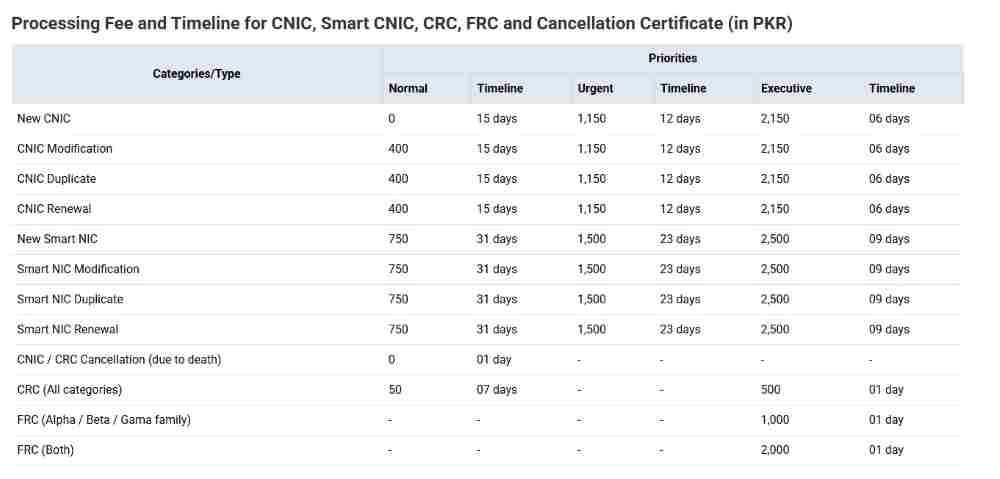
What is the Complete Fee Structure for B-Form?
The fee structure remains consistent across all application methods:
| Service Category | Fee Amount | Processing Time | Best Suited For |
|---|---|---|---|
| Normal | Rs. 50 | 7 working days | Routine registrations, non-urgent needs |
| Executive | Rs. 500 | 1 working day | Urgent passport applications, travel emergencies |
| Duplicate | Rs. 50-500 | 1-7 days | Replacement of lost certificates |
| Correction | Rs. 50-500 | 1-7 days | Fixing spelling or data errors |
| Home Delivery | Rs. 100 additional | Included in processing time | Avoiding center visits |
The executive fee represents excellent value for urgent situations, costing only Rs. 500 for guaranteed next-day processing.
Are There Any Hidden Costs?
No hidden costs exist in the official fee structure. However, applicants should budget for:
- Transportation to and from NADRA centers (if not using online method)
- Photocopying charges (if required at centers)
- Courier charges for home delivery (Rs. 100 optional fee)
- Late fees from Union Councils (separate from NADRA fees)
Union Councils may impose their own late registration penalties if the birth was not registered within 60 days. These fees vary by location and are collected separately by the Union Council, not by NADRA.
Tracking Your B-Form Application
How to Check B-Form Status Online?
Multiple tracking methods keep you informed throughout the process:
Via Pak ID App:
- Open the app and log in
- Navigate to “My Requests” or “Application Status”
- View real-time updates for all active applications
- Receive push notifications when status changes
Via SMS:
- Compose a new text message
- Type your 13-digit tracking ID number
- Send to 8400
- Receive immediate response with current status
Via NADRA Website:
- Visit the official NADRA tracking portal
- Enter your tracking ID and CNIC number
- View detailed status information
Via Helpline:
- Call NADRA helpline at 1777
- Provide your tracking ID to the agent
- Receive verbal status update
What Do Different Status Messages Mean?
Understanding status messages helps you know what to expect:
- Submitted: Application received, pending initial review
- Under Review: NADRA officials examining documents
- Query Raised: Issue detected, correction needed
- Approved: Application cleared, payment now required
- Payment Received: Fee processed, printing initiated
- Printed: Certificate ready for collection or dispatch
- Dispatched: Physical copy sent via courier
- Delivered: Certificate received at your address
Late Registration and Special Cases
How to Register a Child After Several Years?
Late registration follows the same basic process with enhanced verification:
- Obtain Union Council birth certificate first (may require affidavit and witnesses)
- Visit NADRA center with the child (mandatory for ages 10+)
- Child must provide fingerprints and photograph
- Parents must provide additional attestation
- Processing may take longer due to verification requirements
- No additional NADRA late fee exists beyond standard charges
The key difference is that older children must appear in person. No exceptions exist for this requirement.
Can Adults Obtain a B-Form?
Adults over 18 cannot obtain a B-Form because they are no longer children. Instead, they must apply directly for a CNIC. For adults who never had any identity document, NADRA’s special 2026 scheme provides a pathway:
- Available until December 31, 2026 only
- No birth certificate required
- Based on family member biometric verification
- Different requirements for married women, unmarried women, and men
- First CNIC issued free of charge
This represents a historic opportunity for undocumented adults to finally enter the national database.
How to Correct Errors on an Existing B-Form?
Mistakes happen, but correction procedures exist:
- Identify the exact error (spelling, date, parent name, etc.)
- Gather supporting documents showing correct information
- Visit any NADRA Registration Center
- Submit correction application with supporting evidence
- Pay applicable fee (Rs. 50 normal, Rs. 500 executive)
- Provide biometric verification
- Receive corrected certificate after processing
For date of birth changes, a court order is required. NADRA does not accept verbal requests for DOB modifications.
How to Obtain a Duplicate B-Form?
Lost your B-Form? Replacement is straightforward:
- Option 1: Download from Pak ID app ID Vault (free, instant)
- Option 2: Visit NADRA center and request duplicate
- Provide parent’s CNIC and child’s information
- Pay standard fee (Rs. 50 or Rs. 500)
- Receive new certificate with same details and new issuance date
The digital version from the app is legally valid for all purposes. Many parents now rely solely on digital copies.
Digital Initiatives and Future Developments
Which Cities Have Full Digital Registration?
NADRA’s digital transformation continues expanding. Currently, full end-to-end digital registration (no Union Council visit required) is available in:
- All districts of Punjab province
- Karachi East, Karachi South, Karachi West, Karachi Central, and Karachi Malir
- Shaheed Benazirabad district, Sindh
- Larkana district, Sindh
- Jamshoro district, Sindh
- Tando Muhammad Khan district, Sindh
- Tando Allahyar district, Sindh
- Quetta district, Balochistan
Residents of these areas can complete the entire birth registration process through the Pak ID app without visiting any government office.
What is Same-Day Birth Registration?
Punjab province has pioneered same-day birth registration in government hospitals:
- Parents receive B-Form on the day of birth
- Registration occurs at the hospital before discharge
- Eliminates separate Union Council and NADRA visits
- Currently available in major government hospitals
- Expansion to private hospitals underway
This innovation represents the ultimate convenience for new parents, completing the entire process before leaving the hospital.
How Does Home Delivery Work?
Home delivery saves you a trip to the NADRA center:
- Select “Home Delivery” option during online application
- Pay additional Rs. 100 courier fee
- Provide accurate delivery address
- Certificate dispatched via courier partner after printing
- Receive tracking number for courier
- Sign upon delivery to confirm receipt
The service covers all major cities and most smaller towns across Pakistan.
Frequently Asked Questions
How long does the B-Form remain valid?
The B-Form remains valid until the child turns 18. At that point, it must be replaced with a CNIC. The document does not expire before the child reaches adulthood.
Can I apply for B-Form if my parents are divorced?
Yes, divorced parents can apply. The custodial parent should provide divorce papers along with their CNIC and the child’s Union Council certificate. Both parents’ names still appear on the certificate.
Is the B-Form accepted for international travel?
Yes, the B-Form is accepted for passport applications, which are required for international travel. However, the B-Form itself is not a travel document. You must obtain a passport for actual travel.
What if my parent’s CNIC has a different spelling?
Spelling discrepancies between parents’ CNICs and the child’s documents can cause issues. Correct the parent’s CNIC first at NADRA, then apply for the child’s B-Form with consistent spelling.
Can I get B-Form for a child born outside Pakistan?
Yes, for children born abroad to Pakistani parents, the process uses the foreign birth certificate (attested by Pakistani embassy) and parents’ NICOPs. This is processed at Pakistani embassies or special NADRA desks.
How do I add my child to my family tree?
Applying for the B-Form automatically adds the child to the family tree. Once issued, the child appears under both parents’ records in the NADRA database and can be viewed in the Pak ID app family section.
What is the QR code on the B-Form for?
The QR code enables instant verification of the certificate’s authenticity. Anyone can scan it with a smartphone to confirm the document is genuine and matches NADRA’s records.
Conclusion
Securing your child’s Child Registration Certificate is not just a bureaucratic formality—it is the foundation of their legal identity in Pakistan. The process in 2026 offers unprecedented convenience through the Pak ID mobile app, with options for digital application, online tracking, and home delivery. Whether you choose the affordable normal service at Rs. 50 or the rapid executive service at Rs. 500, the important thing is to act promptly.
Register your child within the first month of birth as the law recommends, or take advantage of late registration options if needed. For adults who somehow missed registration altogether, remember that the special CNIC scheme without a birth certificate expires on December 31, 2026—this is your window to finally enter the national database. Download the Pak ID app today or visit your nearest NADRA center to begin the process.
Frequently Asked Questions
What is the difference between B-Form and birth certificate?
The Union Council issues birth certificates to record the birth event. NADRA issues B-Forms to register the child as a citizen. You need the birth certificate first, then you can apply for the B-Form.
How much does NADRA charge for B-Form?
NADRA charges Rs. 50 for normal service (7 days) and Rs. 500 for executive service (1 day). Duplicate certificates and corrections cost the same amounts.
Can I apply for B-Form online without visiting NADRA?
Yes, you can complete the entire application through the Pak ID mobile app, including document upload, biometric verification, and fee payment. In select cities, even the Union Council step is digital.
What documents are needed for newborn B-Form?
You need the computerized Union Council birth certificate and original CNICs of both parents. The newborn does not need to visit NADRA.
How can I track my B-Form application?
Use your 13-digit tracking ID in the Pak ID app, send it via SMS to 8400, or check on the NADRA website. You will receive updates at every stage.
Is home delivery available for B-Form?
Yes, home delivery is available nationwide for an additional Rs. 100 fee. Select this option during online application to receive the certificate at your address.
What if my child is over 10 years old and never registered?
Visit a NADRA center with your child, as their fingerprints are mandatory. Bring the Union Council certificate and parents’ CNICs. The process is the same but requires child’s presence.
Can overseas Pakistanis apply for B-Form?
Yes, overseas Pakistanis can apply through the Pak ID app using their NICOP and the child’s foreign birth certificate. Pakistani embassies also provide assistance.

Add a Comment