
Picture this: You have secured a job offer abroad, and the embassy requires proof that your spouse and children are genuinely your family members. Without official documentation, your visa application stalls, dreams are delayed, and frustration mounts. This exact scenario affects thousands of Pakistani citizens annually who discover that family relationships require government-verified proof, not just verbal claims or informal documents.
The NADRA Family Registration Certificate (FRC) serves as this essential verification—an authoritative snapshot of your family tree that confirms relationships by blood, marriage, or legal adoption. With the 2026 fee structure maintaining affordability at Rs.1,000 and the entire process now accessible through the Pak Identity mobile app, obtaining your FRC has never been more straightforward. This comprehensive guide walks you through every aspect of the FRC process, from fee calculation and payment methods to step-by-step application procedures and troubleshooting common issues.
What this guide covers:
- Current FRC fee structure for 2026 across all categories
- Complete online application walkthrough for Pak ID app
- All accepted payment methods including JazzCash, Easypaisa, and cards
- Document requirements for birth, marriage, and adoption categories
- Processing timelines and digital delivery expectations
- Special provisions for overseas Pakistanis
- Solutions for common application errors and rejections
Key Takeaways
- Flat Fee Structure: The NADRA FRC fee is Rs.1,000 for single-category certificates (Birth, Marriage, or Adoption) and Rs.2,000 for the All Categories combined option, regardless of processing speed selected.
- Digital-Only Delivery: FRCs are delivered exclusively as PDF documents via email and the Pak ID app inbox—physical courier delivery is not available for certificates.
- Online Application Mandate: All FRC applications must be submitted through the Pak Identity mobile app or web portal; NADRA centers accept applications but require physical presence.
- Payment Flexibility: Fees can be paid through credit/debit cards, JazzCash, Easypaisa, e-Sahulat franchises, or Raast QR after application approval.
- Data Accuracy Critical: Your FRC will only include family members with valid 13-digit NADRA-issued identification numbers—unregistered individuals are automatically excluded.
- Processing Speed: Online applications typically process within 24 hours, while in-person applications at NADRA centers are issued same-day within 1-3 hours.
- Read More: NADRA Office Timing | NADRA Working Hours (All Cities Today)
- Read More: NADRA Tracking ID Check SMS | CNIC Tracking | NICOP, POC, FRC
- Read More: NADRA Birth Certificate: How To Apply Online (Fee & Home Delivery)
NADRA FRC Fee Update | FRC Online Apply (Normal+Urgent)
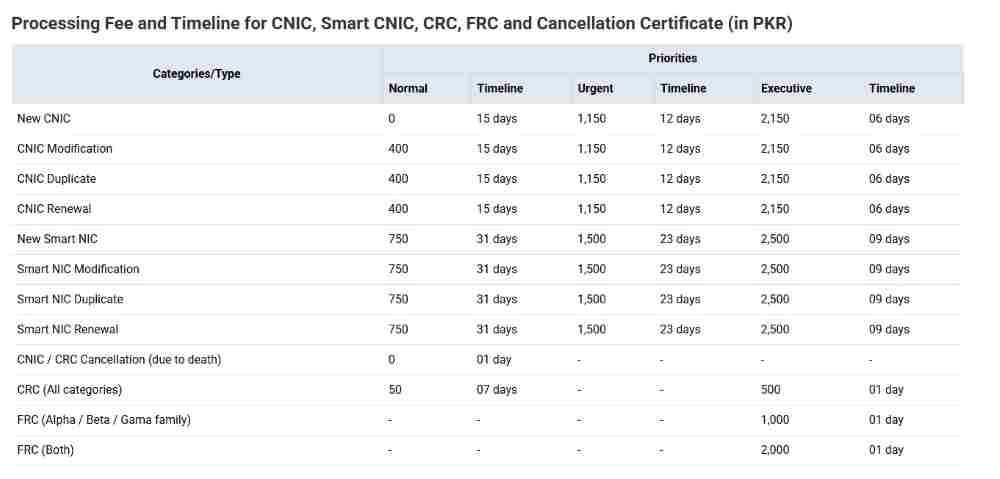
Table of Contents
Understanding the NADRA Family Registration Certificate (FRC)
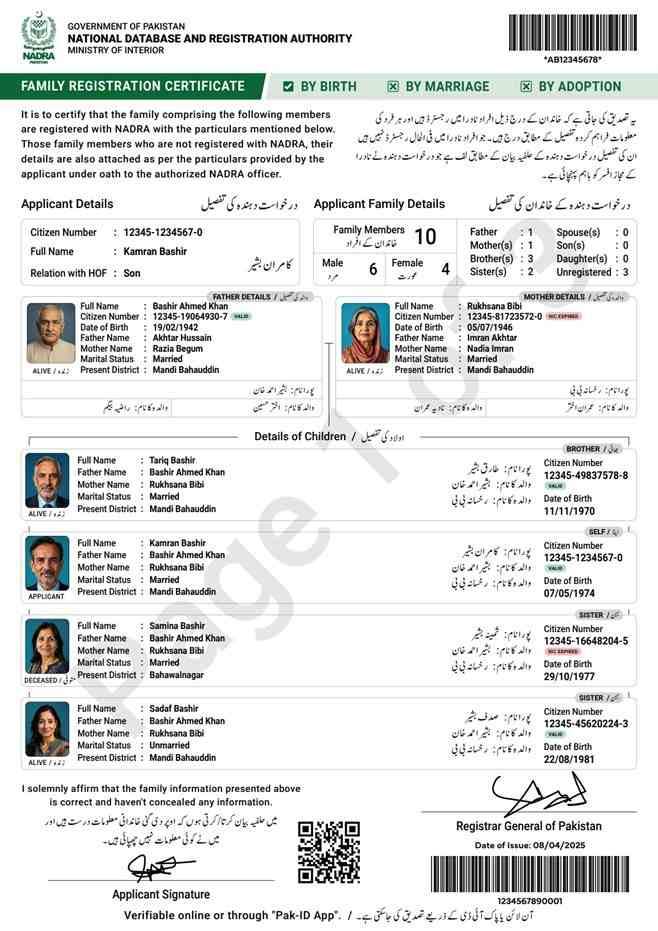
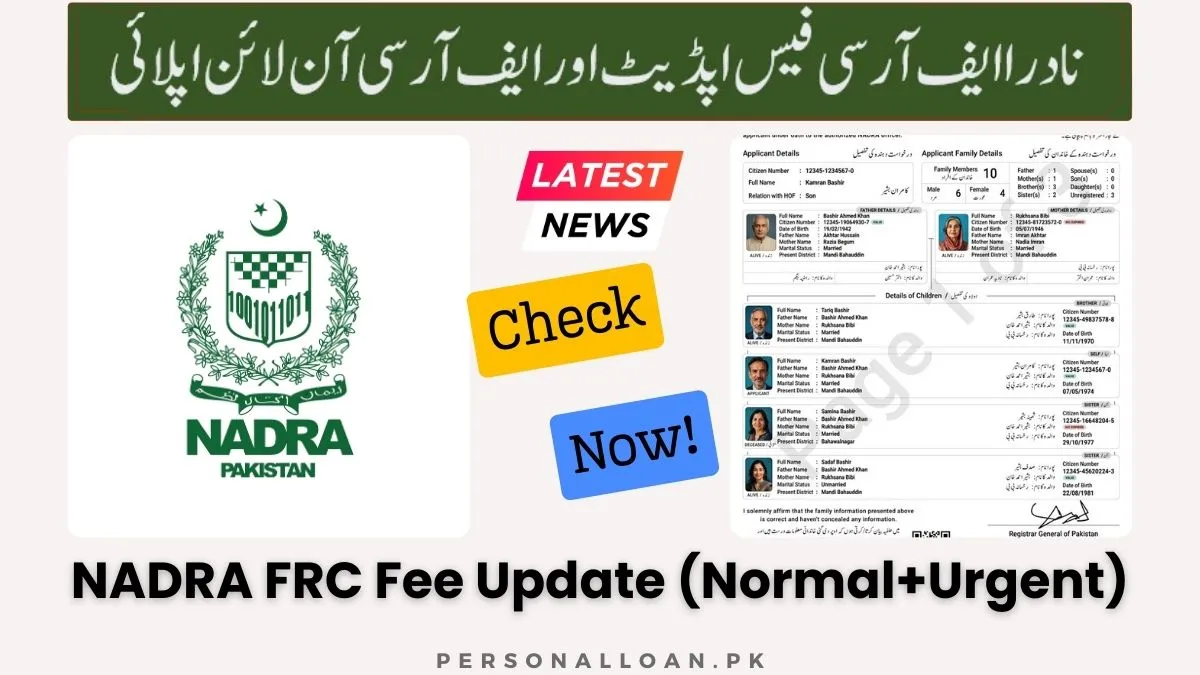
The Family Registration Certificate (FRC) is an official document issued by NADRA that contains the complete family details of a citizen, verified against the national database. Any Pakistani citizen aged 18 years or above who needs official documentation of their family relationships can apply for an FRC. This document serves as legally recognized proof of family composition and is accepted by all government departments, foreign embassies, and judicial forums.
What Information Does an FRC Contain?
The FRC displays the following information for each family member:
- Full name as registered in NADRA records
- 13-digit CNIC, NICOP, or CRC number
- Relationship to the applicant
- Father’s name (for minors and unmarried individuals)
- Spouse’s name (for married individuals)
- QR code for instant verification
- Digital signature of issuing authority
FRC vs. Other NADRA Documents: Key Differences
| Document Type | Purpose | Validity | Contains |
|---|---|---|---|
| FRC | Proves family relationships | Lifetime (snapshot) | Multiple family members with relationships |
| CNIC/Smart ID | Individual identification | 10 years | Single person’s identity |
| CRC/B-Form | Child registration | Until age 18 | Single child with parents’ details |
| NICOP | Overseas Pakistani ID | Varies by category | Single person with international status |
Why Would You Need an FRC?
The FRC has become an indispensable document for numerous life events and official procedures:
Visa and Immigration Applications:
- Most countries require documented proof of family relationships when applying for family visas
- Dependent visas specifically demand verification that applicants are genuinely related
- Immigration authorities routinely request FRCs to prevent fraud and misrepresentation
- Embassy staff verify relationships against NADRA database using QR codes
Passport Applications for Minors:
- Child’s first passport application requires proof of parental relationship
- FRC confirms both parents have authorized the application
- Passport offices cross-verify FRC data with NADRA records
- Single parent applications require additional documentation along with FRC
Inheritance and Succession Matters:
- Courts require FRCs when processing inheritance claims
- Revenue departments demand family verification for property transfers
- Succession disputes rely on FRCs to establish rightful heirs
- Banking institutions require FRCs for releasing deceased accounts
Educational Institutions:
- Schools request FRCs during admissions to verify parent-child relationships
- Universities use FRCs for emergency contact verification
- Scholarship programs require family composition proof
- Hostel accommodation requests need guardian verification
Government Benefits and Programs:
- Benazir Income Support Programme (BISP) uses FRCs for household verification
- Zakat and Ushr departments require family composition proof
- Social welfare programs determine eligibility based on FRC data
- Health insurance schemes verify dependent coverage through FRCs
Bank Account Opening:
- Joint accounts require relationship verification between holders
- Minor accounts need guardian relationship proof
- Nominee designations benefit from FRC documentation
- International wire transfers sometimes require family relationship proof
Legal Proceedings:
- Family courts use FRCs as primary evidence in custody cases
- Divorce proceedings require child relationship verification
- Guardianship applications depend on FRC documentation
- Domestic violence cases use FRCs to establish household composition
NADRA FRC Fee Structure 2026: Complete Breakdown
The current NADRA FRC fee for 2026 is Rs.1,000 for a single category certificate and Rs.2,000 for the All Categories combined option, with no difference between normal, urgent, or executive processing speeds. This flat-rate structure applies uniformly across all application methods, whether you apply online through the Pak ID app or in person at a NADRA Registration Center.
Detailed FRC Fee Table
| Certificate Type | Processing Priority | Fee (PKR) | What’s Included |
|---|---|---|---|
| By Birth | Normal/Urgent/Executive | Rs.1,000 | Applicant, parents, and all siblings |
| By Marriage | Normal/Urgent/Executive | Rs.1,000 | Applicant, spouse, and all children |
| By Adoption | Normal/Urgent/Executive | Rs.1,000 | Guardian and adopted child(ren) |
| All Categories Combined | Normal/Urgent/Executive | Rs.2,000 | Complete family tree including parents, siblings, spouse, and children |
Why Is the Fee Uniform Across Processing Speeds?
The flat-rate structure exists because FRCs are entirely digital documents:
- No physical card production costs involved
- No chip embedding or lamination required
- No courier delivery expenses
- Digital workflow uses same backend resources regardless of priority label
- PDF generation costs are identical for all applications
What Is the Total Cost for a Family of Five to Get an FRC?
A family of five requires only one FRC application, not five separate certificates:
Scenario 1: Nuclear Family (Parents + 3 Children)
- Select By Marriage category: Rs.1,000
- Certificate includes both parents and all three children
- Total cost per family: Rs.1,000
Scenario 2: Extended Family (Parents + Children + Grandparents)
- Select All Categories combined: Rs.2,000
- Certificate includes applicant, spouse, children, parents, and siblings
- Total cost per family: Rs.2,000
Scenario 3: Siblings Only (Brothers and Sisters)
- Select By Birth category: Rs.1,000
- Certificate includes all siblings and parents
- Total cost per sibling group: Rs.1,000
Does the Pak ID App Charge Extra for FRC Processing?
The Pak ID application charges absolutely no additional fees:
- No platform charges
- No convenience fees
- No processing surcharges
- No hidden costs
- You pay only the government-mandated fee directly to NADRA
Are There Any Hidden Delivery Charges?
Physical courier delivery does not exist for FRCs, so delivery charges are impossible:
- Certificate delivered via email as PDF attachment
- Downloadable from Pak ID app ID Vault section
- Accessible anytime through Pak Identity account
- No courier fees applicable
- No postal charges involved
What Is the Fee for an FRC if Applying from Overseas?
Overseas Pakistanis pay the same base fee converted to foreign currency:
Currency Conversion Examples:
- US Dollar (USD): Approximately $6-$8 for single category
- British Pound (GBP): Approximately £5-£7 for single category
- Euro (EUR): Approximately €6-€8 for single category
- Saudi Riyal (SAR): Approximately 25-30 SAR for single category
- UAE Dirham (AED): Approximately 25-30 AED for single category
Accepted International Payment Methods:
- International credit cards (Visa/Mastercard)
- Debit cards with international transaction enabled
- Overseas bank accounts via online transfer
- Pakistani embassy/consulate counters (cash in local currency)
- Foreign currency cash at designated NADRA counters
FRC Fee Analysis: Understanding All Cost Aspects
Beyond the base fee of Rs.1,000, applicants should understand peripheral costs, correction scenarios, refund policies, and special considerations that might affect the total amount payable. This section examines every financial aspect of obtaining and maintaining your Family Registration Certificate.
Are There Any Bank-Related Charges?
While NADRA charges only the government fee, banks and payment platforms may apply their own charges:
Credit Card Transactions:
- Domestic cards: Usually no additional charges
- International cards: 1-3% foreign currency conversion fee
- Some banks charge Rs.50-Rs.100 as internet banking fee
- Corporate cards may have different fee structures
Mobile Wallet Payments:
- JazzCash: Nominal transaction fee (Rs.20-Rs.50)
- Easypaisa: Small service charge for bill payments
- Wallet-to-bank transfers may incur minimal fees
- Some promotional periods offer fee-free transactions
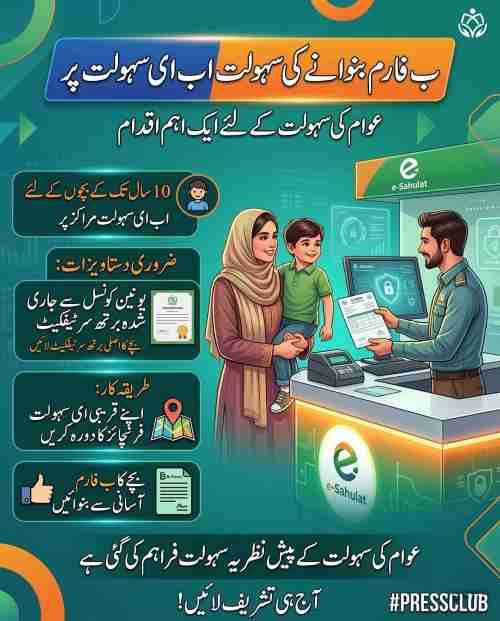
e-Sahulat Franchise Payments:
- Agent service fee: Rs.25-Rs.50 typically
- Cash handling charges may apply
- Receipt printing fee sometimes included
- Total paid at franchise slightly exceeds NADRA fee
What Is the Fee for an FRC Correction?
Correction scenarios and associated costs vary based on who made the error:
NADRA-Initiated Errors:
- Spelling mistakes by NADRA officer
- Incorrect data entry during processing
- System-generated errors
- Wrong relationship assignment
- Result: Free correction, no fee payable
Applicant-Provided Incorrect Information:
- Wrong CNIC numbers entered
- Incorrect names provided
- Wrong relationship selected
- Missing family members during application
- Result: New application required with full fee payment
Database Errors Needing Prior Correction:
- Family member’s CNIC has wrong name
- Spouse’s record shows incorrect marital status
- Child’s B-Form has father’s name misspelled
- Parent’s record missing from database
- Result: First update individual records (separate fees), then apply for fresh FRC
Is the FRC Fee Refundable if the Application Is Rejected?
Refund policies follow specific guidelines based on rejection reasons:
Non-Refundable Scenarios:
- Application rejected due to incorrect information provided by applicant
- Biometric verification failed after multiple attempts
- Family member not found in NADRA database
- Applicant withdrew application after processing started
- Duplicate application submitted intentionally
Refund-Eligible Scenarios:
- Technical duplicate payment for same application
- System error caused application failure without processing
- NADRA officer incorrectly rejected valid application
- Payment made but application never reached NADRA system
- Applicant cancelled before any processing began
Refund Process Steps:
- Submit request through NADRA Centralized Complaint Management System (NCCMS)
- Provide complete tracking ID and citizen number
- Attach payment proof and transaction receipts
- Include detailed reason for refund request
- Wait 15-30 working days for processing
- Refund credited to original payment method
How Much Does It Cost to Reprint a Lost FRC?
Reprinting a lost FRC costs absolutely nothing because your original digital certificate remains accessible forever:
Access Methods for Lost Certificates:
- Log in to Pak Identity mobile app
- Navigate to ID Vault section
- Locate your previously issued FRC in documents list
- Click to view or download PDF again
- Save new copy to device or cloud storage
If You Cannot Access Original Account:
- Visit nearest NADRA center with your CNIC
- Request account recovery assistance
- Once access restored, download existing FRC from ID Vault
- If account cannot be recovered, apply for fresh FRC with standard fee
Is There a Discount for Senior Citizens or Low-Income Families?
NADRA does not offer discounted rates specifically for FRC applications:
Current Concession Policies:
- First-time Smart ID card applicants (age 18+) receive free normal processing
- Certain welfare programs may cover documentation fees for eligible beneficiaries
- Transgender persons have special provisions for free documentation
- BISP beneficiaries sometimes qualify for fee coverage through partner organizations
- No universal discount applies to FRC applications
Does the FRC Fee Include the Digital Copy?
Yes, the fee comprehensively covers all digital aspects:
What Your Fee Includes:
- Unlimited PDF downloads from Pak ID account
- Lifetime access through ID Vault feature
- Email delivery to registered address
- QR code verification functionality
- Digital signature authentication
- Forwarding and sharing rights
- No expiry on certificate access
How to Apply for FRC Online: Complete Step-by-Step Guide
Applying for your NADRA Family Registration Certificate online through the Pak Identity mobile app represents the fastest and most convenient method, typically delivering your certificate within 24 hours of approval. This comprehensive guide walks through every step from initial registration to final download, ensuring you avoid common pitfalls that delay processing.
What Are the Requirements Before Starting?
Gather these essential items before beginning your online application:
Personal Requirements:
- Valid CNIC or NICOP (applicant must be 18 years or older)
- Mobile number registered with NADRA
- Active email address for certificate delivery
- Smartphone with working camera (minimum 8MP recommended)
- Stable internet connection (WiFi or 4G)
Family Members’ Information:
- CNIC numbers for all adult family members (18+ years)
- CRC/B-Form numbers for all children under 18
- Exact spellings of names as they appear in NADRA records
- Relationship details for each family member
Document Checklist (For Reference):
- Your CNIC front and back images (if using web portal)
- Children’s B-Form numbers (documents not required if numbers correct)
- Spouse’s CNIC number
- Parents’ CNIC numbers
- Adoption decree if applicable
- Marriage certificate if marriage not in NADRA record
Step 1: Register and Log In to Pak Identity Platform
Pak ID Mobile App Registration (Recommended):
- Download Pak ID app from Google Play Store (Android)
- Download from Apple App Store (iOS)
- Open app and select “Create New Account”
- Enter your 13-digit CNIC number without spaces
- Provide mobile number registered with NADRA
- Receive OTP via SMS within 30 seconds
- Enter verification code received
- Create strong password (8+ characters with mix)
- Complete profile information
- Accept terms and conditions
Web Portal Registration (Alternate):
- Visit id.nadra.gov.pk in your browser
- Click “Register” or “Sign Up”
- Enter CNIC number and mobile number
- Verify via OTP sent to mobile
- Create login credentials
- Complete profile setup
- Upload photograph if required
Pak ID App vs Web Portal Comparison:
| Feature | Pak ID Mobile App | Web Portal |
|---|---|---|
| Biometric Capture | Direct via phone camera | Requires external scanner |
| Photograph Upload | Camera capture or gallery | File upload only |
| Ease of Use | Optimized for mobile | Desktop-friendly |
| Fingerprint Quality | 600 DPI supported | Requires external scanner |
| Push Notifications | Real-time updates | Email/SMS only |
| ID Vault Access | Instant download | Limited functionality |
| Convenience | Apply anywhere | Requires computer |
Step 2: Navigate to FRC Service and Select Category
Finding the FRC Service:
- Log in to your Pak ID account
- Look for “Identity Services” section
- Select “Family Registration Certificate (FRC)”
- Read service description and requirements
- Click “Apply Now” or “New Application”
Category Selection Guide:
FRC by Birth:
- Includes: Yourself, your parents, and all siblings
- Best for: Siblings needing relationship proof
- Ideal for: Inheritance matters requiring parental verification
- Perfect for: Educational admissions needing family tree
- Requirement: All siblings must have valid CNIC or CRC numbers
FRC by Marriage:
- Includes: Yourself, your spouse, and all children
- Best for: Family visa applications
- Ideal for: Spousal visa documentation
- Perfect for: Child travel documents
- Requirement: Marriage registered in NADRA database
FRC by Adoption:
- Includes: Guardian(s) and adopted child(ren)
- Best for: Internationally adopted children
- Ideal for: Legal guardianship proof
- Perfect for: Custody matters
- Requirement: Court adoption decrees registered with NADRA
All Categories Combined:
- Includes: Parents, siblings, spouse, and children
- Best for: Complete family tree documentation
- Ideal for: Multiple visa applications
- Perfect for: Comprehensive record-keeping
- Cost: Rs.2,000 (double single category fee)
Step 3: Add Family Members and Verify Data
Adding Family Members Process:
- Click “Add Family Member” button
- Select relationship type (parent, sibling, spouse, child)
- Enter 13-digit CNIC or CRC number
- System auto-populates name from NADRA database
- Verify displayed information matches your records
- Click “Confirm” to add member
- Repeat for each family member
- Review complete list before proceeding
Verify My Family Feature:
After entering all members, click “Verify My Family.” This function:
- Cross-checks all entered numbers against NADRA’s central database
- Confirms each individual is a registered citizen
- Validates family relationships based on existing records
- Flags any inconsistencies or missing registrations
- Generates preview of how your FRC will appear
- Identifies members needing record updates
- Provides error messages for invalid numbers
Troubleshooting Verification Failures:
| Error Message | Cause | Solution |
|---|---|---|
| “Citizen not found” | CNIC number incorrect or expired | Double-check number, renew if expired |
| “Record not verified” | Individual’s data needs update | Visit NADRA center for record update |
| “Relationship mismatch” | Database shows different relationship | Update both individuals’ records |
| “Minor not registered” | Child missing from database | Register child for CRC first |
| “Multiple matches found” | Duplicate records exist | Visit NADRA center for resolution |
Step 4: Capture Biometrics and Photograph
Fingerprint Capture Guidelines (600 DPI Quality):
Preparation:
- Clean your fingers with dry cloth
- Remove any dirt or oil
- Ensure fingers are not wet
- Find well-lit location
- Place phone on stable surface
Capture Process:
- Position fingers within on-screen guides
- Keep fingers flat and stationary
- Apply gentle pressure
- Avoid tilting or curling fingertips
- Hold position until capture completes
- Review quality before proceeding
- You have 10 attempts total
- After 10 failures, visit NADRA center
Photograph Requirements:
Background:
- Plain white background only
- No patterns, textures, or objects behind
- Even lighting without shadows
- No shadows on face or background
Personal Appearance:
- Both ears clearly visible
- No glasses (except special medical cases)
- No hats or headgear (except religious)
- Female applicants: hijab/abaya allowed with full face visible
- Male applicants: turban/cap allowed with complete face shown
- Neutral facial expression
- Eyes looking directly at camera
- Mouth closed naturally
Technical Specifications:
- Photo taken within last 6 months
- No filters or editing
- No alterations or touch-ups
- High resolution (minimum 300 DPI)
- Proper exposure (not too bright or dark)
- JPEG format accepted
- File size under 2MB recommended
Step 5: Review Application and Submit
Pre-Submission Checklist:
Information Verification:
- All names spelled correctly
- CNIC/CRC numbers accurate
- Relationships correctly assigned
- No family members missing
- Your contact details correct
- Email address properly entered
Document Confirmation:
- Biometrics successfully captured
- Photograph meets requirements
- Family verification completed
- No error messages present
- Preview looks accurate
Declaration and Affidavit:
- Read the Bayan-e-Halfi (Affidavit) carefully
- Understand you are declaring information true
- Acknowledge penalties for false information
- Electronically sign using fingerprint
- Confirm submission
After Submission:
- Receive confirmation message
- Get tracking ID via SMS
- Receive email acknowledgment
- Application moves to “Submitted” status
- Wait for NADRA officer review
Step 6: Pay the Fee After Approval
Payment Timeline:
- NADRA officer reviews your application
- Verification of family records completed
- If approved, payment notification sent
- You receive SMS and email with payment link
- Payment must be completed within 30 days
- After payment, certificate generation begins
Payment Methods Available:
Credit/Debit Card:
- Visa (credit and debit)
- Mastercard (credit and debit)
- Union Pay (selected banks)
- Enter card details securely
- Receive OTP for authentication
- Instant confirmation
JazzCash:
- Open JazzCash mobile app
- Select “Government Payments”
- Choose “NADRA, NIS” option
- Enter tracking ID
- Confirm amount
- Enter MPIN
- Save transaction receipt
Easypaisa:
- Launch Easypaisa mobile app
- Select “Payments” section
- Choose “NADRA” from billers
- Enter tracking ID
- Verify applicant details
- Confirm with MPIN
- Screenshot confirmation
e-Sahulat Franchise:
- Generate payment slip through Pak ID
- Note PSID (Payment Slip ID)
- Visit nearest e-Sahulat franchise
- Provide PSID to agent
- Pay cash plus service fee
- Collect receipt with transaction ID
Raast QR:
- Select Raast QR payment option
- Scan QR code with banking app
- Confirm amount
- Authenticate transaction
- Receive instant confirmation
Step 7: Track Application and Download Certificate
Application Tracking Methods:
| Method | What You Need | What You Get |
|---|---|---|
| Pak ID App | Login credentials | Real-time status updates |
| SMS | Send CNIC to 8001 | Current stage information |
| Web Portal | Tracking ID + CNIC | Detailed processing status |
| Registered email | Milestone alerts |
Status Meanings:
| Status | What It Means | What To Do |
|---|---|---|
| Submitted | Application received | Wait for review |
| Under Process | Officer examining | No action needed |
| Data Verification | Cross-checking records | Ensure phone accessible |
| Approved | Application accepted | Proceed to payment |
| Payment Received | Transaction confirmed | Wait for certificate |
| Issued | PDF ready | Download immediately |
| Rejected | Issue identified | Check reason, reapply |
Certificate Download Methods:
Method 1: Email Delivery
- PDF sent to registered email
- Check inbox within 24 hours of payment
- Check Spam/Junk folder
- Save PDF to secure location
- Forward to family members if needed
Method 2: Pak ID App (ID Vault)
- Log in to Pak ID mobile app
- Tap menu icon (three lines)
- Select “ID Vault” or “My Documents”
- Find FRC in certificates list
- Click to view
- Download PDF
- Share directly via apps
Method 3: Web Portal Download
- Visit id.nadra.gov.pk
- Log in with credentials
- Navigate to “My Applications”
- Locate approved FRC
- Click “Download Certificate”
- Save to computer
NADRA FRC Payment Methods: Complete Guide
NADRA offers multiple payment channels for FRC fees to accommodate all citizens, whether they prefer digital wallets, bank cards, or cash payments at physical locations. Understanding each method’s procedure ensures smooth transaction completion without delays.
How to Pay via Easypaisa (Step by Step)
Method 1: Through Pak ID App Integration
- After approval notification, open Pak ID app
- Go to Inbox section
- Select your FRC application
- Click “Pay Now” button
- Choose Easypaisa as payment method
- You are redirected to Easypaisa interface
- Log in with your Easypaisa credentials
- Verify amount (Rs.1,000 or Rs.2,000)
- Enter MPIN for confirmation
- Transaction completes instantly
- Return to Pak ID app automatically
Method 2: Direct Easypaisa App Payment
- Note your 15-digit tracking ID from SMS
- Open Easypaisa mobile app
- Select “Payments” or “Bill Payments”
- Choose “NADRA” from billers list
- Enter your tracking ID
- System displays applicant name and amount
- Verify all details carefully
- Confirm payment with MPIN
- Save transaction confirmation screenshot
- Return to Pak ID app—status updates automatically
How to Pay via JazzCash (Step by Step)
JazzCash Mobile App Process:
- Note tracking ID from approval SMS
- Launch JazzCash mobile app
- Navigate to “Government Payments” section
- Select “NADRA, NIS” option
- Input your 15-digit tracking ID
- Review displayed application details
- Verify applicant name matches
- Confirm amount (Rs.1,000/Rs.2,000)
- Enter your JazzCash MPIN
- Complete transaction
- Note reference number provided
- Allow 5-10 minutes for synchronization
How to Pay via Credit or Debit Card
Online Card Payment Process:
- From Pak ID app Inbox, select pending application
- Click “Pay Now” and choose “Credit/Debit Card”
- Enter card details carefully:
Required Card Information:
- Cardholder name exactly as on card
- 16-digit card number
- Expiry date (MM/YY format)
- CVV/CVC (3 digits on back)
Additional Verification:
- 3D Secure authentication enabled
- OTP sent to registered mobile number
- Enter OTP within time limit
- Bank may send confirmation SMS
Transaction Completion:
- Click “Proceed to Payment”
- Wait for “Transaction Successful” message
- Download or screenshot receipt
- Return to application automatically
- Status updates within minutes
Card Acceptance Details:
| Card Type | Domestic | International |
|---|---|---|
| Visa Credit | Yes | Yes |
| Visa Debit | Yes | Yes (if enabled) |
| Mastercard Credit | Yes | Yes |
| Mastercard Debit | Yes | Yes (if enabled) |
| Union Pay | Selected banks | Limited |
How to Pay at e-Sahulat Center
Step-by-Step Process:
- Generate payment slip through Pak ID app
- Select e-Sahulat as payment method
- Note the PSID (Payment Slip ID) generated
- Take screenshot or write down PSID
- Visit any e-Sahulat franchise nationwide
- Provide PSID to franchise agent
- Agent verifies amount in system
- Pay cash amount (Rs.1,000/Rs.2,000)
- Agent adds service fee (typically Rs.25-Rs.50)
- Collect printed receipt with transaction ID
- Allow 24 hours for payment to reflect
- Check application status next day
How to Pay at NADRA Mega Center
In-Person Payment Process:
- Visit nearest NADRA Mega Center
- Obtain token from reception for “Fee Payment”
- Wait for your token number to appear
- Approach designated counter
- Provide tracking ID to cashier
- Cashier verifies amount in system
- Pay via cash or card at counter
- Receive official NADRA receipt
- Application processing continues immediately
- Certificate generation begins
Payment Voucher Validity Period
Important Time Limits:
- Payment vouchers valid for 30 days
- PSIDs expire after 30 days
- Payment links deactivate automatically
- Application remains pending status
- No penalty for expired voucher
- Must request new voucher through Pak ID
If Payment Link Expires:
- Log in to Pak ID app
- Go to Inbox section
- Open pending application
- Click “Generate New Voucher”
- New PSID created
- New 30-day validity starts
- Pay using new voucher
What If You Pay Wrong Amount?
Overpayment Scenario:
- System automatically detects excess payment
- Application flagged for review
- NADRA officer identifies discrepancy
- Excess amount becomes credit balance
- Refund request required through NCCMS
- Processing time: 15-30 working days
- Refund to original payment method
Underpayment Scenario:
- Transaction fails automatically
- Amount reversed within 5-7 working days
- Reversal depends on bank processing
- No application processing occurs
- Must restart payment with correct amount
- Original tracking ID remains usable
Double Payment Scenario:
- First payment processes application
- Second payment detected as duplicate
- System creates credit balance
- Refund request necessary for second amount
- Submit both transaction IDs with request
- Refund processed to original source
In-Person Application at NADRA Centers
While online application is recommended, visiting a NADRA Registration Center remains a valid option for citizens who prefer face-to-face assistance or lack smartphone access. This section covers center-based application procedures, costs, and what to expect during your visit.
Is the Fee Same Across All Cities?
Yes, NADRA maintains uniform nationwide pricing:
Fee Consistency Across Pakistan:
- Karachi: Rs.1,000/Rs.2,000
- Lahore: Rs.1,000/Rs.2,000
- Islamabad: Rs.1,000/Rs.2,000
- Peshawar: Rs.1,000/Rs.2,000
- Quetta: Rs.1,000/Rs.2,000
- All smaller cities: Same rates
- No regional variations apply
Mega Center vs. Normal Center Comparison
| Feature | Mega Center | Normal Registration Center |
|---|---|---|
| Location | Major cities only | All districts |
| Size | Large facility | Smaller office |
| Counters | 20-50 counters | 5-10 counters |
| Wait Time | 1-3 hours typically | 2-4 hours typically |
| Services | All NADRA services | Basic services |
| Weekend Hours | Some open Saturdays | Closed weekends |
| Fee | Same as standard | Same as standard |
Step-by-Step Center Application Process
Before You Go: Document Preparation
Essential Documents Checklist:
- Your original CNIC
- Photocopies of your CNIC (2 copies)
- Original CNICs of all adult family members
- B-Forms for all children under 18
- Marriage certificate (if applicable)
- Adoption decree (if applicable)
- Death certificate (if widowed)
- Divorce decree (if divorced)
At the Center: Step-by-Step
Step 1: Token Collection
- Arrive early (centers open 8:00 AM)
- Proceed to reception area
- Request token for FRC application
- Specify category (Birth/Marriage/Adoption)
- Receive token with number
- Note approximate wait time
Step 2: Form Distribution
- While waiting, obtain FRC application form
- Fill form completely:
- Your CNIC number
- Your name as per CNIC
- Father’s/husband’s name
- Family members’ CNIC numbers
- Family members’ names
- Relationship details
- Contact information
- Email address
- Mobile number
Step 3: Counter Submission
- When token number called, proceed to counter
- Submit filled form and documents
- Officer enters information in system
- Verify each entry on screen
- Correct any mistakes immediately
- Confirm family members list complete
Step 4: Biometric Verification
- Place fingers on biometric scanner
- Follow officer instructions
- Multiple attempts may be needed
- Photograph capture at counter
- Sign digital affidavit
Step 5: Fee Payment
- Receive payment challan
- Proceed to cash counter
- Pay applicable fee
- Collect official receipt
- Keep receipt safe
Step 6: Certificate Issuance
- Return to issuance counter
- Wait for certificate printing
- Verify all details on printed copy
- Collect original FRC
- Additional copies available on request
Physical Presence Requirements for Minors
When Minors Must Be Present:
- Child under 18 with no photograph in NADRA record
- Infant born after parents’ last CNIC issuance
- Child whose B-Form lacks photograph
- Juvenile without previous biometric record
- Adoption cases requiring guardian verification
When Minors Need Not Attend:
- Child with photo B-Form
- Child with Juvenile Card containing photo
- Child previously photographed for CRC
- Teenager with existing biometric record
Processing Time and Digital Delivery Explained
Understanding FRC processing timelines ensures you know when to expect your certificate and what to do if delivery is delayed. The shift to digital delivery has dramatically reduced waiting periods compared to physical document issuance.
Online Application Processing Time
Typical Timeline:
- Application submission: Immediate
- Initial review: Within 2-4 hours
- Data verification: 4-8 hours
- Officer approval: 8-12 hours
- Payment notification: Within 24 hours
- Certificate generation: Instant after payment
Factors Affecting Speed:
- NADRA database load (weekdays faster)
- Family record complexity
- Verification requirements
- Biometric quality
- Time of submission (morning faster)
- Public holidays and weekends
Center Application Processing Time
Same-Day Issuance Timeline:
- Token collection: 8:00-9:00 AM
- Counter submission: 9:00-11:00 AM
- Data entry: 11:00 AM-12:00 PM
- Verification: 12:00-1:00 PM
- Payment: 1:00-2:00 PM
- Certificate printing: 2:00-3:00 PM
- Total time: 3-5 hours typically
Digital Delivery Methods Explained
Method 1: Email Delivery
- PDF sent to email address in profile
- Usually arrives within 1 hour of payment
- Subject line: “NADRA FRC Issued”
- Contains attachment with certificate
- Also includes verification instructions
- Save to permanent storage immediately
Method 2: Pak ID App ID Vault
- Open Pak ID mobile app
- Log in with credentials
- Tap menu icon (three horizontal lines)
- Select “ID Vault” option
- Browse to “Certificates” section
- Find FRC with issuance date
- Tap to open PDF
- Download or share as needed
Method 3: Web Portal Download
- Visit id.nadra.gov.pk
- Log in to your account
- Click on “My Applications”
- Find FRC application
- Status should show “Issued”
- Click “Download Certificate”
- PDF downloads to computer
- Save to secure folder
What If You Don’t Receive Email?
Troubleshooting Steps:
- Check Spam/Junk folder thoroughly
- Search for “NADRA” in all folders
- Verify email address in profile is correct
- Check Pak ID app inbox instead
- Wait 24 hours (system delays possible)
- Contact NADRA helpline 1777
- Provide tracking ID for assistance
Can You Get FRC for Free?
Free FRCs are not available under normal circumstances:
Exceptional Scenarios:
- First-time registration drives in remote areas
- Government social protection programs
- Transgender persons (special provisions)
- Correction of NADRA errors (free corrected copy)
- Welfare organization partnerships
- Documentation camps during natural disasters
Regular Applicants:
- Standard fee always applies
- No concession for any category
- No discount for bulk applications
- No waiver for low-income individuals
Document Requirements and Common Problems
Successfully obtaining your FRC depends entirely on the accuracy of family data in NADRA’s database and proper submission of required information. This section details documentation requirements across scenarios and provides solutions to frequently encountered problems.
Complete Document Checklist by Scenario
For All Applicants (Base Requirements):
Essential Items:
- Your valid CNIC or NICOP (original)
- Mobile number registered with NADRA
- Active email address
- List of family members with ID numbers
For By Birth Category:
Required Documents:
- Your CNIC
- Parents’ CNIC numbers
- Siblings’ CNIC/CRC numbers
- Death certificate if parent deceased
- Missing parent affidavit if applicable
For By Marriage Category:
Required Documents:
- Your CNIC
- Spouse’s CNIC number
- Children’s B-Form/CRC numbers
- Marriage certificate (Nikahnama)
- Divorce decree (if applicable)
- Widow certificate (if applicable)
- Custody documents (if separated)
For By Adoption Category:
Required Documents:
- Guardian’s CNIC
- Adopted child’s CRC (if available)
- Court adoption decree
- Guardian certificate
- Biological parents’ consent (if living)
- Death certificates (if parents deceased)
For All Categories Combined:
Required Documents:
- All documents from above categories
- Complete family tree documentation
- Proof of all relationships
- Additional verification documents
Common Application Errors and Solutions
Error 1: “Citizen Not Found”
Possible Causes:
- CNIC number entered incorrectly
- CNIC expired beyond one year
- Record marked for verification
- Overseas Pakistani using wrong format
- Recent issuance not yet in database
Solutions:
- Double-check all digits carefully
- Renew expired CNIC at NADRA center
- Visit center for biometric verification
- Use correct NICOP format with prefix
- Wait 48 hours after new issuance
Error 2: “Family Member Not Found”
Possible Causes:
- Member not registered with NADRA
- CNIC number entered incorrectly
- Member’s record temporarily unavailable
- Name mismatch in database
- Recent registration not yet synced
Solutions:
- Verify member has valid CNIC/CRC
- Check number carefully before re-entry
- Wait 24 hours for system sync
- Update member’s record if needed
- Register unregistered members first
Error 3: “Biometric Verification Failed”
Possible Causes:
- Dirty or oily fingerprints
- Dry skin preventing capture
- Phone camera quality insufficient
- Improper finger placement
- Medical conditions affecting fingerprints
Solutions:
- Clean fingers thoroughly with dry cloth
- Moisturize very dry hands
- Use better quality phone camera
- Follow placement guides exactly
- Visit NADRA center for manual verification
Error 4: “Relationship Mismatch”
Possible Causes:
- Database shows different relationship
- Parents’ records not linked
- Marriage not registered
- Divorce not updated in system
- Adoption not properly recorded
Solutions:
- Update both individuals’ records
- Register marriage with NADRA
- Update marital status after divorce
- Complete adoption registration
- Provide supporting documents at center
Error 5: “Photograph Rejected”
Possible Causes:
- Background not plain white
- Shadows on face
- Glasses causing glare
- Headgear obscuring features
- Poor lighting conditions
Solutions:
- Use plain white wall background
- Ensure even lighting without shadows
- Remove glasses for photograph
- Adjust religious headwear to show face
- Retake in well-lit area
How to Update Family Data Before Applying
Step-by-Step Data Update Process:
For Individual Record Updates:
- Affected family member visits NADRA center
- Submits original documents (birth certificate, educational documents, etc.)
- Provides reasons for data correction
- Pays applicable CNIC modification fees
- Completes biometric verification
- Receives updated card (7-30 days)
- Waits 48 hours for database synchronization
- Proceeds with FRC application
For Marriage Registration:
- Visit union council with Nikahnama
- Obtain marriage registration certificate
- Visit NADRA center with spouse
- Both provide biometric verification
- Marriage added to both records
- Wait 72 hours for system update
- Apply for FRC
For Child Registration:
- Visit NADRA center with child
- Submit B-Form application
- Provide parents’ CNICs
- Child’s photograph captured
- Receive CRC within 15-30 days
- Wait 48 hours after receipt
- Include child in FRC application
Special Scenarios: Overseas Pakistanis
Overseas Pakistanis face unique considerations when applying for FRCs, including different fee payment methods, documentation requirements, and delivery channels. This section addresses all aspects relevant to the Pakistani diaspora.
Fee Structure for Overseas Applicants
Base Fee Conversion:
| Country/Region | Currency | Single Category | All Categories |
|---|---|---|---|
| United States | USD | $6-$8 | $12-$16 |
| United Kingdom | GBP | £5-£7 | £10-£14 |
| European Union | EUR | €6-€8 | €12-€16 |
| Saudi Arabia | SAR | 25-30 SAR | 50-60 SAR |
| UAE | AED | 25-30 AED | 50-60 AED |
| Canada | CAD | 8-10 CAD | 16-20 CAD |
| Australia | AUD | 9-12 AUD | 18-24 AUD |
How to Apply from Abroad
Step-by-Step Overseas Application Process:
Step 1: Download Pak ID App
- Available on international app stores
- Works on any smartphone worldwide
- No VPN required
- Compatible with all mobile networks
Step 2: Register with NICOP
- Use NICOP number (not CNIC)
- Enter 13-digit number correctly
- Include prefix if applicable
- Verify with OTP on international number
Step 3: Complete Profile
- Foreign address for correspondence
- International contact number
- Email address for delivery
- Emergency contact details
Step 4: Select FRC Service
- Choose appropriate category
- Enter family members’ ID numbers
- Family can have CNIC (in Pakistan) or NICOP (abroad)
- Mix of both accepted
Step 5: Biometric Capture
- Works internationally
- Use phone camera
- Follow same guidelines
- 10 attempts allowed
- Visit embassy if repeated failures
Step 6: Submit Application
- Review all information
- Confirm family tree
- Submit for processing
- Receive tracking ID
Step 7: Payment
- Credit/debit card only (Pakistan services unavailable)
- International cards accepted
- Currency conversion applies
- Bank may charge foreign transaction fee
Step 8: Download Certificate
- PDF sent to email
- Access via ID Vault
- Download and save
- Print as needed
Payment Methods for Overseas Applicants
Available Options:
- International credit cards (Visa/Mastercard)
- Debit cards with international transaction enabled
- Overseas bank accounts via online transfer
- Pakistani embassy/consulate counters
- Foreign currency cash at designated counters
Unavailable Options:
- JazzCash (Pakistan-only service)
- Easypaisa (Pakistan-only service)
- e-Sahulat franchises (Pakistan-only)
- Raast QR (Pakistan-only)
- Cash on delivery (not applicable)
NADRA Mobile Registration Drives Abroad
What Are Mobile Registration Drives?
NADRA periodically conducts mobile registration drives in countries with significant Pakistani diaspora populations:
Drive Features:
- Temporary NADRA offices established
- Located in major cities
- Staffed by trained NADRA officers
- Full services available
- On-the-spot biometric verification
- Faster processing times
- Fee payment in local currency accepted
- Certificates issued within days
How to Find Drive Information:
- Check NADRA official website
- Follow Pakistani embassy social media
- Subscribe to diaspora newsletters
- Join Pakistani community groups
- Contact nearest embassy directly
Countries with Regular Drives:
- United Kingdom (London, Birmingham, Manchester)
- United States (Washington DC, New York, Houston)
- Canada (Toronto, Vancouver)
- Saudi Arabia (Riyadh, Jeddah)
- UAE (Dubai, Abu Dhabi)
- European countries (varies by year)
Address Considerations for Overseas Applicants
Important Facts About FRC and Address:
- FRCs do not display any address
- Only names, CNIC numbers, and relationships shown
- Foreign address not visible on certificate
- Correspondence address used for delivery only
- Email delivery works globally
- No physical mailing required
Address Requirements:
- Provide current foreign address for correspondence
- Pakistani address optional
- Both addresses accepted
- Update address if changed
- Email remains primary delivery method
Post-Application: Using Your FRC Effectively
Once you receive your Family Registration Certificate, understanding its applications, verification methods, and differences from other documents ensures you maximize its utility. This section covers everything after certificate issuance.
Is Digital FRC Accepted Everywhere?
Acceptance by Various Authorities:
Embassies and Consulates:
- Fully accepted for visa applications
- QR code enables instant verification
- Digital signature validates authenticity
- Printouts accepted with original
- Some require notarized copies
Government Departments:
- NADRA departments accept digital version
- Passport offices accept PDF printouts
- Revenue departments accept digital copies
- Courts accept with proper verification
- Education boards accept for admissions
Banks and Financial Institutions:
- Account opening accepted
- Loan applications accepted
- Joint account verification accepted
- Minor account opening accepted
- Nominee verification accepted
Educational Institutions:
- School admissions accept
- University registrations accept
- Scholarship applications accept
- Hostel admissions accept
- Emergency contact verification accept
How to Verify FRC Authenticity
QR Code Verification Method:
- Scan QR code printed on certificate
- Link opens NADRA verification portal
- Enter CNIC number if prompted
- View certificate status (Valid/Invalid)
- Check issuance date matches document
- Verify all names match records
- Confirmation screen appears
Manual Verification Method:
- Visit NADRA verification website
- Enter certificate serial number
- Enter CNIC of applicant
- Submit for verification
- View certificate details
- Compare with physical copy
- Print verification result
Getting Attested or Notarized Copies
Process for Official Attestation:
Step 1: Print Certificate
- Print digital FRC on plain paper
- Use high-quality printer
- Ensure QR code clearly visible
- Print multiple copies
Step 2: Notary Public Attestation
- Visit Notary Public or Oath Commissioner
- Present original PDF on phone
- Show printed copy
- Notary compares both versions
- Attests copy as true reproduction
- Pays notary fees (varies by city)
- Receives notarized copy
Step 3: Ministry of Foreign Affairs (For Foreign Use)
- Submit notarized copy to MOFA
- Pay attestation fees
- Wait for processing (1-3 days)
- Collect attested document
Step 4: Embassy Attestation (If Required)
- Submit MOFA-attested copy
- Pay embassy fees
- Wait for processing
- Collect fully attested document
FRC vs. Other Family Documents Comparison
| Document Type | Issuing Authority | Cost | Validity | Use Cases |
|---|---|---|---|---|
| FRC | NADRA | Rs.1,000 | Lifetime | All official purposes |
| B-Form/CRC | NADRA | Free | Until age 18 | Child identification |
| Nikahnama | Union Council | Rs.100-Rs.500 | Lifetime | Marriage proof |
| Family Tree | Local government | Varies | Not standardized | Informal use |
| Succession Certificate | Civil Court | Court fees | Specific case | Inheritance only |
Frequently Asked Questions (FAQs)
1. What is the exact NADRA FRC fee for 2026?
The Family Registration Certificate fee is Rs.1,000 for a single category (Birth, Marriage, or Adoption) and Rs.2,000 for the All Categories combined option. This fee applies uniformly across all processing priorities and application methods.
2. How can I apply for FRC online?
Download the Pak Identity mobile app from Google Play or Apple App Store, register with your CNIC, select FRC service, choose your category, enter family members’ ID numbers, complete biometric verification, and submit. After approval, pay the fee through credit card, JazzCash, or Easypaisa to receive your PDF certificate via email.
3. How long does FRC processing take?
Online applications are typically processed within 24 hours after payment confirmation. In-person applications at NADRA centers are issued the same day, often within 1-3 hours, provided all documents are in order and family records are verified.
4. Can I get an FRC if family members lack NADRA registration?
No, only individuals with valid 13-digit NADRA-issued identification numbers (CNIC for adults, CRC for children) will appear on your FRC. Unregistered family members must first obtain their own identity documents before you can include them in an FRC application.
5. What payment methods are accepted for FRC fees?
NADRA accepts credit/debit cards (Visa/Mastercard), JazzCash, Easypaisa, Raast QR, and cash payments at e-Sahulat franchises. Overseas applicants can use international credit cards or visit Pakistani embassy counters.
6. Is the digital FRC valid for visa applications?
Yes, the PDF Family Registration Certificate with QR code and digital signature is fully accepted by all foreign embassies, immigration authorities, and government departments for official purposes, including visa applications and legal proceedings.
7. How do I correct a mistake in my issued FRC?
If NADRA made the error, contact helpline 1777 or use NCCMS portal with supporting documents for free correction. If you provided incorrect information during application, you must submit a fresh application with correct details and pay the standard fee again.
8. Can overseas Pakistanis apply for FRC?
Yes, overseas Pakistanis can apply through the Pak ID app using their NICOP. Payment must be made via international credit card as local payment methods are unavailable. Certificate is delivered by email worldwide.
9. What documents do I need for FRC application?
You need your valid CNIC, CNIC numbers of all adult family members, B-Form/CRC numbers for all children, and supporting documents like marriage certificate or adoption decree if applicable.
10. Can I include adopted children in my FRC?
Yes, select the “By Adoption” category and provide court adoption decree and guardian certificate. The fee remains Rs.1,000 for adoption category.
11. Is the FRC fee refundable if application rejected?
Fees are generally non-refundable once processing begins. However, duplicate payments, system errors, or cancellations before processing may qualify for refund through NCCMS.
12. How can I track my FRC application?
Track through Pak ID app status, SMS by sending CNIC to 8001, web portal with tracking ID, or email notifications from NADRA.

Add a Comment