
Waiting for a national identity card or travel document can disrupt travel plans, delay financial transactions, and create uncertainty for millions of Pakistani citizens and overseas Pakistanis every year. The National Database and Registration Authority processes thousands of applications daily, and knowing exactly how to track your NADRA application through SMS, the official website, or the Pak-ID mobile app transforms this waiting period from anxious uncertainty into informed patience. This comprehensive handbook covers every tracking method for CNIC, NICOP, POC, FRC, and B-Form applications, providing step-by-step instructions, status interpretations, and troubleshooting solutions based on NADRA’s current systems and recent digital service expansions.
What this guide delivers:
- Complete SMS tracking procedures including codes, formats, and response interpretations
- Detailed online tracking walkthroughs for domestic and overseas applicants
- Pak-ID mobile app features including application history and appointment booking
- Specialized guidance for NICOP, POC, FRC, and B-Form tracking scenarios
- Comprehensive troubleshooting for common tracking failures and status issues
- Updated information on NADRA’s service network and processing timelines
Key Takeaways
- SMS remains primary method: Sending your 10-digit Tracking ID to 8400 provides instant status updates for applications submitted within Pakistan, though international applicants must use online channels.
- Tracking ID security matters: Your application receipt contains sensitive information—never share your Tracking ID on social media or with unauthorized third parties.
- Status terminology guides action: Understanding the difference between “In Process,” “Deferred,” and “Printed” helps you respond appropriately and avoid unnecessary center visits.
- Digital services expanding rapidly: NADRA’s Pak-ID app now includes appointment scheduling, fee payment, and comprehensive application tracking.
- Multiple tracking channels exist: Choose between SMS for quick checks, website for detailed views, or mobile app for notifications and history.
- Read More: NADRA Birth Certificate: How To Apply Online (Fee & Home Delivery)
- Read More: NADRA B Form Fee Update (Track & Apply Online)
- Read More: B Form Registration Process (NADRA Pak Identity App)
NADRA Tracking ID Check SMS | CNIC Tracking | NICOP, POC, FRC
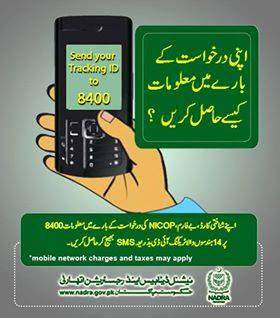
Table of Contents
Understanding NADRA Application Tracking Fundamentals
NADRA’s application tracking ecosystem operates through three primary channels, each designed for specific user needs and circumstances.
The three tracking methods explained:
- SMS service via 8400: The most accessible method requiring only a basic mobile phone and network connectivity within Pakistan. Works for all application types submitted domestically.
- Online tracking portal: Provides comprehensive status details through the NADRA website, accessible from anywhere in the world with internet access. Ideal for detailed information.
- Pak-ID mobile application: NADRA’s most sophisticated tracking platform integrating push notifications, application history, and appointment booking features.
The foundation of all tracking methods is the Tracking ID, a unique reference number generated at application submission.
Tracking ID formats and usage:
- Appears on your NADRA center receipt as both a 10-digit number optimized for SMS queries
- Also printed as a 13-digit number formatted for online portal entry
- The dual-format system ensures compatibility across tracking platforms
- Without this Tracking ID, accessing your application status becomes significantly more difficult
NADRA has substantially expanded service accessibility through multiple channels to accommodate citizens with varying technical capabilities and geographic locations.
Who should use each tracking method:
- SMS tracking: Best for users without smartphones, limited internet access, or needing quick simple updates
- Online tracking: Ideal for users wanting detailed status information, overseas applicants, or those with reliable internet
- Pak-ID app: Perfect for smartphone users wanting push notifications and integrated services
Complete SMS Tracking Guide for NADRA Applications
How to Check NADRA Application Status via SMS to 8400
Sending an SMS to 8400 remains the fastest method to check your NADRA application status, requiring only your mobile phone and the Tracking ID from your receipt.
Step-by-step SMS tracking process:
- Open your mobile phone’s messaging application
- Compose a new message containing only your 10-digit Tracking ID
- Do not add any spaces, dashes, words, or special characters
- Send the message to short code 8400
- Wait approximately 10-30 seconds for the automated response
- Read the reply containing your current application status and update date
Example of correct SMS format:
- Correct: 1234567890 sent to 8400
- Incorrect: “My tracking ID is 1234567890” sent to 8400
- Incorrect: 12345-67890 sent to 8400
- Incorrect: 1234567890 sent with spaces
What Information Will You Receive After Sending Your Tracking ID to 8400
The automated response from NADRA follows a standardized format designed for quick comprehension.
Typical SMS response elements:
- Your Tracking ID number for confirmation
- Current application status (In Process, Printed, Dispatched, etc.)
- Date of the most recent status update
- Additional information for dispatched applications including courier name
Example response messages:
- “Your application 1234567890 is currently In Process as of 15-06-2025”
- “Application 1234567890 status: Printed on 10-06-2025, ready for dispatch”
- “Your NICOP application 1234567890 is Dispatched via TCS tracking number 123456789”
Is the NADRA 8400 SMS Service Free or Paid?
The 8400 SMS service operates on a paid basis with charges applied by your mobile network operator.
SMS service charges explained:
- Standard fee of Rs. 10 plus tax per SMS sent to 8400
- Charge applies regardless of whether query succeeds or returns error
- Fee deducted by mobile network operator, not by NADRA directly
- Some mobile packages may include discounted short code rates
- No additional charges for receiving the response message
Common Reasons Why NADRA Tracking ID SMS Fails on 8400
When your SMS tracking attempt fails, several common issues may be causing the problem.
Troubleshooting checklist for SMS failures:
- Verify you are sending exactly the 10-digit Tracking ID from your receipt
- Allow 24-48 hours after application submission before first tracking attempt
- Confirm sufficient mobile balance for the SMS charge
- Ensure you are sending from within Pakistan on a Pakistani network
- Check that no extra characters appear before or after the Tracking ID
- Try again after one hour if technical issues suspected
- Verify your mobile number is active and not blocked from short codes
Can You Track CNIC by CNIC Number Using 8400 SMS Service?
The 8400 service specifically requires Tracking IDs and does not accept CNIC numbers for application tracking.
Important distinction between services:
- 8400 service: Accepts only 10-digit Tracking IDs for application status
- 7000 service: Accepts CNIC numbers for identity verification
- Sending CNIC to 8400 returns error message
- Use appropriate short code based on your needs
How to Check CNIC Verification Status Through SMS Using 7000
For CNIC verification rather than application tracking, use the dedicated 7000 service.
CNIC verification via 7000:
- Type your 13-digit CNIC number without dashes or spaces
- Send to short code 7000
- Receive response containing cardholder name and father’s name
- Confirms whether CNIC is valid, active, or expired
- Charge approximately Rs. 10 plus tax per query
- Useful for employment verification, tenant screening, and identity confirmation
NADRA Tracking ID Format: 10-Digit vs 13-Digit Numbers
Understanding the dual-format system prevents confusion when switching between tracking methods.
Tracking ID format comparison:
- 10-digit format: Designed specifically for SMS queries to 8400
- 13-digit format: Optimized for online portal entry on NADRA website
- Both numbers appear on your application receipt
- Using wrong format on wrong platform results in error
- Check your receipt carefully to identify which number corresponds to which method
Complete Online Tracking Guide for NADRA Applications
How to Track CNIC Application Status Online Through NADRA Website
Online tracking provides comprehensive status information beyond the brief SMS response.
Step-by-step online tracking process:
- Visit the official NADRA website at www.nadra.gov.pk
- Locate the “Track Your Application” section on homepage
- Alternatively navigate through Services menu to find tracking option
- Enter your 13-digit Tracking ID in the designated field
- Type the captcha code displayed on screen for verification
- Click Submit or Check Status button
- View complete application details including current stage and history
Information displayed on online tracking portal:
- Current application status with color-coded indicator
- Complete status history with dates of each change
- Processing center location and contact information
- Estimated remaining processing time
- Any notes or messages from processing officers
- Courier tracking number if application dispatched
What Each NADRA Online Tracking Status Means
Understanding status terminology helps you interpret exactly where your application stands.
Complete status definitions:
- Received or Submitted: Application entered system, initial verification not begun
- Under Process or In Process: Documents, photograph, biometrics actively reviewed
- Sent for Verification: Application forwarded to concerned authorities for additional checks
- Printed or Ready: Card successfully manufactured awaiting dispatch
- Dispatched: Card handed to courier service for delivery
- Delivered: Card signed for and received at your address
- Deferred or On Hold: Problem requiring your attention
- Rejected: Application cannot be processed further without fresh submission
What Does “In Process” Mean in NADRA Tracking Context
The “In Process” status indicates active verification but requires understanding of what happens during this phase.
Activities during In Process stage:
- Photograph comparison with previous records
- Fingerprint matching against national database
- Document scrutiny for authenticity
- Background checks with relevant authorities
- Data entry verification by multiple officers
- Quality control reviews before printing approval
Typical duration of In Process stage:
- Normal CNIC applications: 8-12 days
- Executive CNIC applications: 3-4 days
- NICOP applications: Several weeks to months
- B-Form applications: 5-7 days
- FRC applications: 4-6 days
What Does “Deferred” Mean in NADRA Tracking
“Deferred” status requires immediate action to prevent application cancellation.
Common reasons for deferral:
- Poor photograph quality not meeting NADRA standards
- Unclear fingerprints that could not be verified
- Mismatched information with existing database records
- Missing supporting documents
- Biometric mismatch with previous records
- Data discrepancies requiring clarification
Required actions for deferred applications:
- Visit the NADRA center where you originally applied
- Bring original CNIC and all supporting documents
- Do not submit new application
- Ask staff to explain exact correction needed
- Complete necessary updates immediately
- Confirm application returns to processing queue
How to Check CNIC by CNIC Number Online for Verification
Online CNIC verification serves different purposes than application tracking.
Online verification process:
- Visit NADRA website verification section
- Enter 13-digit CNIC number to verify
- Complete captcha challenge
- Submit query to receive basic cardholder information
- Confirms card validity and authenticity
- Useful for business and security purposes
Complete Pak-ID Mobile App Tracking Guide
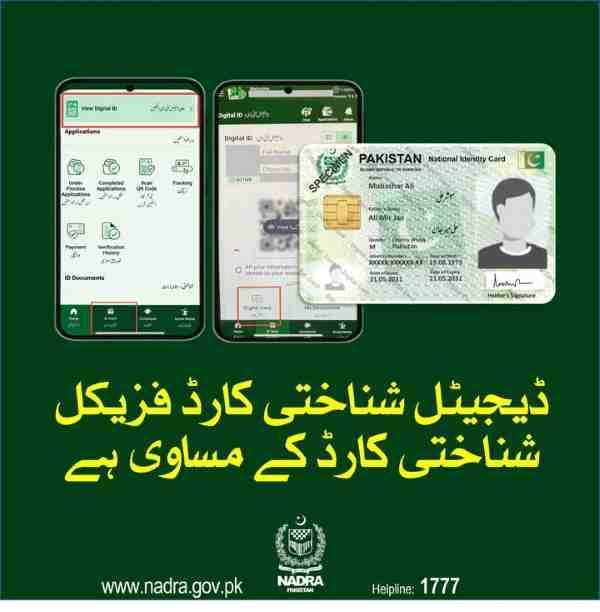
How to Check NADRA Application Through Pak-ID Mobile App
The Pak-ID app offers the most comprehensive tracking experience with additional features.
Step-by-step app tracking process:
- Download Pak-ID app from Google Play Store or Apple App Store
- Install and open the application
- Register using your CNIC number
- Verify through OTP sent to registered mobile number
- Log in to your account
- Navigate to Track Application or Application Status option
- Enter your Tracking ID when prompted
- View complete status with visual timeline
Key Features of Pak-ID App for Application Tracking
The app provides numerous advantages over other tracking methods.
Pak-ID app tracking benefits:
- Push notifications when application status changes
- Visual timeline showing each status transition with dates
- Complete application history accessible offline after initial load
- Integration with token booking system for center appointments
- Document upload capability through phone camera
- Video guides explaining each status and required actions
- Multiple application tracking if you submitted several requests
How to Book NADRA Token Online Through Pak-ID App
The appointment scheduling feature eliminates long queues at registration centers.
Token booking process:
- Open Pak-ID app and log in
- Navigate to Appointments or Token Booking section
- Select required service type (CNIC renewal, NICOP, B-Form)
- Choose preferred NADRA Registration Center from list
- View available dates and time slots
- Select convenient appointment time
- Generate digital token with QR code
- Display QR code at center upon arrival
- Receive priority service at scheduled time
Specialized Tracking for Different Document Types
How Overseas Pakistanis Can Track NICOP Applications
International applicants must use different channels than domestic users.
NICOP tracking methods for overseas Pakistanis:
- NADRA website: Use dedicated NICOP tracking portal
- Pak-ID app: Full functionality available internationally
- Email inquiries: Contact NADRA overseas support
- Embassy assistance: Pakistani missions can help with status inquiries
Why SMS to 8400 doesn’t work internationally:
- Short codes are network-specific to Pakistan
- International roaming doesn’t support domestic short codes
- System designed for Pakistani mobile networks only
- Alternative channels specifically built for overseas users
How to Track Pakistan Origin Card (POC) Application Status
POC tracking follows identical procedures to NICOP tracking.
POC tracking methods:
- NADRA website overseas tracking portal
- Pak-ID mobile app
- Same Tracking ID format as other applications
- Processing involves international verification steps
- Status updates reflect embassy coordination
How to Track Family Registration Certificate (FRC) Status
FRC applications use the same tracking system as individual identity documents.
FRC tracking specifics:
- Use same Tracking ID from FRC application receipt
- SMS to 8400 works for domestic FRC applications
- Online tracking shows family relationship verification status
- Pak-ID app displays FRC-specific status updates
- Processing involves matching all family members’ records
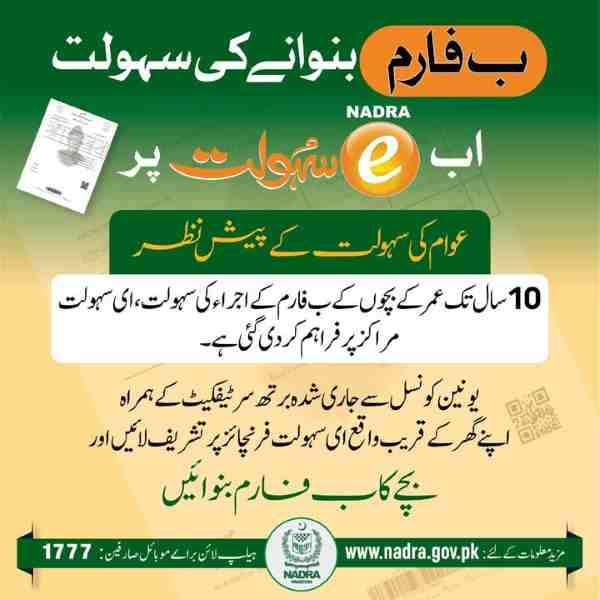
How to Track Child’s B-Form Application Online
B-Form tracking requires the unique Tracking ID from the application receipt.
B-Form tracking information:
- Tracking ID provided on child’s application receipt
- Use NADRA website, Pak-ID app, or SMS to 8400
- Processing typically completes within 7-10 working days
- Status shows when certificate printed and ready for collection
- Parent or guardian must collect in person
Advanced Tracking Troubleshooting and Security
What to Do When NADRA Tracking ID Not Working
Systematic troubleshooting resolves most tracking failures.
Troubleshooting steps by issue type:
For “No Record Found” errors:
- Wait 24-48 hours after application submission
- Verify you entered correct Tracking ID format
- Check receipt for possible data entry errors
- Try alternate tracking method (SMS vs online)
For “Invalid Tracking ID” errors:
- Confirm using 10-digit for SMS, 13-digit for online
- Check for similar looking numbers (0 vs O, 1 vs I)
- Verify receipt number against SMS confirmation
- Contact NADRA center if issue persists
For technical failures:
- Try again after one hour
- Switch between mobile data and WiFi
- Clear browser cache and cookies
- Update Pak-ID app to latest version
- Restart your mobile device
How Long Is a NADRA Tracking ID Valid
Tracking IDs remain active for specific durations based on application status.
Tracking ID validity periods:
- During active processing: Full functionality throughout
- After document delivery: 3-6 months for historical reference
- Unprocessed applications: Up to 6 months from submission
- After 6 months: Archived and inaccessible through public portals
- Archived records: Accessible via helpline or center visit
Security Guidelines for NADRA Tracking ID Protection
Protecting your Tracking ID prevents unauthorized access to your application information.
Security best practices:
- Never share Tracking ID on social media platforms
- Avoid posting receipt photos publicly
- Do not give Tracking ID to unauthorized third parties
- Keep physical receipt in secure location
- Take digital photo as backup but store securely
- Report suspected misuse to NADRA helpline immediately
Why Tracking ID security matters:
- Contains personal application information
- Can be used to check your status without consent
- May reveal sensitive personal details
- Could facilitate identity theft attempts
- NADRA specifically advises against public sharing
NADRA Helpline Numbers for Tracking Issues
When self-service tracking fails, helpline assistance is available.
NADRA contact information:
- From mobile within Pakistan: 1777
- From landline or overseas: 051-111-786-100
- Online complaint portal: complaints.nadra.gov.pk
- Available during business hours: Monday to Friday
- Have ready when calling: Tracking ID, CNIC number, application date
How to File Formal Complaint About Application Status
The online complaint system provides official escalation for unresolved issues.
Complaint filing process:
- Visit complaints.nadra.gov.pk
- Complete complaint form with personal details
- Select appropriate category (Delay, Tracking Issue, etc.)
- Provide clear description of problem
- Upload supporting documents and screenshots
- Submit to receive complaint tracking number
- Monitor complaint status online
- Expect response within 48 hours
Understanding NADRA Processing Timelines
Standard Processing Times by Application Type
Knowing expected timelines helps identify actual delays requiring intervention.
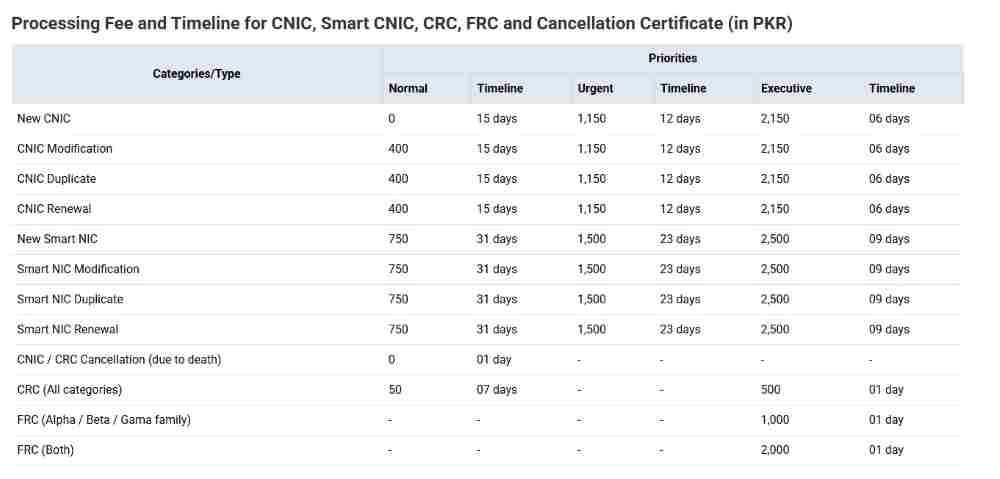
Current NADRA processing timelines:
CNIC applications:
- Normal processing: 15 working days
- Urgent processing: 12 working days
- Executive processing: 6 working days
NICOP applications:
- Standard processing: 3-6 months
- Urgent processing: 2-3 months
- Executive processing: 1-2 months
Other document types:
- POC applications: 3-6 months
- FRC applications: 7-10 working days
- B-Form applications: 7-10 working days
- Reprint applications: 5-7 working days
Factors Affecting Processing Times
Multiple variables influence how quickly your application progresses.
Processing time影响因素:
- Application type and complexity
- Current workload at processing center
- Biometric quality at time of submission
- Document completeness and clarity
- Verification requirements with external agencies
- Geographic location of applicant
- Time of year (peak vs off-peak seasons)
What to Do When CNIC Delivery Delayed
Systematic approach to address delayed delivery situations.
Steps for delayed delivery:
If status shows “Printed” but not delivered:
- Wait 5 working days after printed date
- Check with local post office
- Contact courier service if tracking number available
- Call NADRA helpline for dispatch investigation
If status shows “Dispatched” beyond expected delivery:
- Verify courier tracking number from online status
- Track through courier company website
- Contact courier customer service
- Request trace investigation
If status stuck at earlier stage beyond timeline:
- Check for deferral notices
- Visit application center for status inquiry
- File online complaint for escalation
- Consider urgent processing upgrade if available
Additional NADRA Digital Services
Other Useful NADRA SMS Codes Beyond 8400
NADRA operates multiple SMS services for various identity-related needs.
Complete list of NADRA SMS codes:
- 8400: Application tracking with Tracking ID
- 7000: CNIC verification and identity confirmation
- 668: Check active SIMs registered on your CNIC
- 8300: Voter registration and polling station information
- 8009: Family tree information request
- 8171: Ehsaas program eligibility check
Each service features:
- Instant automated response
- Nominal charge per query
- 24/7 availability
- Simple format requirements
How to Pay for NADRA Services Online
Digital payment options eliminate cash handling and receipt management.
Online payment methods:
- Pak-ID app: Pay via JazzCash, EasyPaisa, or QR code scanning
- NADRA website: Credit cards, debit cards, internet banking
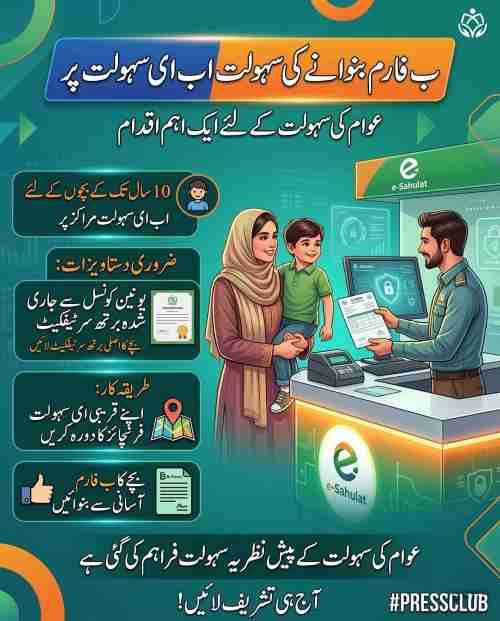
- E-Sahulat outlets: Cash payments with payment slips
- Bank transfer: Direct deposit for certain services
- Mobile wallets: Integrated with popular platforms
Payment confirmation:
- Instant receipt generation
- Automatic linking to application
- Email and SMS confirmation
- Digital record for future reference
NADRA’s E-Franchise Network for CNIC Services
The expanded e-franchise network brings services closer to citizens.
E-franchise services available:
- CNIC renewal applications
- CNIC replacement for lost or damaged cards
- Biometric verification without center visit
- Photograph and fingerprint capture
- Fee collection and receipt generation
- Application status inquiries
E-franchise advantages:
- Over 2,000 locations nationwide
- Reduced travel to main centers
- Shorter waiting times
- No smartphone required
- Same NADRA database access
NADRA Application Status FAQ
How can I check my NADRA card status using mobile phone?
Send your 10-digit Tracking ID to 8400 via SMS, use the Pak-ID app, or visit the NADRA website through your mobile browser. All methods provide real-time updates from the central database.
What number do I send for NADRA tracking via SMS?
Send your Tracking ID to 8400. The message must contain only the 10-digit number without any additional text, spaces, or special characters.
Can I track my NICOP application from Saudi Arabia?
Yes, use the NADRA website’s NICOP tracking portal or the Pak-ID mobile app. The SMS service to 8400 does not work internationally, so online channels are your only option.
How much does NADRA SMS tracking cost?
Each SMS to 8400 costs approximately Rs. 10 plus tax, deducted by your mobile network operator. This fee applies whether your query succeeds or returns an error.
What should I do if my Tracking ID has 13 digits?
Use the 13-digit number for online tracking through the NADRA website or Pak-ID app. For SMS tracking, check your receipt for a separate 10-digit number or try the first 10 digits of your 13-digit number.
How do I know when my CNIC is ready for collection?
Your tracking status will show “Printed” or “Ready,” and you may receive a dispatch SMS from NADRA. If collection from center is required, status will specify “Ready for Collection” with center location.
Why is my NADRA application showing “Deferred”?
“Deferred” indicates an issue requiring your attention, such as poor photograph quality, unclear fingerprints, or mismatched information. Visit your application center immediately to resolve the issue.
Can I track FRC application without Tracking ID?
Tracking without ID is difficult. Check SMS history for NADRA messages, search email for digital receipts, or contact helpline at 1777 with your CNIC number for assistance retrieving your Tracking ID.
Conclusion
Mastering NADRA application tracking through SMS to 8400, the official website, or the Pak-ID mobile app transforms the waiting period from anxious uncertainty into manageable patience. Each tracking method serves specific needs—SMS for quick domestic checks, online portal for detailed international access, and mobile app for comprehensive management with push notifications. Keep your application receipt secure, understand what each status means, and know exactly how to respond when issues like deferral or delay occur. With over 2,000 e-franchise centers nationwide and expanding digital services, NADRA continues making identity document access easier for all Pakistani citizens and overseas Pakistanis.
Disclaimer: This guide provides general information about NADRA tracking procedures based on publicly available processes. Always verify specific details with official NADRA channels for your individual application.
Frequently Asked Questions
How can I check my NADRA card status?
Send your 10-digit Tracking ID to 8400 via SMS, visit the NADRA website tracking portal, or use the Pak-ID mobile app’s Track Application feature. All methods provide real-time updates.
What is the number to check NADRA tracking ID via SMS?
The short code for NADRA tracking ID check via SMS is 8400. Send only your 10-digit Tracking ID without any additional text.
Can I track my NICOP from UK with my tracking ID?
Yes, track your NICOP from UK using the NADRA website’s NICOP tracking portal or the Pak-ID mobile app. SMS service to 8400 does not work internationally.
How much does it cost to send an SMS to 8400?
Sending an SMS to 8400 costs approximately Rs. 10 plus tax per message, deducted by your mobile network operator.
My NADRA tracking ID is 13 digits. Can I send it to 8400?
No, the 8400 SMS service accepts only 10-digit Tracking IDs. Use the NADRA website or Pak-ID app for 13-digit numbers.
How do I know if my CNIC is ready for collection?
When your CNIC status shows “Printed” or “Ready” in tracking, and you receive a dispatch SMS, your card is ready. Collection center status will specify location.
Why is my NADRA application showing deferred?
Deferred status means an issue requires your attention. Visit your application center immediately to resolve photograph, fingerprint, or document problems.
How can I track my FRC application status?
Use your FRC application Tracking ID through SMS to 8400, NADRA website, or Pak-ID app. Processing involves verifying all family members’ records.
Can I track my child’s B-Form online?
Yes, use the Tracking ID from your child’s B-Form application receipt on NADRA website, Pak-ID app, or via SMS to 8400.
What is NADRA helpline number for tracking issues?
Call 1777 from any mobile phone within Pakistan or 051-111-786-100 from landline or overseas for tracking assistance.

Add a Comment