
Every year, millions of deserving families across Punjab miss out on government assistance simply because their names never appear on the right lists. The old system of fragmented records and manual selection meant that even the most vulnerable households could be overlooked while benefits reached those who needed them least.
The Punjab Socio-Economic Registry (PSER) Portal was built to solve this exact problem—a centralized digital platform that captures household data once and makes it available for every government program. This guide walks you through everything you need to know about PSER registration, from understanding why it matters to completing your application and accessing the benefits you qualify for.
Key Takeaways
- Your PSER Profile Is Your Ticket to Government Support: Without registration, you cannot access the Nigehban Card, Himmat Card, Kisan Card, or any other Punjab welfare program.
- The PMT Score Determines Your Eligibility: Every household receives a poverty score based on assets, education, and housing—lower scores mean higher priority for assistance.
- Self-Registration Takes 20–30 Minutes: The entire online application can be completed from a mobile phone or computer without visiting any government office.
- Data Accuracy Protects Your Future Benefits: False information leads to permanent disqualification, while accurate records ensure you receive the help you deserve.
- Verification Happens Automatically: After submission, your application undergoes automated checks and field verification before your profile becomes active.
- Read More: PSER Punjab gov pk Registration Online | PSER Check Eligibility
- Read More: Top 10 Social Welfare Programs by CM Punjab (Eligibiliy+Apply Online)
- Read More: Working Women Hostel Scheme: Eligibility, How to Apply Online
- Read More: Day Care Center in Lahore (List & Helpline by CM Punjab)
PSER Portal | PSER Registration (Benefits & How to Apply Online)
Table of Contents
Understanding the PSER Portal: Punjab’s Digital Transformation for Social Welfare
The PSER Portal represents a fundamental shift in how Punjab identifies and serves families in need. Before its launch, government departments operated in silos—each maintaining separate beneficiary lists for food subsidies, health coverage, educational support, and cash transfers. A family might receive assistance from one program while being completely invisible to another, with no mechanism to verify need or prevent duplication.
What PSER actually does:
- Creates a single, verified household database for the entire province
- Replaces manual, politically influenced selection with data-driven targeting
- Enables real-time identification of families affected by emergencies
- Provides all government departments with the same reliable information source
The scale of the initiative:
The PSER survey spans every district, tehsil, and union council in Punjab. More than 5,000 registration centers operate across the province, complemented by a fully functional online portal that allows families to register from anywhere with internet access. Trained enumerators conduct door-to-door surveys to ensure even remote communities are included, leaving no household behind.
Why this matters for ordinary families:
Before PSER, eligibility for government programs often depended on knowing the right person or being in the right place at the right time. Today, your household data speaks for itself. If your PMT score falls below the threshold, the system automatically flags you for relevant programs—no connections required, no paperwork repeated.
How the PSER Portal Reshapes Public Service Delivery Across Punjab
The PSER Portal does more than store data—it transforms how every government department approaches service delivery. The shift from assumption-based to evidence-based policymaking touches every aspect of governance.
Data-Driven Governance: Moving Beyond Guesswork
Government planners now have access to granular household-level data that reveals the true distribution of poverty across Punjab. This visibility allows:
- Precise budgeting: Departments know exactly how many households fall into each poverty bracket, enabling accurate fund allocation.
- Geographic targeting: Resources can be concentrated in districts with the highest concentration of vulnerable families rather than spread thinly across the province.
- Impact measurement: Programs can be evaluated against baseline data to determine whether they are actually reaching the intended beneficiaries.
- Fraud prevention: Cross-referencing asset declarations across different programs catches attempts to claim duplicate benefits.
Unified Social Protection: One Registry, Endless Possibilities
The days of registering separately for each program are over. With a single PSER profile, households gain access to a growing list of initiatives:
Nigehban Card Program
Provides subsidized food packages and cash assistance during Ramzan and other designated periods. Eligibility is determined directly from PSER data, and cards are issued automatically to qualifying households.
Himmat Card Initiative
Persons with disabilities receive monthly stipends to support their independence. The health status section of the PSER application captures disability information, enabling automatic enrollment without separate applications.
Kisan Card for Farmers
Small farmers access subsidized agricultural inputs including seeds, fertilizers, and pesticides. Land ownership data from PSER verifies eligibility and ensures support reaches genuine cultivators.
Educational Scholarships
Children from PSER-registered families qualify for fee reimbursements, stipends, and free textbooks across government schools.
Health Coverage Programs
Provincial health insurance schemes use PSER data to identify families eligible for free or subsidized medical treatment.
Citizen-Centric Service: Reducing Burden, Increasing Access
The citizen-centric philosophy behind PSER means government services adapt to people’s needs rather than the other way around. Key improvements include:
- One-time data submission: Families provide their information once instead of submitting documents to multiple departments repeatedly.
- Faster processing: Pre-verified profiles eliminate verification delays, reducing application approval times from weeks to days.
- Digital accessibility: The online portal allows registration from home, eliminating travel costs and time away from work.
- Assisted registration: For those without internet access, 5,000 centers across Punjab offer in-person support with trained staff.
Disaster Resilience: Preparation Before Crisis Strikes
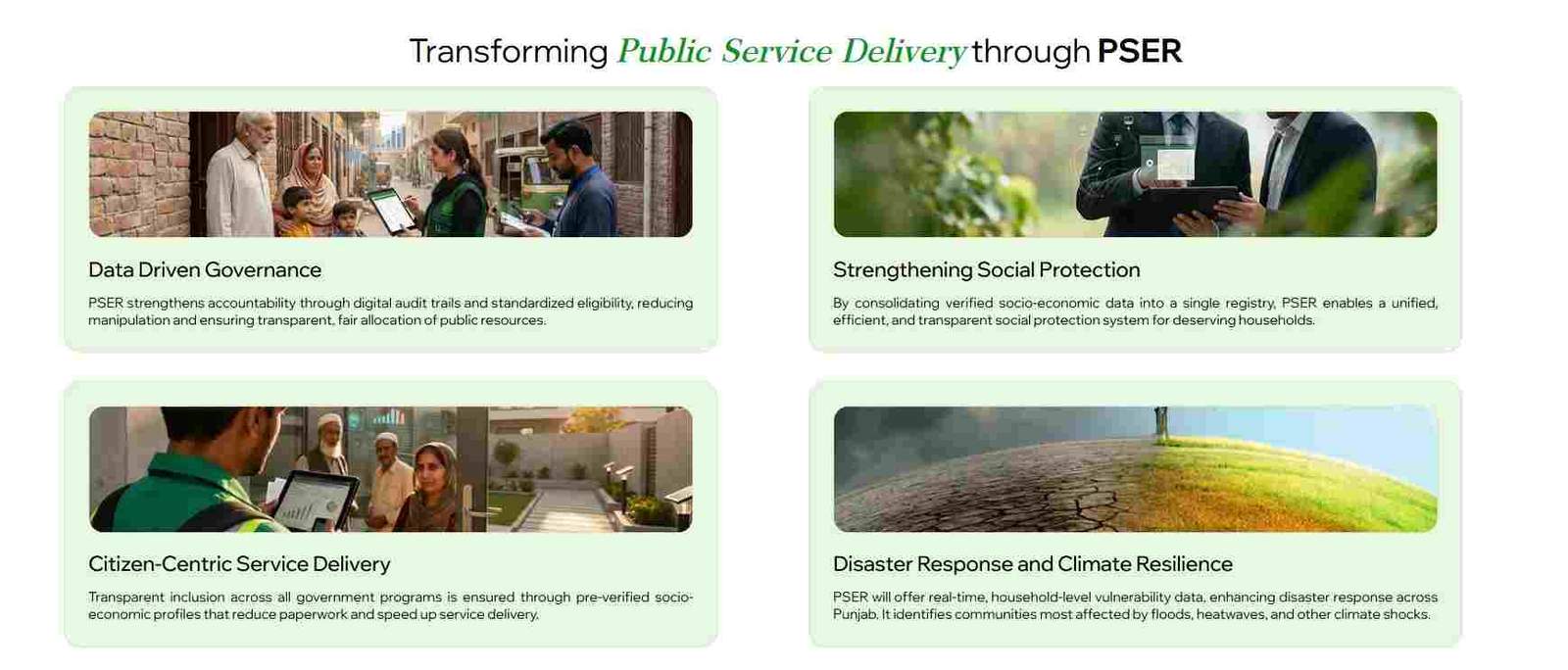
Perhaps the most forward-looking aspect of PSER is its application in disaster management. When floods, earthquakes, or other emergencies occur, response teams no longer waste critical hours conducting preliminary assessments. The registry already contains:
- Household-level location data identifying communities in high-risk zones
- Health vulnerability information highlighting families with disabled or chronically ill members who need priority evacuation
- Contact details enabling rapid communication with affected populations
- Bank account information allowing direct cash transfers within hours of a disaster
This pre-positioned data transforms emergency response from reactive scrambling to coordinated, targeted action that reaches the most vulnerable first.
Read More: Nawaz Sharif Cancer Hospital Lahore (Helpline & Key Details)
Complete Walkthrough: PSER Online Registration Step by Step
Registering for PSER involves providing comprehensive information about your household. The process is structured into logical sections, each collecting specific data points used for PMT calculation and program eligibility.
Accessing the Official Portal: Your First Step
Navigate directly to the official PSER website at pser.punjab.gov.pk. No third-party websites are authorized to process registrations. Once on the homepage:
- Locate and click the “New Application” button
- Read the declaration carefully—it affirms that all information provided is truthful and complete
- Check the acknowledgment box to proceed
Household Identification: Establishing Your Family Unit
The first data section establishes who is responsible for the household:
- Enter the full name of the head of family exactly as it appears on the CNIC
- Provide the 13-digit CNIC number without spaces or dashes
- The system automatically validates the CNIC against NADRA records
Critical note: The head of family should be the person who will later apply for benefits on behalf of all household members. This individual’s CNIC becomes the primary identifier for the entire family unit.
Demographic Details: Who Lives in Your Home
For each household member, you will enter:
- Full name
- Relationship to the head of family
- Gender
- Date of birth (matching NADRA records)
This information helps the government understand family composition—identifying dependents, elderly members, and the overall size of the household, all of which factor into PMT calculation.
Health Status: Identifying Medical Needs
The health section captures conditions that may qualify household members for specialized support:
Disability types you can select:
- Upper limb disability
- Lower limb disability
- Mental disability
- Speech disability
- Hearing disability
- Visual disability
Chronic diseases to report:
- Diabetes
- Heart disease
- Kidney failure requiring dialysis
- Cancer
- Any other long-term condition requiring ongoing medical care
This data is essential for programs like the Himmat Card, which provides monthly stipends specifically for persons with disabilities.
Educational Attainment: Measuring Human Capital
Education levels serve as both a poverty indicator and a determinant of future earning potential. For each household member:
- Indicate whether the person can read a simple sentence in any language
- Select the highest degree completed (primary, middle, matric, intermediate, bachelor, master, or higher)
- If never attended school, specify the primary reason (economic constraints, lack of nearby schools, family circumstances, etc.)
Higher education levels generally correlate with higher income potential and therefore result in higher PMT scores.
Employment and Income: Capturing Economic Activity
This section builds a picture of household earnings and employment stability:
Key data points:
- Last month’s total income from all sources
- Main source of income (salary, business, agriculture, daily wage, remittances, etc.)
- Nature of employment (permanent, temporary, seasonal, self-employed, unemployed)
- Average monthly cash income in Pakistani rupees
For households with irregular income, the system accepts averages. Accuracy matters—underreporting may lead to eligibility for programs you don’t genuinely need, while overreporting could exclude you from support you deserve.
Banking Information: Enabling Direct Transfers
The system asks whether any household member has a bank account:
- Select “Yes” or “No”
- If yes, provide the bank name and account number
Bank account details enable direct cash transfers when you qualify for programs, eliminating the need to visit distribution centers or deal with intermediaries.
Contact Information: Staying Connected
Provide two mobile numbers with their respective network operators (Jazz, Zong, Ufone, Telenor). These numbers serve multiple purposes:
- Receiving application status updates via SMS
- Receiving verification calls from field staff
- Receiving emergency alerts during disasters
- Being contacted for program enrollment notifications
Address Details: Where You Live
The address section requires both current and permanent addresses if they differ:
For each address, provide:
- Province
- District
- Tehsil
- Union council
- City or village name
- Urban or rural status
- Complete address including street, house number, and landmarks
Accurate addresses enable field verification teams to locate your household and ensure your data matches physical conditions.
Asset Information: The Heart of PMT Calculation
This section carries the most weight in determining your PMT score. Each subsection collects verifiable data points:
Dwelling Unit Characteristics
- Ownership status (owned, rented, rent-free, encroached)
- Wall material (baked brick, unbaked brick, mud, wood, other)
- Roof material (concrete, iron sheets, thatch, other)
- Residential condition (good, repairable, dilapidated)
- Number of rooms
Household Composition and Energy
- Total number of family members living in the dwelling
- Primary cooking fuel (natural gas, LPG, wood, kerosene, agricultural waste, other)
Sanitation and Water Access
- Toilet type (flush connected to sewer, flush connected to septic tank, pit latrine, open defecation, other)
- Drinking water source (tap water inside dwelling, tap water outside, hand pump, well, tanker, other)
Utilities and Livestock
- Electricity connection type (own meter, shared meter, illegal connection, no connection)
- Livestock ownership with counts (cows, buffaloes, goats, sheep, chickens, other)
Land and Transportation Assets
- Agricultural land ownership (yes/no, with total acreage)
- Transport items owned (motorcycle, car, tractor, rickshaw, other, with quantities)
Agricultural Information: For Farming Households
If you indicated agricultural land ownership, additional questions appear:
- Type of cultivation (own cultivator, contract cultivator, shared cultivator)
- Size of cultivated land in acres or kanals
- Primary crops grown (if applicable)
This data is essential for programs like the Kisan Card that provide agricultural subsidies specifically to small farmers.
Final Questions: Capturing Vulnerabilities
The last section asks four questions designed to identify households facing unique challenges:
- Does any family member receive financial help from the government?
- Has the family experienced the death of a child in the previous year?
- Does the family have access to mobile or internet?
- Was the family affected by any natural disaster in the previous five years?
These questions help the government identify families with specific vulnerabilities that may not be captured by asset data alone.
Submission and Confirmation
After completing all sections:
- Review all information for accuracy
- Submit the application
- Note the confirmation number or tracking ID provided
- Save or screenshot the confirmation for reference
Required Documentation for PSER Registration
Unlike many government processes, PSER online registration does not require uploading or submitting physical documents. However, having certain information readily available makes the process smoother.
Primary Requirement: Valid CNIC
The head of family’s CNIC is the only mandatory requirement for online registration. The system validates the CNIC number against NADRA records to:
- Confirm identity
- Pull basic demographic information
- Prevent duplicate registrations
Information to Have Ready Before Starting
To complete the application without interruption, gather:
- CNIC numbers for all adult household members
- Bank account details if applicable
- Mobile numbers for all adult members
- Complete address information
- Details about land ownership (if any)
- Livestock counts
- Vehicle information
Supporting Documents for Field Verification
While not required for online submission, field verification teams may request to see:
- CNICs of all household members
- Utility bills (electricity, gas, water)
- Property ownership documents
- Vehicle registration books
- Disability certificates
- Land ownership records
Having these documents available during verification visits ensures the process completes without delays.
Understanding the PMT Score: How Your Eligibility Is Determined
The Proxy Means Test (PMT) score is the mathematical formula that translates your household data into an eligibility ranking. Understanding how it works helps you appreciate why accurate reporting matters.
Components of the PMT Calculation
The PMT model assigns statistical weights to multiple indicators based on their correlation with poverty:
Housing indicators:
- Wall and roof materials (katcha structures receive lower scores)
- Number of rooms per household member
- Residential condition (dilapidated housing increases vulnerability)
Asset indicators:
- Land ownership (more land increases score)
- Livestock ownership (type and quantity matter—cattle have different weight than poultry)
- Vehicle ownership (car ownership heavily increases score)
- Agricultural equipment ownership
Human capital indicators:
- Educational attainment of household members
- Employment status and income stability
- Dependency ratio (number of earners vs. dependents)
Utility access indicators:
- Type of drinking water source
- Sanitation facilities
- Electricity connection type
- Cooking fuel type
What Different PMT Scores Mean
Very low scores (0–20):
Households in extreme poverty with minimal assets, poor housing, and no stable income. These families receive highest priority for all assistance programs.
Low scores (21–40):
Households living below or near the poverty line with some assets but significant vulnerabilities. Eligible for most welfare programs.
Medium scores (41–60):
Households with modest assets and stable income, likely self-sufficient but may qualify for targeted support during emergencies.
High scores (61–100):
Households with substantial assets, good housing, and stable income. Generally ineligible for means-tested programs.
How Assets Influence Your Score
The PMT model assigns higher weights to assets that strongly predict economic status:
- Land ownership: Even small agricultural holdings increase scores significantly
- Vehicle ownership: Car ownership adds substantial weight; motorcycle ownership adds moderate weight
- Livestock: Multiple cattle or buffaloes indicate significant wealth
- Housing quality: Concrete structures with modern finishes score much higher than katcha structures
Tracking Your PSER Registration Status
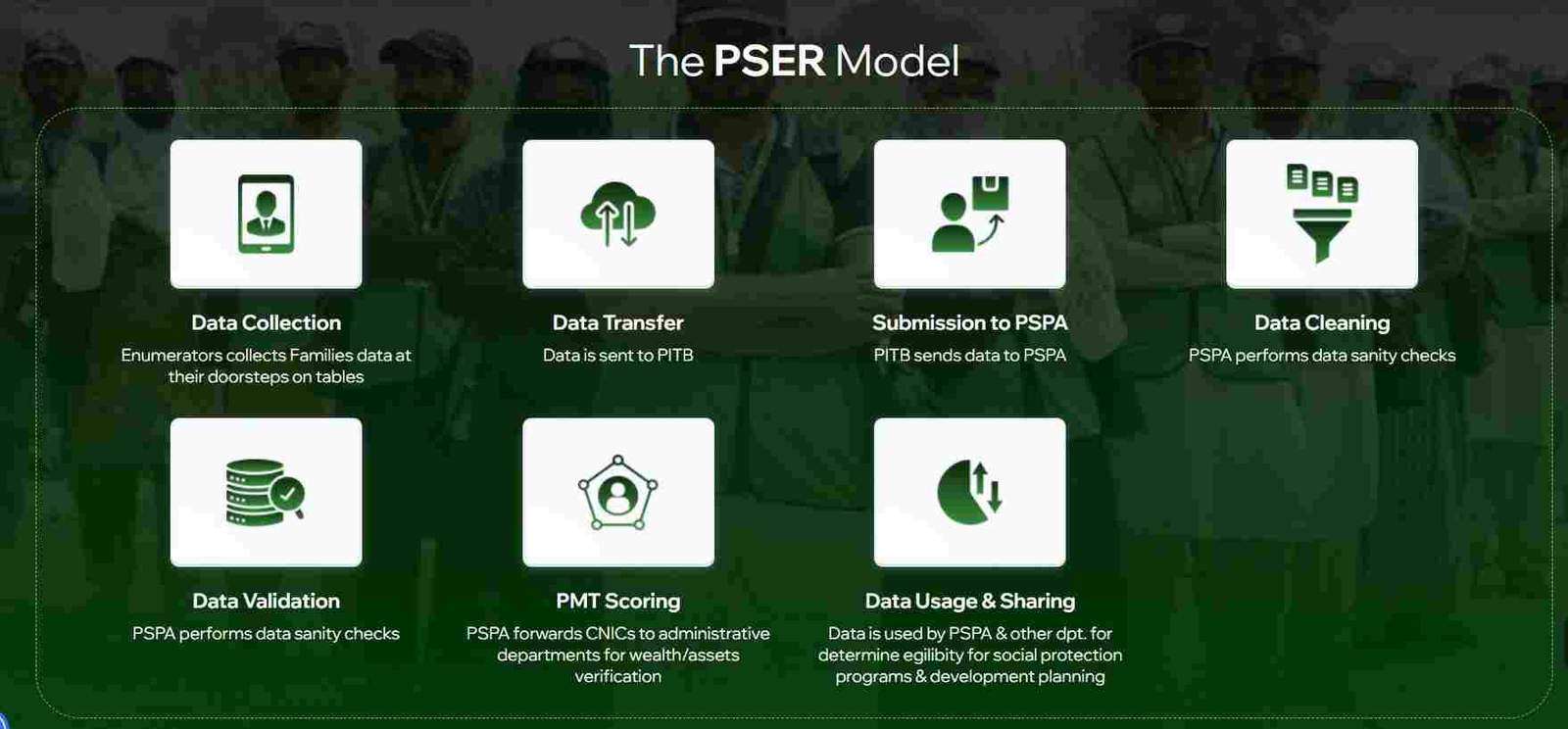
After submission, your application moves through several stages before your profile becomes active.
Online Status Check
To check your status:
- Visit pser.punjab.gov.pk
- Click “Check Status” or “Track Application”
- Enter the head of family’s CNIC
- Enter the mobile number used during registration
- View current status
Understanding Status Messages
“Submitted”
Your application has been received and entered the processing queue. No action needed.
“Under Verification”
Your data is being checked. This may involve automated data cleaning or field visits to verify information.
“Data Validation”
Field teams or call center staff are confirming key information with your household. Respond promptly to any calls or visits.
“Verified”
Your application has passed all checks. Your PSER profile is active and ready for program enrollment.
“Rejected”
Your application failed verification or contained critical errors. Contact the helpline to understand why and how to reapply.
Processing Timelines
Typical processing takes 30–45 days from submission to verification, though times vary by:
- Volume of applications in your district
- Completeness and accuracy of your data
- Whether your household was selected for physical verification
- Current workload of field teams
Maximizing PSER Benefits: Programs You Can Access
A verified PSER profile opens doors to numerous government programs. Understanding what’s available helps you take full advantage of your registration.
Nigehban Card Benefits
The Nigehban Card provides:
- Subsidized food packages containing essential items like flour, cooking oil, and pulses
- Cash assistance during Ramzan and other designated periods
- Emergency food support during crises
Eligibility is determined automatically from PSER data. Qualifying households receive notification to collect their cards.
Himmat Card Support
Persons with disabilities registered in PSER receive:
- Monthly cash stipends
- Access to assistive devices
- Priority in government employment schemes
- Educational support
The Himmat Card is issued automatically based on health status data captured during registration.
Kisan Card Program
Small farmers with PSER profiles benefit from:
- Subsidized seeds, fertilizers, and pesticides
- Agricultural extension services
- Access to farming equipment at reduced rates
- Crop insurance options
Educational Support
Children from PSER-registered families qualify for:
- Free textbooks through government schools
- Stipends for secondary and higher education
- Fee reimbursements for technical and vocational training
- Scholarships for higher education
Health Coverage
PSER data determines eligibility for:
- Provincial health insurance schemes covering hospitalization costs
- Free outpatient care at government facilities
- Maternal and child health programs
- Chronic disease management support
Troubleshooting Common PSER Registration Issues
Even with careful completion, applicants sometimes encounter problems. Here’s how to resolve the most common issues.
CNIC Rejection
If your CNIC is rejected:
Possible causes:
- Name mismatch with NADRA records
- Duplicate registration already exists
- Technical portal issues
- CNIC not valid or expired
Solutions:
- Verify your exact name as on CNIC
- Wait 24 hours and try again
- Visit a registration center for manual assistance
- Call the helpline (0800-02345)
Application Pending for Extended Periods
If your application remains pending beyond 45 days:
- Call the helpline with your CNIC and tracking number
- Visit your nearest registration center for an update
- Ensure all verification calls and visits were responded to
Incorrect Information After Submission
To correct errors:
- If the portal allows edits, log in and modify relevant sections
- Visit a registration center with supporting documents for correction
- Call the helpline to request correction assistance
Lost or Forgotten Tracking Information
If you lose your confirmation:
- Use the CNIC status check to retrieve information
- Call the helpline with your CNIC for assistance
- Visit a registration center with your CNIC
Frequently Asked Questions
What is the PSER Portal?
The PSER Portal is the official digital platform for the Punjab Socio-Economic Registry, a province-wide household data collection initiative that serves as the foundation for all social protection programs in Punjab.
How can I register for the PSER program online?
Visit pser.punjab.gov.pk, click “New Application,” and complete the multi-section form with accurate information about your household, assets, and socio-economic status.
Who is eligible for PSER registration?
All residents of Punjab, including families, individuals, and overseas Pakistanis with a valid CNIC or NICOP, can register. There are no income or status restrictions.
What are the benefits of being registered in the Punjab Socio-Economic Registry?
Registration makes you eligible for the Nigehban Card, Himmat Card, Kisan Card, educational scholarships, health coverage, and all other Punjab government welfare programs.
Which documents are required for the PSER application?
The CNIC of the head of family is required for online registration. Supporting documents may be requested during field verification.
How do I check my PSER registration status?
Use the “Check Status” feature on pser.punjab.gov.pk, or call the helpline at 0800-02345 with your CNIC.
What is a PMT score in PSER?
The Proxy Means Test score is a poverty score calculated from your household data using statistical models that weight assets, education, housing, and other indicators.
Disclaimer
This guide provides general information about the PSER Portal and registration process. Program details, eligibility criteria, and procedures are determined by the Government of Punjab and may change. Always refer to official PSER communications and the official portal for the most current information.

Add a Comment