
Imagine spending your hard-earned money on a new iPhone or Samsung device only to discover sixty days later that it no longer works on any Pakistani mobile network. This frustrating scenario plays out daily for thousands of Pakistanis who skip the essential step of verifying their device’s compliance with the Pakistan Telecommunication Authority. Performing a PTA mobile device registration and tax payment check protects your investment and ensures uninterrupted connectivity. This comprehensive guide walks you through every verification method, explains the tax rates following the recent valuation cuts, and provides actionable steps to complete your payment through banking apps or mobile wallets.
Key Takeaways
- PSID Generation Required First: You cannot pay PTA tax directly without first generating a 17-digit Payment Slip ID through the official DIRBS portal after submitting your device details.
- Passport Registration Costs Less: Devices registered using a passport consistently attract lower tax rates compared to those registered with a Computerized National Identity Card.
- Sixty-Day Deadline Enforced Strictly: The moment you insert a local SIM card, the sixty-day countdown begins automatically. No extension requests are entertained.
- Recent Valuation Cuts Benefit Used Phones: The Federal Board of Revenue significantly reduced customs values for used iPhone and Samsung models in early 2026, making legal registration more affordable.
- Multiple Payment Channels Available: You can pay your calculated tax through JazzCash, Easypaisa, all major bank mobile apps, ATMs, or over-the-counter at bank branches nationwide.
- Read More: PTA Mobile Registration Online Check | PTA Approved Check [DVS PTA]
- Read More: BISP Payment Check by CNIC Online Pakistan
- Read More: BISP 13500 Rupee Payment Phase 2 (Register to Apply)
PTA Tax Check Online | PTA Tax Check By IMEI
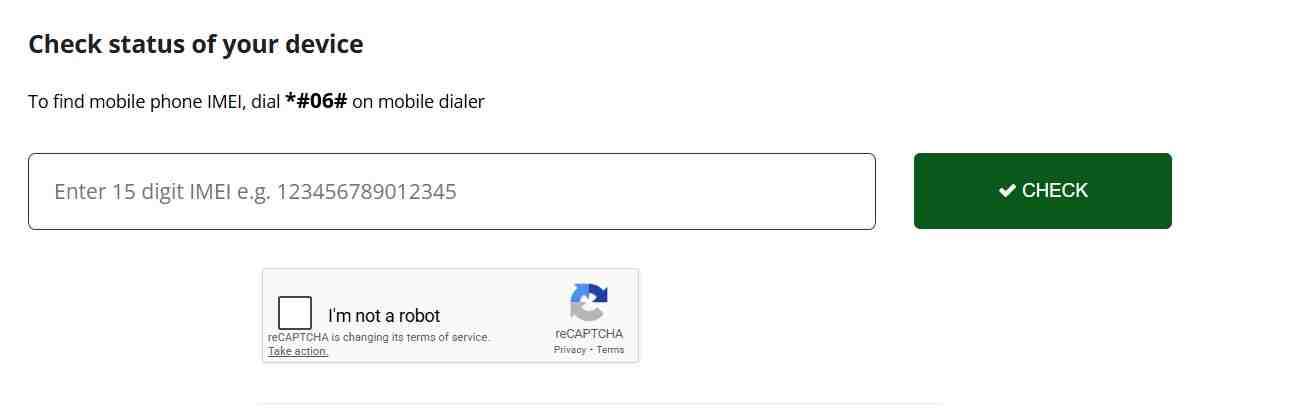
Table of Contents
Understanding PTA Mobile Tax and Why Compliance Matters
PTA mobile tax represents the government-imposed levy on all mobile devices imported into Pakistan for personal or commercial use, ensuring these devices meet local telecommunication standards and contribute to national revenue. This tax collection mechanism serves dual purposes: regulating the mobile device market and generating funds for infrastructure development.
The DIRBS System and Its Role in Device Management
The Device Identification Registration and Blocking System functions as the central database tracking every IMEI number active on Pakistani networks. When you insert a local SIM card, DIRBS immediately detects your device and cross-references it against import records and tax payment history. The system automatically initiates a sixty-day compliance window. If no tax payment registers by the deadline, DIRBS sends blocking commands to all mobile operators, effectively disabling cellular services on that specific IMEI.
Components of the Total Tax Amount
Many people mistakenly believe PTA tax is a single fixed fee. In reality, the amount displayed during your PTA mobile device registration check comprises three distinct government charges. Customs duty forms the base layer, calculated as a percentage of the device’s assessed value. Sales tax adds another seventeen percent on top of the duty-inclusive value. Income tax represents the third component, with rates varying based on whether you maintain filer status with the Federal Board of Revenue.
Latest FBR Valuation Rulings Impact
The Directorate General of Customs Valuation periodically issues updated valuation rulings to reflect current market realities. Recent valuation rulings introduced significantly reduced customs values for used and refurbished devices from major brands including Apple, Samsung, Google Pixel, and OnePlus. This revision acknowledged that previous valuations had become outdated over many months of rapid new model launches and natural depreciation. For consumers, this translates directly into lower payable taxes on popular used models.
Tax Implications for iPhone 16 Pro Max
The iPhone 16 Pro Max falls into the highest valuation bracket, attracting substantial tax liability. Based on current customs valuations, an iPhone 16 Pro Max registered with a CNIC typically incurs total taxes ranging from 130,000 to 145,000 Pakistani rupees. Passport-based registration reduces this amount to approximately 115,000 to 130,000 rupees. These figures include all applicable duties, sales tax, and income tax components calculated on the device’s assessed value.
Tax Rates for Samsung S23 and S24 Series
Samsung’s flagship models benefit from the recent valuation adjustments. The S23 Ultra, now classified with a lower customs value, attracts estimated taxes between 47,000 and 55,000 rupees for CNIC registration and 41,000 to 48,000 rupees for passport registration. The newer S24 series commands higher valuations, with taxes ranging from 95,000 to 110,000 rupees depending on the specific model and storage configuration.
Rationale Behind Used Phone Tax Reductions
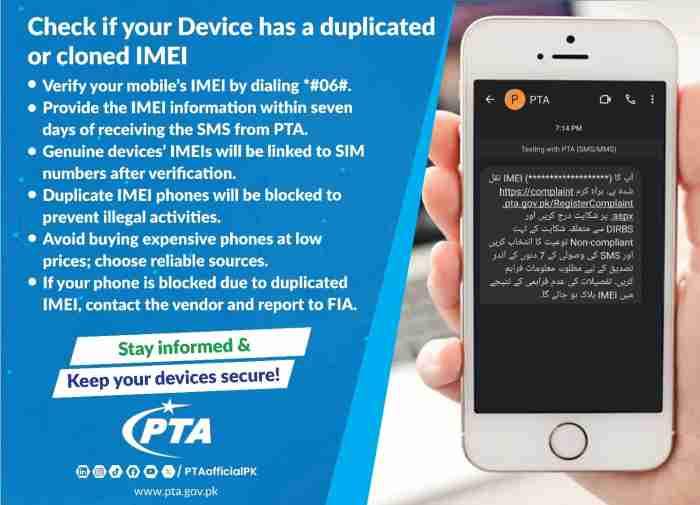
Government authorities implemented these valuation cuts primarily to combat widespread smuggling and under-invoicing in the mobile phone trade. When official taxes become prohibitively high, consumers naturally gravitate toward gray market alternatives. By reducing customs values to more realistic levels, the Federal Board of Revenue aims to formalize the market, encouraging legal imports and ultimately increasing total revenue collection through higher compliance volumes rather than excessive per-unit rates.
Consequences of Non-Payment Within Sixty Days
Failure to pay applicable taxes within the sixty-day grace period triggers automatic network blocking across all Pakistani operators. Your device loses access to cellular services completely: no voice calls, no SMS messaging, and no mobile data connectivity. The phone effectively transforms into a Wi-Fi-only device, severely limiting its utility for everyday communication and mobile banking.
Local SIM Usage During the Grace Period
You retain full functionality throughout the sixty-day window from your first SIM insertion. This grace period allows time to arrange funds and complete the registration process without service interruption. Importantly, the countdown starts from first network detection, not from your purchase date or arrival in Pakistan.
Wi-Fi Functionality on Blocked Devices
Network blocking specifically targets cellular connectivity. Your device continues functioning normally over Wi-Fi networks, enabling internet-based applications like WhatsApp, YouTube, and email. However, you lose the ability to receive SMS verification codes essential for banking transactions and two-factor authentication.
Locating Your 15-Digit IMEI Number for Verification
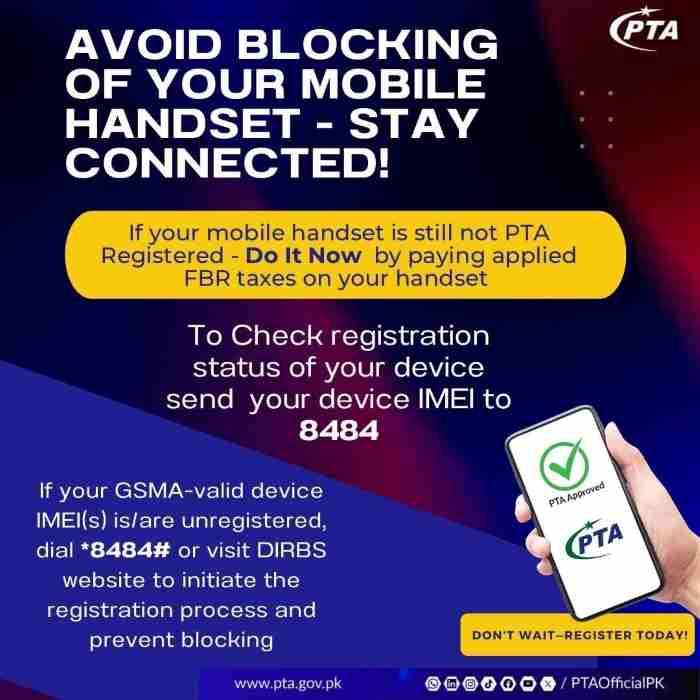
The International Mobile Equipment Identity number serves as your device’s unique fingerprint for all PTA verification processes. This fifteen-digit code identifies your specific unit within global telecommunications databases.
What Makes the IMEI Number Essential
DIRBS relies entirely on IMEI numbers to track device status, import history, and tax payment records. Entering an incorrect IMEI during your PTA mobile device registration check returns results for the wrong device, potentially causing unnecessary concern or missed deadlines. Accurate IMEI entry ensures you receive correct information about your specific phone.
Universal Code Method for All Phones
The fastest way to retrieve your IMEI works on every mobile phone regardless of brand or operating system. Open your dialer application and type asterisk-hash-zero-six-hash. The screen instantly displays your fifteen-digit IMEI number. Dual-SIM devices show two numbers labeled IMEI one and IMEI two, corresponding to each SIM slot.
Finding IMEI on iPhone Devices
iPhone users have multiple options for locating their IMEI. The settings method requires navigating to Settings, then General, then About, and scrolling to find the IMEI entry. For non-functional devices, examine the SIM card tray carefully. Many iPhone models feature the IMEI laser-etched directly onto the tray surface.
Finding IMEI on Samsung and Android Devices
Android manufacturers consistently place IMEI information within the About Phone section of settings. Navigate to Settings, select About Phone or About Device, then choose Status Information to view your IMEI details. The original retail box provides another reliable source, with IMEI numbers printed on the barcode sticker alongside the serial number.
Retrieving IMEI from Non-Functional Devices
When your phone won’t power on, the original packaging becomes your primary information source. Examine all sides of the box for a white sticker containing barcodes and alphanumeric codes. The fifteen-digit IMEI appears clearly printed alongside the model number and serial number. Purchase receipts often list the IMEI as well, especially for devices bought through authorized retailers.
Understanding Dual-SIM IMEI Differences
Dual-SIM phones contain two distinct IMEI numbers, one assigned to each SIM slot. During your PTA mobile device registration process, you must check both IMEIs separately. Brand new devices require tax payment on both IMEIs for full registration. However, if you plan using only one SIM slot permanently, you may register just that specific IMEI, though this limits the phone’s future resale value and dual-SIM functionality.
Verifying IMEI Authenticity Before Used Phone Purchase
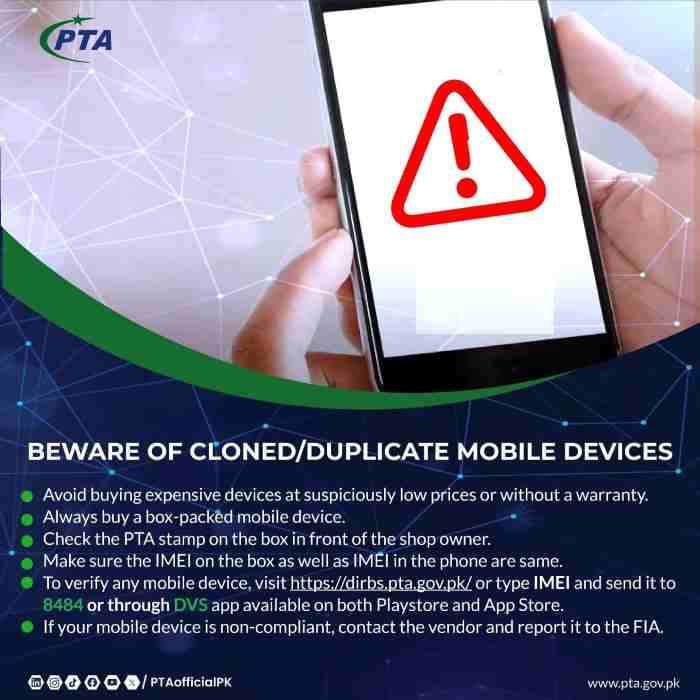
Fake or altered IMEIs signal potential problems with a used device. Before completing any purchase, dial asterisk-hash-zero-six-hash and compare the displayed number with the IMEI printed on the phone’s back panel or box. Mismatches indicate possible motherboard repairs or IMEI cloning. Perform a quick PTA IMEI check online as well. If the system shows the IMEI as blocked or associated with a different phone model, walk away from the deal immediately.
Complete PTA Mobile Device Registration Methods

The Pakistan Telecommunication Authority offers multiple verification channels to accommodate different user preferences and internet access situations. Each method provides the same underlying information through different interfaces.
Official DIRBS Web Portal Method
The DIRBS website at dirbs.pta.gov.pk serves as the most comprehensive verification platform. This portal provides detailed status information and initiates the formal registration process when tax payment becomes necessary.
Step-by-Step Web Verification Process
Navigate to the DIRBS homepage and locate the Check Compliance search bar. Enter your fifteen-digit IMEI number carefully, ensuring no digits are transposed or omitted. Complete the captcha verification to prove you are human, then click the Check or Submit button. The system processes your query instantly and displays your device’s current status.
Understanding DIRBS Status Messages
The result from your PTA mobile device registration check falls into three distinct categories with specific meanings. Compliant (Approved) status confirms your device is legally registered with all taxes paid, requiring no further action. Non-Compliant (Tax Due) indicates the system recognizes your device but tax payment remains pending within the sixty-day window. Blocked status means the deadline expired without payment or the device was reported stolen, rendering it unusable on cellular networks.
Checking Tax Status Without PSID
The public compliance checker provides status information without revealing specific tax amounts. You learn whether tax is due but not the exact figure. This preliminary check helps you understand your situation before proceeding to formal registration. To view the precise payable amount, you must log into the system and generate a Payment Slip ID, which triggers complete tax calculation based on current valuations.
Dual-SIM Device Verification Requirements
Owners of dual-SIM phones must check both IMEI numbers individually through the compliance checker. Discrepancies between the two statuses occasionally occur when only one SIM slot was previously registered by a former owner. In such cases, you need only pay tax on the non-compliant IMEI to restore full functionality to that specific SIM slot.
Troubleshooting No Data Found Errors
A No Data Found message creates understandable concern but has logical explanations. Brand new devices sometimes haven’t synchronized with local databases yet, requiring a few days for information propagation. More concerning scenarios involve devices from unofficial import channels whose IMEIs never entered FBR valuation lists. If the error persists beyond one week, consider visiting a PTA facilitation center for manual verification assistance.
Verifying Used Phone Tax Status Before Purchase
Smart buyers make PTA verification part of their used phone purchasing routine. Request the IMEI from the seller and perform an immediate online check through the DIRBS portal. Compliant status confirms all taxes are paid, freeing you from future liability. Non-Compliant status means you’ll inherit the tax obligation, information that should factor into your price negotiation.
SMS Verification Service to 8484
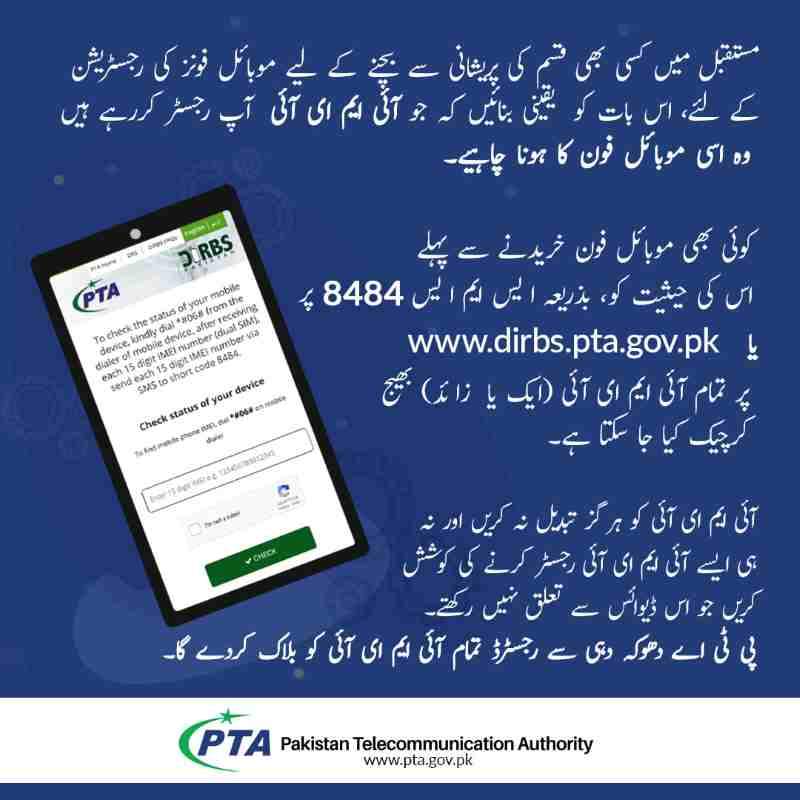
Users without reliable internet access can still perform complete PTA mobile device registration checks through Pakistan’s telecommunications infrastructure. The SMS service to short code 8484 works on any mobile phone with basic cellular signal.
Understanding the 8484 Service
PTA established short code 8484 specifically for device verification queries. This service operates independently of smartphone capabilities or mobile data connections, making it accessible to feature phone users and those in areas with poor internet coverage.
Proper SMS Format for Verification
Open your messaging application and create a new message. Type your exact fifteen-digit IMEI number into the message body with no additional text, spaces, or punctuation marks. Send this message to 8484 and await the response, which typically arrives within seconds.
Decoding SMS Response Messages
The reply message clearly states your device status using plain language. Compliant messages confirm approval with no further action required. Non-Compliant responses indicate tax is due and often include a reminder about the sixty-day deadline. The SMS does not provide specific tax amounts, only status information.
Service Costs and Charges
PTA does not impose fees for this verification service. However, standard SMS charges from your mobile operator apply based on your existing tariff plan. These nominal deductions from your balance follow your regular messaging rates.
Benefits for Remote Area Users
The SMS method proves invaluable for residents of areas with unreliable mobile data connectivity. As long as basic cellular signal exists for SMS transmission, you can perform complete PTA mobile device registration checks without visiting cities or finding Wi-Fi hotspots.
Device Verification System Mobile App
The official DVS mobile application brings PTA verification capabilities to smartphone users with an intuitive interface optimized for mobile devices.
Official App Availability
The Device Verification System app is developed and published by the Pakistan Telecommunication Authority itself, ensuring authenticity and data security. Android users can download it free from the Google Play Store by searching for DVS – Device Verification System. Currently, no official iOS version exists on the Apple App Store, requiring iPhone users to rely on web portal or SMS methods.
Safe Download Practices
Always download the DVS app exclusively through official app stores. Third-party websites offering APK downloads may distribute modified versions designed to steal your IMEI information or personal data. Verify the developer name as Pakistan Telecommunication Authority before installing.
IMEI Scanning Feature Benefits
The DVS app’s most convenient feature allows barcode scanning instead of manual typing. Simply point your camera at the IMEI barcode on your phone’s box or beneath the removable back cover. The app automatically populates the number and performs the verification, eliminating typing errors common with fifteen-digit sequences.
Advantages Over Web Portal
Mobile app users enjoy saved search history functionality, enabling quick reference to previously checked devices. The app also provides more detailed device information, confirming that the IMEI matches the expected brand and model. This extra verification helps identify mismatched or counterfeit devices before purchase.
Generating PSID and Calculating Exact Tax Amount
Moving from status checking to actual payment requires generating a Payment Slip ID through the Device Registration System. This seventeen-digit number represents your unique tax invoice linked to specific IMEIs.
Understanding Payment Slip ID Function
A PSID serves as the government’s official payment tracking mechanism. When you generate a PSID through the DRS portal, the system calculates your exact tax liability based on current customs valuations, exchange rates, and your registration category. This number must be entered correctly during payment to ensure funds apply to your specific device.
Creating Your DRS Account
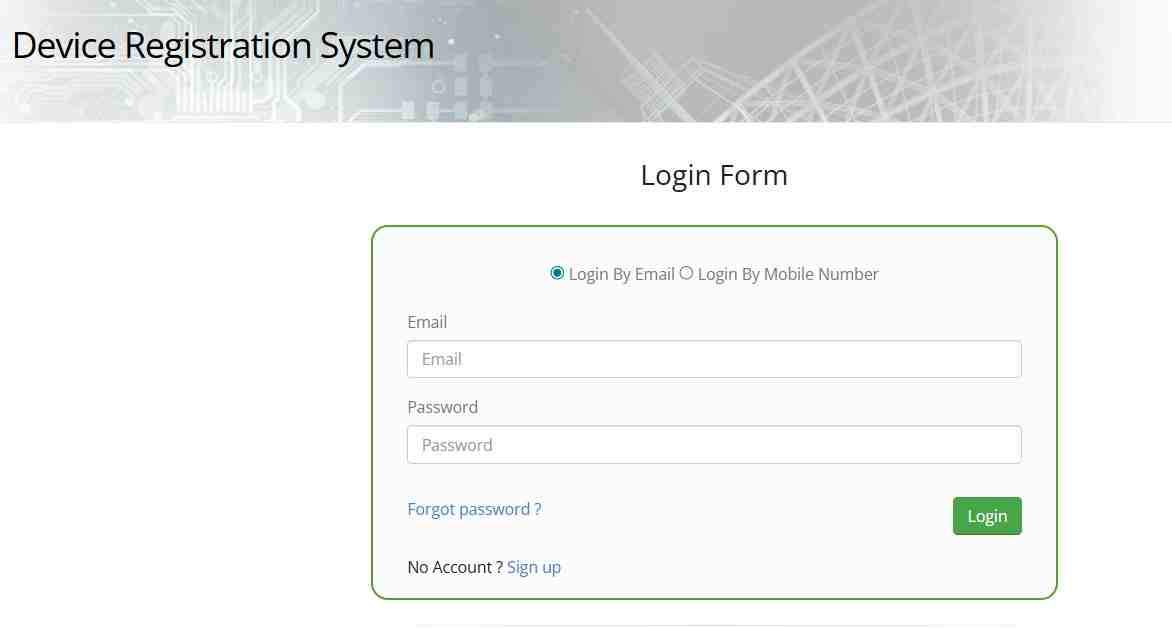
The Device Registration System requires user authentication before generating PSIDs. Visit the DRS portal and click the Sign Up or Register button. Select Individual as your user type and enter your CNIC number without dashes. Provide your full legal name, active email address, and mobile number. The system sends verification codes via SMS and email for account activation.
Step-by-Step PSID Generation Process
Follow these steps precisely to generate your payment slip:
- Log into your activated DRS account using CNIC and password
- Navigate to Request for Certificate of Compliance or Register Device section
- Select Personal Use as your declaration purpose
- Enter your device IMEI number carefully, verifying each digit
- Choose your device brand and model from the dropdown selection menus
- Review all entered information for accuracy
- Submit your request and wait for system processing
- Note the generated seventeen-digit PSID and total payable amount displayed
Generating PSID for Family Members
While technically possible to generate PSIDs using family members’ CNIC numbers, this practice creates ownership complications. Tax receipts link permanently to the CNIC used during PSID generation. For proper ownership records, each person should generate PSIDs using their own credentials, ensuring devices register in their names.
Checking Tax Status Using CNIC
The public compliance checker does not accept CNIC numbers as search criteria. However, once logged into your DRS account, you can view complete registration history for all devices linked to your CNIC. This feature helps track multiple family devices and verify tax payment status without re-entering IMEIs.
Using Online PTA Tax Calculators Wisely
Numerous third-party websites offer PTA tax calculators providing estimates before you commit to purchase. These tools prove valuable for budgeting and comparing different phone models. However, remember that only the official DRS portal generates final, binding tax amounts using real-time FBR exchange rates and current customs valuations. Always treat calculator estimates as approximations, not guarantees.
Exchange Rate Impact on Final Tax
Because device valuations often originate in US dollars, the FBR system converts these amounts to Pakistani rupees using prescribed exchange rates before applying tax percentages. Daily currency fluctuations can slightly alter final payable amounts compared to older online estimates. The DRS system uses the most current rates at calculation time.
Passport Versus CNIC Registration Differences
Your choice of identification document significantly impacts final tax liability. Passport registration typically treats the user as a temporary visitor or overseas Pakistani, applying lower tax rates across all valuation brackets. CNIC registration applies standard resident rates, which run substantially higher for identical devices. This differential encourages overseas Pakistanis to register legally during visits rather than avoiding compliance.
Tax-Free Registration for Overseas Pakistanis
Eligible overseas Pakistanis qualify for one hundred twenty days of tax-free device usage per visit. To avail this facility, register through the DIRBS portal using your passport number within thirty days of arrival. The system verifies your travel history automatically. If you entered Pakistan within the past month, temporary registration approval grants full network access without any tax payment for four months.
Understanding the 120-Day Facility
The one hundred twenty day rule specifically benefits short-term visitors who don’t require permanent registration. After the temporary period expires, you face two choices: pay full applicable taxes for continued use or depart Pakistan with the device. This facility resets per visit, meaning each new arrival potentially qualifies for another tax-free period.
PTA Tax Payment Methods and Procedures
After generating your PSID through proper channels, multiple payment avenues accommodate different preferences and banking relationships.
Payment Through JazzCash Application
JazzCash users enjoy streamlined PTA tax payment within their familiar app environment. Open your JazzCash app and navigate to the Bill Payments or Pay Bills section. Look specifically for FBR, Tax, or PSID Payment options, sometimes labeled under 1Bill services. Enter your seventeen-digit PSID exactly as generated. The app automatically fetches the due amount from government systems for verification. Confirm payment using your mobile account PIN or biometric authentication. Immediately save the transaction receipt or reference number screenshot for your records.
Payment Through Easypaisa Application
Easypaisa follows virtually identical steps for tax payments. Access the app’s main menu and select Bill Payments. Choose the FBR Tax Payment or PSID Payment option. Enter your PSID carefully, verify the displayed amount matches your records, and complete the transaction using your account PIN. The confirmation screen provides a transaction ID worth photographing for future reference.
Payment Through Bank Mobile Applications
All major Pakistani banks support PTA tax payments through their internet banking platforms and mobile apps. Log into your HBL, UBL, Alfalah, Meezan, or other bank application. Navigate to Bill Payments or Government Payments sections. Select FBR or PTA Tax from available billers, or choose 1Bill/Invoice Payment for PSID entry. Input your seventeen-digit PSID as the billing reference. The system displays the verified tax amount for your confirmation before finalizing payment. Download the payment slip or screenshot the confirmation screen as proof.
Lump Sum Payment Requirement
PTA tax cannot be split into installments under any circumstances. Your generated PSID represents the total calculated amount payable in one complete transaction. The PSID itself carries a limited validity period, typically seven days from generation. If you fail to pay within this window, the PSID expires, requiring fresh generation with potentially updated exchange rates.
ATM Payment Process
For users preferring physical banking channels, ATMs offer convenient payment options. Visit any ATM of a participating bank, insert your card, and enter your PIN. Navigate through menus to find Bill Payments, Government Payments, or FBR Payment categories. Select 1Bill or PSID Payment from available options. Enter your seventeen-digit PSID carefully using the ATM keypad. The machine displays the verified tax amount for confirmation. Complete the transaction and collect the printed receipt, which serves as your official payment proof.
Online Payment Verification Methods
After completing payment through any channel, verify successful processing through your DRS account. Log into the portal and navigate to payment history or device request sections. The status for your specific device should update from Payment Pending to Payment Received or In-Process. The system displays payment date and amount, confirming government systems have registered your transaction.
Device Unblocking Timeline
Following successful payment reconciliation between banks and FBR systems, DIRBS updates device status automatically. This process typically completes within three to four hours but occasionally extends to twenty-four or forty-eight hours during high-volume periods. Once the database updates, your device connects to cellular networks immediately without requiring restart or manual intervention.
Troubleshooting Persistent Blocking
If your phone remains blocked beyond forty-eight hours post-payment, investigate potential causes. First, confirm your PSID was generated specifically for this IMEI. Mismatched numbers explain most persistent blocks. Second, verify your payment completed successfully by checking bank statements. Third, contact PTA helpline with your PSID and transaction receipt for manual reconciliation assistance.
Complete Tax Rate Tables for Popular Models
The following tables reflect estimated taxes based on recent valuation rulings. Actual amounts may vary slightly based on exchange rates at PSID generation time.
Apple iPhone Series Tax Estimates
Recent valuation adjustments significantly reduced taxes on used iPhone models.
| iPhone Model | Estimated CNIC Tax | Estimated Passport Tax |
|---|---|---|
| iPhone 11 | 5,400 – 15,600 | 4,500 – 13,000 |
| iPhone 12 | 15,600 – 37,968 | 13,000 – 31,640 |
| iPhone 13 | 15,600 – 37,968 | 13,000 – 31,640 |
| iPhone 14 Pro Max | 50,352 | 41,960 |
| iPhone 15 Pro Max | 50,352 | 41,960 |
| iPhone 16 Pro Max | 130,000 – 145,000 | 115,000 – 130,000 |
Samsung Galaxy Series Tax Estimates
Samsung devices follow similar valuation patterns based on model age and specifications.
| Samsung Model | Estimated CNIC Tax | Estimated Passport Tax |
|---|---|---|
| Galaxy S22 Ultra | 55,000 – 65,000 | 48,000 – 57,000 |
| Galaxy S23 Ultra | 47,000 – 55,000 | 41,000 – 48,000 |
| Galaxy S24 Ultra | 95,000 – 110,000 | 82,000 – 95,000 |
| Galaxy A54 | 18,000 – 24,000 | 14,000 – 19,000 |
Mid-Range and Budget Device Taxes
Phones valued between one hundred and two hundred US dollars attract flat tax structures typically ranging from 9,000 to 15,000 rupees depending on exact specifications. Devices between two hundred and three hundred fifty dollars see taxes starting around 14,000 rupees plus seventeen percent sales tax, often totaling 25,000 to 35,000 rupees.
Accessing Official Tax Documents
The Federal Board of Revenue publishes valuation rulings on their official website rather than maintaining simple tax list PDFs. These legal documents appear under the Valuation Rulings section, though they use technical customs language rather than consumer-friendly price lists. For practical purposes, the PSID generated through DRS provides your legally binding tax amount.
Used Versus New Phone Tax Comparison
Recent valuation rulings created meaningful separation between used and new device tax treatments. Previously, used phones faced taxes near new device levels despite lower market values. Current rulings reduce customs values for used devices by approximately forty to fifty percent in many cases, making legal registration financially viable for second-hand phone buyers.
Tax Depreciation for Older Models
As devices age, their market values naturally decline. The FBR updates valuation tables periodically to reflect this depreciation, though not on a fixed schedule. Consequently, an iPhone 11 commands significantly lower tax today than at launch, with this trend continuing as devices grow older.
Special Registration Categories and Exemptions
Beyond standard resident registration, specific user categories qualify for alternative arrangements.
Temporary Registration for Foreign Visitors
Foreign nationals visiting Pakistan can register their devices temporarily without tax payment. Visit the DIRBS portal and select Temporary Registration for Foreign Nationals. Enter your passport details, travel document information, and IMEI number. Approval grants one hundred twenty days of network access for tourism or business purposes.
Overseas Pakistani Returning Residents
Overseas Pakistanis face a choice upon returning permanently. Within thirty days of arrival, they can either register temporarily using the one hundred twenty day facility or proceed directly with permanent registration and tax payment. The temporary option suits uncertain return durations, while permanent registration makes sense for those settling long-term.
Multiple Device Registration Limits
Current DIRBS policy permits individual CNIC holders to register up to five mobile devices per calendar year for personal use. Attempting to register more triggers system reviews to prevent commercial importing without proper business licenses. Commercial importers must register as companies and obtain appropriate permits.
Gifted Device Tax Obligations
Phones received as gifts from abroad carry the same tax obligations as personally purchased imports. The FBR makes no distinction based on gifting, assessing tax according to the device model’s customs valuation. Recipients must pay applicable taxes for legal network access.
Security Considerations and Scam Prevention
Protecting yourself from fraud requires vigilance when dealing with financial transactions related to PTA compliance.
Official PTA Website Domains
Memorize these official domain patterns for safe browsing:
- DIRBS Portal: dirbs.pta.gov.pk
- DRS Registration: drs.pta.gov.pk
- Complaint System: cms.pta.gov.pk
Always verify that pta.gov.pk appears in the web address before entering personal information or payment details.
Recognizing Phishing Attempts
PTA never requests direct bank transfers to individual accounts via SMS links. If you receive messages demanding immediate payment to avoid blocking and linking to unfamiliar websites, treat them as fraudulent. Always manually type official website addresses rather than clicking message links.
Using the Complaint Management System
The CMS portal handles stolen phone reports, operator complaints, and device blocking disputes. Register using your CNIC, file your complaint with supporting documentation, and track resolution progress online. This system maintains accountability and provides official channels for problem resolution.
Frequently Asked Questions
How can I check my mobile PTA tax online by IMEI?
You can check your mobile PTA tax online by IMEI by visiting dirbs.pta.gov.pk, entering your fifteen-digit IMEI number found by dialing asterisk-hash-zero-six-hash, and completing the captcha. The system instantly displays whether your device is Compliant (Approved) or Non-Compliant (Tax Due).
What is the SMS code to check PTA registration status?
The SMS code for PTA registration status is 8484. Type your exact fifteen-digit IMEI number in the message body with no extra text and send it to 8484. You receive a reply within seconds indicating your device’s compliance status.
How much is the PTA tax on iPhone 16 Pro Max in Pakistan?
The PTA tax on iPhone 16 Pro Max ranges from approximately 130,000 to 145,000 rupees for CNIC registration and 115,000 to 130,000 rupees for passport registration, depending on current exchange rates and specific device configuration.
Can I pay my PTA tax in installments?
No, PTA tax requires full payment in one lump sum transaction using your generated seventeen-digit PSID. Installment payments are not permitted under current regulations.
How do I generate a PSID for PTA tax payment?
Generate a PSID by creating an account on the DRS portal at drs.pta.gov.pk, logging in, submitting a device registration request with your IMEI number and model details. The system calculates your tax and generates a unique seventeen-digit Payment Slip ID.
What happens if I don’t pay PTA tax within 60 days?
Your phone’s IMEI is permanently blocked from all Pakistani mobile networks. You lose cellular services including calls, SMS, and mobile data. The device functions only on Wi-Fi, and you may face additional fines for reactivation.
How can overseas Pakistanis register their mobile phones for free?
Overseas Pakistanis can register one device tax-free for 120 days per visit by using the DIRBS portal with their passport number within thirty days of arriving in Pakistan. This temporary registration provides full network access without tax payment.
Conclusion
Navigating PTA mobile device registration requirements becomes straightforward when you understand the available tools and processes. Begin with a simple IMEI check through the DIRBS portal, SMS to 8484, or the DVS mobile app to determine your device status. If tax is due, generate your PSID through the DRS system, noting the exact amount based on current FBR valuations and your registration type. Complete payment through your preferred channel among JazzCash, Easypaisa, bank apps, ATMs, or branch visits. Following these steps ensures uninterrupted connectivity and full compliance with Pakistani telecommunications regulations, protecting your investment and providing peace of mind.

Add a Comment