
Thousands of families across Punjab miss out on government assistance simply because they registered through the wrong system. The Punjab Socio-Economic Registry (PSER) and the 8171 web portal serve entirely different purposes—one for provincial welfare programs, the other for federal cash transfers—yet confusion between them leads to missed opportunities every single day.
This definitive guide walks you through both systems, showing you exactly how to register for PSER, verify your status through 8171, check eligibility for Himmat Card, Kisan Card, and Honhaar Scholarship, and resolve common issues that delay benefits.
Key Takeaways
- PSER and 8171 Are Separate Systems: PSER is Punjab’s provincial database accessed through pser.punjab.gov.pk for schemes like Himmat Card. 8171 is the federal BISP portal for checking eligibility for national programs like Benazir Kafaalat. Using one does not replace the other.
- Complete PSER Registration Before Deadlines: Seasonal programs like Ramzan Relief and Nigehban Package operate on strict cut-off dates. Families who register after these dates cannot receive benefits, regardless of eligibility.
- PMT Score Determines Access: Your Proxy Means Test (PMT) score—calculated from PSER data—directly determines which programs you qualify for. Lower scores (below 45 for Himmat Card, below 32 for BISP) receive priority across all schemes.
- Free Services Only: PSER registration and 8171 status checks are completely free of charge. Any individual or agent demanding payment for these services is committing fraud and should be reported immediately.
- Accurate Data Prevents Delays: CNIC mismatches, incorrect family member details, and missing disability certificates are the top three reasons applications stall. Verification begins at submission, not after review.
- Read More: PSER Registration Benefits | PSER Survey (Apply Online)
- Read More: PSER Portal | PSER Registration (Benefits & How to Apply Online)
- Read More: PSER Punjab gov pk Registration Online | PSER Check Eligibility
- Read More: Top 10 Social Welfare Programs by CM Punjab (Eligibiliy+Apply Online)
PSER Registration Form 8171 Check Online | PSER Login
Table of Contents
Understanding the PSER and 8171 Landscape: Two Systems, One Goal
The Punjab Socio-Economic Registry (PSER) and the 8171 web portal represent two distinct pillars of Pakistan’s social protection framework. PSER functions as the primary data collection mechanism for Punjab province, capturing granular household information used to determine eligibility for provincial welfare initiatives. The 8171 portal, by contrast, serves as the public-facing interface for the Benazir Income Support Programme (BISP), providing nationwide eligibility verification for federal cash transfers.
This dual-system architecture often confuses citizens. A family may believe registering through 8171 qualifies them for Himmat Card, or that PSER registration automatically enrolls them in Benazir Kafaalat. Neither assumption is correct. PSER feeds into Punjab-specific programs managed by the Punjab Social Protection Authority (PSPA), while 8171 connects to federal BISP databases. Understanding this separation is the first step toward accessing both streams of support.
Why Two Systems Exist: Federal vs. Provincial Social Protection
Pakistan’s social protection architecture operates at two levels. The federal government, through BISP, manages nationwide programs with uniform eligibility criteria applied across all provinces. Provincial governments, including Punjab, maintain their own registries to address region-specific needs that federal programs may not cover.
- Federal Programs (8171/BISP): Focus on unconditional cash transfers, nutrition support, and education stipends. Eligibility determined by national poverty thresholds. Coverage extends to all provinces equally.
- Provincial Programs (PSER): Target Punjab-specific needs such as agricultural support through Kisan Card, disability assistance through Himmat Card, and scholarships through Honhaar Program. Eligibility may consider factors unique to Punjab’s economy and demographics.
The separation ensures resources are directed appropriately. Federal funds support foundational poverty alleviation. Provincial funds address localized challenges like farmer support in rural Punjab or disability services in urban centers.
Consequences of Using the Wrong Portal
Registering through the incorrect system wastes time and delays benefits. Common scenarios include:
- A farmer applies for Kisan Card through the 8171 portal and receives no response because the portal does not handle agricultural program registrations.
- A person with disability checks Himmat Card status on the 8171 SMS service and receives an “ineligible” message despite qualifying under PSER criteria.
- A widow eligible for both BISP and PSER programs only accesses federal support because she never completed Punjab registration.
The solution is straightforward: use PSER for provincial schemes and 8171 for federal eligibility checks. Both systems work in parallel, not interchangeably.
The Punjab Socio-Economic Registry (PSER): A Complete Overview
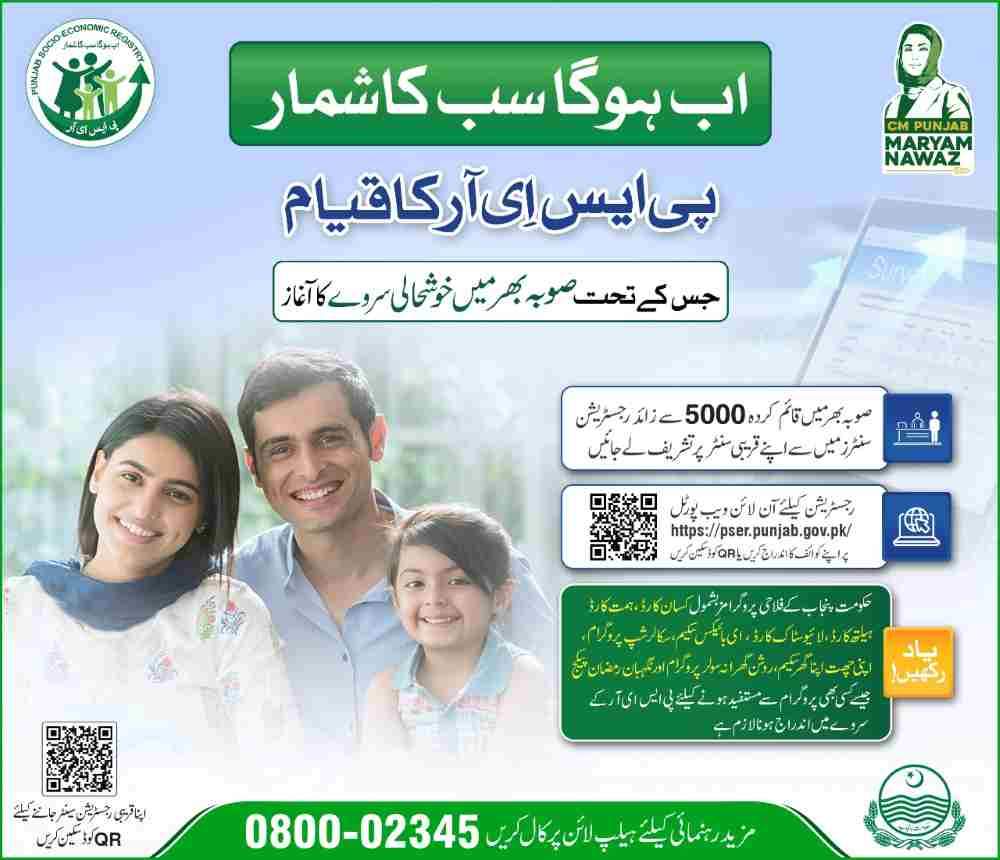
The Punjab Socio-Economic Registry is the most comprehensive household database ever assembled by the Punjab government. It captures over 100 data points per household, creating a detailed socio-economic profile used to target assistance with unprecedented accuracy. Unlike earlier systems that relied on self-declaration or localized surveys, PSER integrates real-time data verification, NADRA cross-checks, and automated PMT scoring.
Core Components of the PSER Database
The registry operates on three foundational elements that ensure data integrity and usability.
Household Profiling
Every registered household receives a unique identifier linked to the head of family CNIC. The profile includes:
- Complete family composition with CNIC or B-Form for each member
- Demographic data including age, gender, marital status, and educational attainment
- Employment status and income sources for all working-age members
Asset and Resource Mapping
PSER captures detailed information about household resources, which directly impacts PMT scoring:
- Housing type: owned, rented, or rent-free accommodation
- Utilities access: electricity connection type, gas availability, water source
- Asset ownership: livestock count, agricultural land area, vehicle types
- Household goods: refrigerators, washing machines, televisions, air conditioners
Vulnerability Indicators
Special categories identify households requiring prioritized assistance:
- Disability status with type and severity classification
- Chronic illnesses requiring regular medical expenditure
- Widow or female-headed household status
- Out-of-school children and reasons for non-enrollment
How PSER Data Translates into Program Eligibility
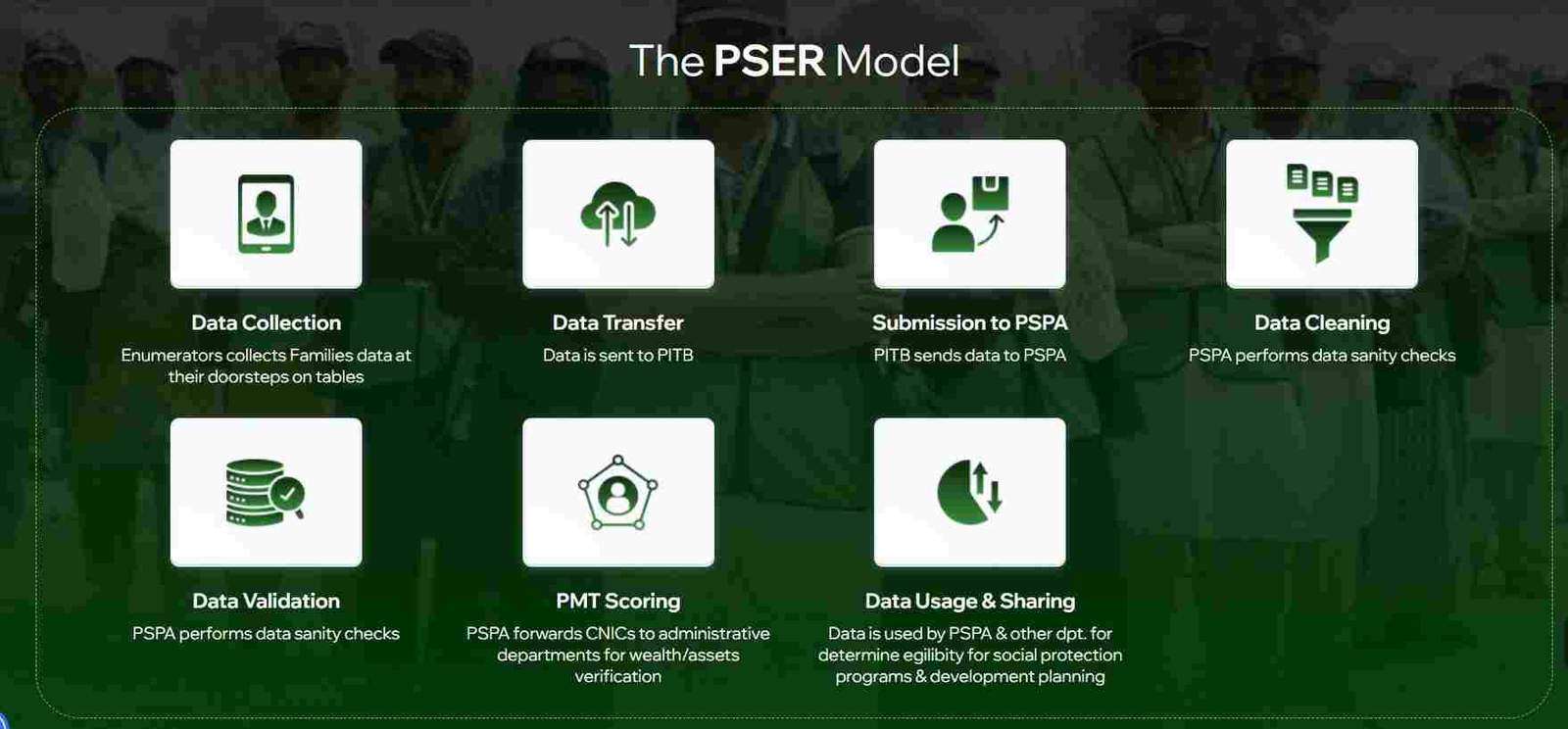
Once PSER data is submitted, the system applies a standardized scoring methodology to determine household poverty levels and program eligibility.
Proxy Means Test (PMT) Calculation
The PMT score, ranging from 0 (most deprived) to 100 (least deprived), is derived from:
- Housing quality and location
- Asset ownership patterns
- Household composition and dependency ratios
- Education levels of adults
- Employment type and stability
Program-Specific Thresholds
Different programs apply different PMT cut-offs based on program objectives:
- Himmat Card: PMT score 45 or below (prioritizes poorest households with disabilities)
- Kisan Card: PMT score 50 or below (broader eligibility for farmers)
- Ramzan Relief: PMT score 30 or below (emergency assistance for ultra-poor)
- Honhaar Scholarship: PMT score 40 or below (education support for academically gifted students from poor families)
PSER Registration Methods: Choosing Your Path
Punjab residents can complete PSER registration through three primary channels, each designed to accommodate different levels of digital access and comfort with technology.
Method 1: Online Self-Registration
Best for: Digitally literate individuals with internet access and CNIC-registered mobile numbers.
Process:
- Visit the official PSER portal (domain ending in .gov.pk)
- Click “New Application” and enter head of family CNIC
- Complete OTP verification via SMS
- Fill the household survey in 12 sections
- Submit and note the application reference number
Method 2: In-Person Center Registration
Best for: Those without internet access or needing assistance with the form.
Locations offering PSER assistance:
- Assistant Commissioner offices in every tehsil
- Union Council offices (rural and urban)
- E-Khidmat Markaz across major cities
- Designated schools during registration drives
Method 3: Door-to-Door Survey
Best for: Remote rural areas and households not reached through other channels.
Process:
- Government enumerators visit neighborhoods in phases
- Surveys conducted on digital tablets with real-time data entry
- Households receive confirmation SMS within 48 hours
- No action required from citizens beyond cooperation with enumerators
Read More: Working Women Hostel Scheme: Eligibility, How to Apply Online
The 8171 Web Portal: Your Gateway to Federal Support
The 8171 web portal represents the public-facing interface for the Benazir Income Support Programme (BISP). It provides a simple, accessible way for citizens to verify their eligibility for federal cash transfers and track payment status without visiting government offices.
What the 8171 Portal Actually Does
The portal functions exclusively as a verification tool. It does not process registrations, accept new applications, or modify existing records. When you enter your CNIC on the 8171 portal, the system:
- Queries the National Socio-Economic Registry (NSER) database
- Retrieves your PMT score and eligibility status
- Displays current program enrollment (Kafaalat, Taleemi Wazaif, Nashonuma)
- Shows payment history and next payment date
- Provides collection center location for cash transfers
Programs Accessible Through 8171 Verification
Benazir Kafaalat
Quarterly cash transfers to eligible women. Current payment amounts are announced before each disbursement cycle. Beneficiaries receive SMS notifications 7-10 days before payments begin.
Key details:
- Payments made through designated bank branches and campsites
- Biometric verification required at collection
- Women must collect payments in person
- Status visible through 8171 portal within 48 hours of disbursement
Benazir Taleemi Wazaif
Education stipends for children of Kafaalat beneficiaries. Payments are conditional on school attendance (minimum 70% required).
Payment structure:
- Primary level: Quarterly stipends per child
- Secondary level: Increased amounts for older students
- Higher secondary: Additional support for continued education
- Payments released directly to mother’s account
Benazir Nashonuma Program
Nutrition support for pregnant women and children under two. Enrollment requires visiting designated Nashonuma centers.
Components:
- Conditional cash transfers for regular health check-ups
- Nutritional supplements provided at centers
- Growth monitoring for children
- Health education sessions for mothers
8171 SMS Service: The Offline Alternative
For citizens without internet access, the 8171 SMS service provides the same eligibility information through a simple text message.
Step-by-step SMS process:
- Open messaging app on any mobile phone
- Type the 13-digit CNIC number without spaces or dashes
- Send the message to 8171
- Wait 30 seconds to 5 minutes for response
SMS response codes and meanings:
- “Eligible” followed by payment amount and collection center: Payment ready
- “Under Process” with reference number: Verification ongoing
- “Not Eligible” with reason code: Review reason and visit BISP office if error suspected
- “Survey Required” with nearest office address: Complete NSER registration first
PSER Registration: Step-by-Step Practical Guide
Completing PSER registration correctly the first time prevents delays and ensures accurate eligibility assessment. This section breaks down the process into manageable steps with practical tips at each stage.
Preparing for Registration: Documents and Information
Gather these items before starting the online registration or visiting a center:
Essential Documents
- CNICs of all adult family members (18 years and above)
- B-Forms for all children under 18
- Recent electricity bill or gas bill for address verification
- Mobile phone registered on head of family CNIC
Additional Documents (If Applicable)
- Disability certificate from government hospital (for Himmat Card)
- Land ownership documents or Fard (for Kisan Card)
- Student ID cards or admission slips (for Honhaar Scholarship)
- Medical reports for chronic illnesses
- Death certificate for deceased family members
Creating Your PSER Account
The account creation process establishes your household’s presence in the PSER system.
Step 1: Portal Access
Open a web browser on a computer or smartphone. Navigate to the official PSER portal. Look for the .gov.pk domain to confirm authenticity. Bookmark the page for future reference.
Step 2: Account Setup
Click “New Application” or “Sign Up” on the homepage. You will be prompted to:
- Enter head of family CNIC (13 digits, no dashes)
- Provide active mobile number (must match NADRA records)
- Create a password (minimum 8 characters with letters and numbers)
- Confirm password
Step 3: OTP Verification
An SMS containing a 6-digit OTP will arrive within 30 seconds. Enter this code in the verification field. If the code does not arrive:
- Check network signal strength
- Verify mobile number entered correctly
- Wait 2 minutes and request resend
- Contact PSER helpline if multiple attempts fail
Step 4: Dashboard Access
After verification, the system creates your account and displays the application dashboard. The dashboard shows:
- Application status (initially “Draft” or “Incomplete”)
- Progress bar indicating completion percentage
- Section navigation for the household survey
- Options to save and resume later
Completing the Household Survey
The survey consists of 12 sections. Each section requires accurate data entry. Inaccurate information in any section can invalidate the entire application.
Section 1: Head of Family Information
- Confirm head of family CNIC (auto-populated)
- Enter full name exactly as it appears on CNIC
- Specify relationship of other members to head
- This section sets the foundation for all family linkages
Section 2: Family Members
For each family member, provide:
- CNIC (adults) or B-Form number (children)
- Full name matching official documents
- Date of birth
- Relationship to head of family
- Marital status
- Gender
Common errors in this section:
- Entering children’s CNICs instead of B-Forms
- Misspelling names (matches matter for verification)
- Omitting family members who live in the same household
Section 3: Residential Details
- Full address with house number, street, mohalla
- Union council and tehsil selection from dropdown
- Housing type (owned, rented, rent-free, informal)
- Number of rooms
- Construction materials (walls, roof, floor)
Section 4: Utility Access
- Electricity connection type (metered, Kunda, none)
- Gas connection status
- Water source (piped, hand pump, well, public tap)
- Monthly utility bills range
Section 5: Household Assets
Select all that apply:
- Refrigerator
- Washing machine
- Television (type: LED, LCD, CRT)
- Air conditioner
- Computer or laptop
- Motorcycle
- Car or other vehicle
Section 6: Agricultural Land
For farmers or landowners:
- Total land area in kanals or acres
- Irrigated vs. non-irrigated land
- Crops cultivated
- Annual yield estimates
Section 7: Livestock Ownership
Count and categorize:
- Cows and buffaloes
- Goats and sheep
- Chickens and poultry
- Camels
- Donkeys or horses
Section 8: Income Sources
List all income streams:
- Salaried employment (monthly amount)
- Self-employed business (monthly profit)
- Agricultural income (seasonal)
- Labor daily wages (average monthly)
- Remittances from family abroad
- Pension
- Rental income
Section 9: Expenditure Patterns
Estimate monthly spending on:
- Food
- Utilities
- Education
- Healthcare
- Transportation
- Other essentials
Section 10: Education Status
For each school-age child:
- Enrollment status (enrolled, never enrolled, dropped out)
- School type (government, private, madrassa)
- Grade level
- Attendance pattern
Section 11: Health and Disability
- Any family member with chronic illness
- Disability status with certificate details
- Regular medication costs
- Hospital visits in last 12 months
Section 12: Declaration and Submission
- Review all entered information
- Check for any missed sections
- Confirm accuracy of all data
- Submit application
- Note reference number for future tracking
PSER Login and Status Tracking
After submission, monitoring your application status ensures you receive program notifications and can address issues promptly.
Accessing Your PSER Dashboard
Login credentials provide ongoing access to your household profile.
Login Process
- Visit PSER portal
- Click “Login”
- Enter head of family CNIC
- Enter password
- Complete captcha if prompted
- Click “Submit”
Dashboard Features
Upon successful login, the dashboard displays:
- Current application status
- PSER registration number
- Date of last update
- PMT score (once calculated)
- Links to update information
- Program-specific eligibility status
Understanding PSER Status Messages
The status message indicates where your application stands in the verification pipeline.
Status: Draft
Application started but not submitted. Data is saved but not yet processed. Login to complete remaining sections and submit.
Status: Submitted
Application received and queued for verification. No action required. Typical duration: 3-7 days.
Status: Under Verification
Initial verification in progress. NADRA records being cross-checked. Field verification may occur. Typical duration: 7-21 days.
Status: Action Required
Verification identified an issue. Login to view the specific problem. Common issues include:
- Missing document uploads
- CNIC mismatch detected
- Address verification pending
- Additional information requested
Status: Verified
Application successfully processed. PMT score assigned. Household is now in the active PSER database. Program applications can proceed.
Status: Rejected
Application failed verification. Reasons appear in dashboard. Visit nearest PSER center with documents to appeal or reapply.
Password Management and Account Security
Protecting your PSER account prevents unauthorized access and data manipulation.
Forgot Password Recovery
- On login page, click “Forgot Password”
- Enter head of family CNIC
- Answer security question set during registration
- Receive OTP on registered mobile
- Set new password
- Login with new credentials
Updating Mobile Number
If your registered mobile number changes:
- Login to PSER dashboard
- Navigate to profile settings
- Enter new mobile number
- Complete OTP verification
- Submit change request
- Receive confirmation within 24 hours
Security Best Practices
- Never share your password with anyone
- Logout after each session, especially on shared devices
- Report suspicious activity to PSER helpline
- Update password periodically
Program Eligibility Deep Dive: Himmat Card, Kisan Card, and Honhaar Scholarship
Each PSER-linked program has distinct eligibility requirements beyond basic registration. Understanding these specifics helps households know which benefits to expect.
Himmat Card: Support for Persons with Disabilities
The Himmat Card provides financial assistance to individuals with disabilities who cannot support themselves.
Eligibility Criteria
- Permanent resident of Punjab province
- Person with disability confirmed by government medical board
- Classification of “not fit to work” from certified medical authority
- PMT score not exceeding 45
- Not receiving similar disability benefits from other programs
Disability Categories Covered
- Physical disabilities affecting mobility or function
- Visual impairment (partial or complete)
- Hearing impairment (severe to profound)
- Intellectual disabilities requiring lifelong support
- Multiple disabilities combining two or more conditions
Application Process
- Complete PSER registration with disability information
- Obtain disability certificate from government hospital
- Visit nearest PSER center for disability verification
- Application forwarded to Himmat Card unit
- Card issued within 30 days of approval
Monthly Benefits
- Financial stipend deposited directly to card
- Card usable at partner retailers
- Quarterly review of continued eligibility
- Renewal required every two years
Kisan Card: Agricultural Support for Farmers
The Kisan Card program supports farmers with subsidized inputs and interest-free credit.
Eligibility Criteria
- Farmer with agricultural land in Punjab
- Land ownership verified through Land Record Management System (LRMS)
- CNIC matches land record details
- PSER registration complete with land and livestock data
- PMT score 50 or below for priority access
Benefits Structure
- Interest-free loans up to specified amounts per cultivation season
- Subsidized fertilizers at 50% of market price
- Discounted certified seeds from approved suppliers
- Agricultural machinery rental at reduced rates
- Crop insurance coverage against natural disasters
Application Timeline
- Registration open throughout the year
- Loan applications accepted before each cultivation season
- Disbursements made before sowing periods
- Repayment due after harvest
Required Documentation
- CNIC matching land record
- Fard (land ownership document)
- PSER registration number
- Bank account details for disbursement
- Passport-sized photograph
Honhaar Scholarship: Education Support for Talented Students
The Honhaar Scholarship program supports academically gifted students from low-income families.
Eligibility Criteria
- Student enrolled in recognized educational institution
- Minimum academic achievement percentage varies by level:
- Matriculation: 80% or above
- Intermediate: 75% or above
- Undergraduate: 70% or above
- Family PMT score 40 or below
- PSER registration complete with education section filled
Scholarship Components
- Tuition fee coverage up to full amount
- Monthly stipend for living expenses
- Book and stationery allowance
- Transportation support where applicable
Application Process
- Student applies through scholarship portal
- System checks PSER database for financial need
- Academic records verified with institutions
- Selection committee reviews applications
- Approved students notified by SMS
- Funds disbursed directly to student accounts
Renewal Conditions
- Maintain minimum academic percentage
- Continue PSER verification active
- Report any changes in family circumstances
- Renewal application each academic year
Troubleshooting Common PSER and 8171 Issues
Technical problems, data mismatches, and processing delays affect many applicants. These solutions address the most frequent issues.
CNIC Not Found in PSER Database
When your CNIC does not appear in PSER database, check these factors:
Family Tree Misalignment
NADRA records determine household linkages. If your family tree does not show the correct household composition, PSER may not recognize your association.
Solutions:
- Visit NADRA office to verify and update family tree
- Ensure all family members are properly linked
- Obtain updated Family Registration Certificate (FRC)
- Provide FRC to PSER center for manual linkage
Head of Family Confusion
If another family member completed registration as head of household, your CNIC appears under their profile rather than as a separate household.
Resolution:
- Ask family members who may have registered
- Have head of family login and add you as member
- If no registration exists, complete new application as head
Data Processing Delays
Peak registration periods create processing backlogs.
Normal processing times:
- Online registration: 7-15 days
- Center registration: 14-21 days
- Door-to-door survey: 21-30 days
Incorrect PMT Score
If your PMT score seems inconsistent with your circumstances:
Factors Affecting PMT Score
- Asset declarations (even small assets increase scores)
- Housing quality (construction materials matter)
- Utility connections (metered electricity increases score)
- Education levels of adults
- Vehicle ownership
Correction Process
- Review your PSER data for errors
- Identify incorrectly entered information
- Submit correction request through dashboard
- Provide supporting documents for disputed entries
- Request recalculation after corrections processed
8171 SMS Not Responding
If your 8171 SMS does not receive a response:
Common Causes
- CNIC entered with spaces or dashes (send only numbers)
- Network issues delaying delivery
- System maintenance periods
- CNIC not in NSER database
Solutions
- Resend CNIC without any spaces
- Wait 15 minutes and try again
- Use web portal as alternative
- Visit BISP Tehsil office for manual verification
Biometric Verification Failures
When fingerprint verification fails at payment collection points:
Reasons for Failure
- Damaged fingerprints (common among manual laborers)
- Temporary swelling or cuts
- Device calibration issues
- NADRA database mismatch
Alternative Process
- Request manual verification at the center
- Provide original CNIC for identity confirmation
- Complete additional security questions
- Receive payment through alternative channel
- Visit NADRA to update biometrics for future transactions
Frequently Asked Questions (FAQs)
What is the difference between PSER registration and 8171 check online CNIC login?
PSER registration is the process of enrolling your household in Punjab’s provincial database to qualify for schemes like Himmat Card, Kisan Card, and Honhaar Scholarship. The 8171 check online CNIC login is a separate federal system used only to verify eligibility for BISP programs like Benazir Kafaalat. One does not substitute for the other.
Can I apply for PSER if my CNIC address is outside Punjab?
No, PSER registration is exclusively for Punjab residents. Your CNIC address must fall within Punjab province boundaries. If you have moved to Punjab but your CNIC shows another province, update your address with NADRA before applying for PSER.
How long does PSER verification take after submission?
Online registrations typically verify within 7 to 15 days. Center-based registrations take 14 to 21 days due to manual data entry and document verification. Door-to-door survey data may take 21 to 30 days to appear in the active database. Complex cases involving agricultural land or multiple assets may extend processing time.
What should I do if my PSER application shows “Action Required”?
Login to your PSER dashboard to view the specific action needed. Common requirements include uploading missing documents, correcting CNIC information, verifying address, or providing additional household details. Complete the requested action within 30 days to avoid application cancellation.
Is there any fee for PSER registration or 8171 status check?
No, both PSER registration and 8171 status checks are completely free government services. Any person or organization demanding payment for registration assistance, eligibility checks, or card processing is committing fraud. Report such incidents to the PSER helpline or nearest Assistant Commissioner office immediately.
How do I check my Himmat Card status through PSER?
Himmat Card status is checked through the DPMIS Punjab portal after completing PSER registration with disability information. Login to the DPMIS portal, enter your CNIC, and view your current eligibility and payment status. If your PSER registration is complete but status shows pending, wait 14 days for processing before contacting the helpline.
Disclaimer
This guide provides general information about PSER and 8171 systems based on publicly available government procedures. Program details, eligibility criteria, and payment amounts may change. Always verify current information through official government channels before making decisions based on this content.

Add a Comment