
Every month, thousands of motorcycle buyers in Punjab unknowingly purchase stolen bikes or vehicles with fake documents simply because they skipped one crucial step: verifying the registration online. The official Motorcycle Registration Check Online Punjab (Check by CNIC) system exists to prevent exactly this kind of fraud, yet most riders do not know how to use it properly. This comprehensive guide walks you through every method MTMIS portal, mobile apps, SMS, doorstep services, and biometric verification so you can confirm ownership, tax status, and vehicle identity before any transaction.
Key Takeaways
- CNIC Privacy Protection: The public MTMIS portal requires a registration number, not CNIC, to view another person’s bike details. This protects owner privacy while allowing transparency.
- Three Free Verification Channels: You can check registration details at no cost via the MTMIS website, ePay Punjab app after login, or SMS to 8785 using the number plate.
- Biometric Transfer from Home: The new PAK-ID app eliminates excise office visits for ownership transfers, using facial recognition and fingerprints to complete the process remotely within 48 hours.
- Zero Registration Fees: All motorcycle registration and transfer fees in Punjab have been abolished, and registered owners can claim a monthly fuel subsidy through the Maryam Ko Batain app.
- Smart Card Tracking via CNIC: Send your CNIC number to 668 via SMS to know exactly when your registration smart card will arrive at your doorstep or local office.
- Engine and Chassis Verification: Always compare the physical numbers on the bike against the MTMIS record. Any mismatch means the vehicle is likely stolen or illegally modified.
- Read More: Public Holidays In Pakistan (1 January to 31 December)
- Read More: How To Check PTA Tax On Mobile | PTA online check
- Read More: How To Check IMEI Number (For Free All Mobiles)
Motorcycle Registration Check Online Punjab (Check by CNIC)
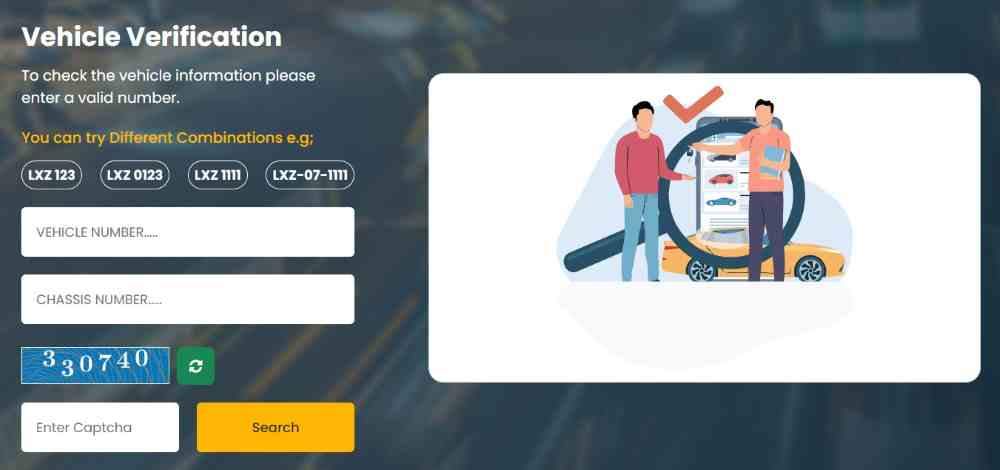
Table of Contents
Understanding the Motorcycle Registration System in Punjab
The entire motorcycle registration ecosystem in Punjab revolves around the Motor Transport Management Information System, commonly known as MTMIS. This digital database holds every piece of information about your bike, from the original owner to the latest token tax payment. Understanding how this system works is the foundation of successful verification.
What Exactly Is MTMIS and What Data Does It Hold?
MTMIS is the official digital record-keeping platform operated by the Punjab Excise, Taxation & Narcotics Control Department. It stores the complete lifecycle of every registered motorcycle. The database contains the following critical information for each vehicle:
- Owner Identity: Full name, father’s name, and CNIC number of the registered owner.
- Vehicle Fingerprints: Engine number, chassis number, make, model, color, and manufacturing year.
- Registration Timeline: Date of first registration, issuing city, and current registration number.
- Tax Compliance: Complete history of token tax payments, due dates, and any outstanding amounts.
- Legal Flags: All pending e-challans, fines, and any court-issued holds on the vehicle.
- Document Status: Smart card printing and delivery tracking.
Who Runs the Motorcycle Registration Verification System?
The Excise, Taxation & Narcotics Control Department of the Government of Punjab is the sole authority managing vehicle registration and verification. This department operates the MTMIS portal, the ePay Punjab app, the PAK-ID biometric platform, and the SMS shortcodes 8785 and 668. All verification requests ultimately route through their central servers.
How Often Does the MTMIS Database Get Updated?
New registrations typically appear in the public database within 3 to 7 working days after the Excise office processes the paperwork. During peak registration months, this window can extend to 10 to 14 days. Smart card linkage to CNIC numbers may take an additional 5 to 7 days to fully synchronize across all systems.
Can You Access MTMIS from Any Device at Any Time?
Yes. The MTMIS portal is built to be fully responsive, meaning it works on desktop computers, laptops, tablets, and smartphones. There is no restriction on access hours—the system operates 24 hours a day, 7 days a week. You never need to visit a government office just to check registration details.
Why Does the System Prioritize Registration Numbers Over CNIC?
Privacy is the primary reason. If anyone could enter any CNIC and instantly see all vehicles registered to that person, it would create massive security and identity risks. By requiring the registration number for public searches, the system allows transparency for individual vehicles while protecting the privacy of owners. Your CNIC is a private identifier; your registration number is a public vehicle identifier.
How to Check Motorcycle Registration Online: Step-by-Step Methods
There are three primary digital channels for verifying motorcycle registration in Punjab. Each method has its own strengths, and knowing all three ensures you can always get the information you need, regardless of your situation.
Method One: Using the Official MTMIS Web Portal
The MTMIS website is the most comprehensive verification tool, displaying every detail the Excise department has on file for a motorcycle.
Step-by-step instructions:
- Open your browser and go to mtmis.excise.punjab.gov.pk. Verify the URL includes “punjab.gov.pk” to ensure you are on the legitimate government site.
- Locate the “Vehicle Verification” tool on the homepage. It is usually in the center or upper right corner.
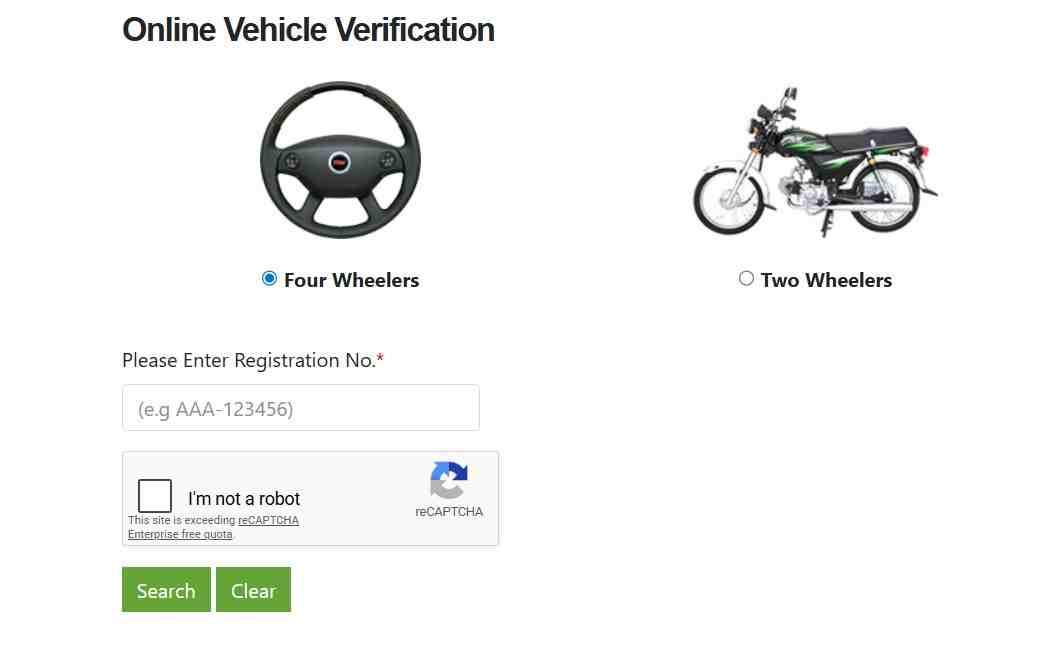
- Enter the full registration number exactly as it appears on the number plate. The correct format uses hyphens, for example: LEA-20-1234.
- Complete the CAPTCHA challenge by typing the characters shown in the image.
- Click the “Search” or “Submit” button.
What appears on the results page:
- Registered owner’s full name and father’s name.
- Motorcycle make, model, color, and year of manufacture.
- Engine number and chassis number.
- Registration date and the city where it was registered.
- Token tax payment status displayed in color: green means paid, red means unpaid.
- Any pending e-challans or fines attached to the registration.
Pro tip: Take a screenshot or print the results page for your records. For official purposes, you may need to request a formal verification certificate from the Excise office.
Method Two: Using the ePay Punjab Mobile Application
The ePay Punjab app is the government’s official digital payment platform, but it also functions as a powerful vehicle verification tool for owners.
How to set up and use ePay Punjab:
- Download the app from the Google Play Store (Android) or Apple App Store (iOS). Look for the official publisher: Government of Punjab.
- Register using your CNIC number, mobile number, email address, and a password of your choice.
- Verify your account using the one-time password sent to your phone or email.
- Log in and navigate to the “Excise & Taxation” section.
- Select “Vehicle Verification” and enter your motorcycle’s registration number.
What you can do inside ePay Punjab after verification:
- View complete ownership and tax details for all vehicles registered under your CNIC.
- Pay token tax instantly by generating a 17-digit PSID number.
- Download a digital E-Registration Card that serves as legal proof of registration.
- Track your payment history for taxes and transfer fees.
Important note: While checking registration is free, paying token tax or transfer fees through the app incurs the standard government charges (though registration and transfer fees for motorcycles have been abolished under the latest relief package).
Method Three: Using the 8785 SMS Service
For users without reliable internet access or smartphones, the SMS service provides a fast, no-frills verification option using any basic mobile phone.
How to use the SMS verification service:
- Open your phone’s messaging app.
- Type the motorcycle’s registration number exactly as it appears on the plate (e.g., LEA-20-1234).
- Send the message to 8785.
- Within a few seconds to one minute, you will receive a reply SMS.
What the SMS reply contains:
- Registered owner’s name.
- Motorcycle make and model.
- Registration status (valid or expired).
- Token tax payment status (paid or unpaid).
Limitations of the SMS service:
- Engine and chassis numbers are not included due to message length restrictions.
- Standard SMS charges from your mobile carrier apply.
- The service only works for Punjab-registered vehicles.
Method Four: Smart Card Delivery Tracking via CNIC and SMS 668
Once you have registered your motorcycle, you need to track when the physical smart card arrives. This is one of the few services that uses your CNIC as the primary search key.
To track your smart card by CNIC via SMS:
- Open your messaging app.
- Type your complete CNIC number (without hyphens).
- Send the message to 668.
- You will receive a reply showing: Processing, Printed, Dispatched, or Delivered.
To track online using your CNIC:
- Visit mtmispunjab.net.pk.
- Navigate to the “Smart Card Status Check” section.
- Enter your CNIC number and submit.
- The system displays the current status of your smart card.
Using Your CNIC for Registration Checks and Related Services
While the public portal does not allow you to look up someone else’s bike using their CNIC, your own CNIC unlocks several powerful services when used in authenticated systems.
How Your CNIC Connects to Your Registered Vehicles
When you register a motorcycle, the Excise department links your CNIC to the vehicle in their internal database. This linkage allows you to access your vehicle portfolio through authenticated channels like ePay Punjab and the Excise office’s internal systems.
What you can do with your own CNIC in authenticated systems:
- View a list of every motorcycle and car registered in your name.
- Check the token tax status for all your vehicles at once.
- Download digital registration cards for each vehicle.
- Pay taxes and fees for any vehicle under your name.
- Track smart card delivery for all pending registrations.
Why Can’t You See Someone Else’s CNIC Details on MTMIS?
The public MTMIS portal intentionally hides CNIC numbers and only displays names. This design prevents identity theft, stalking, and unauthorized data mining. If you need to verify that a seller truly owns the bike they are offering, you must ask to see their original CNIC and then cross-reference the name displayed on the MTMIS results page.
How to Request a Complete Vehicle Ownership Report Under Your CNIC
If you need an official document listing all vehicles registered under your CNIC, follow this process:
- Visit your local Excise and Taxation office.
- Bring your original CNIC and a photocopy.
- Submit a written application requesting a “Vehicle Ownership Report.”
- Pay any applicable administrative fee (minimal or free depending on current policy).
- Receive the report within 1 to 3 working days.
This report is useful for legal matters, inheritance cases, and when you have lost track of old vehicles still registered in your name.
Verifying a Used Motorcycle: A Complete Buyer’s Checklist
Buying a used motorcycle from an individual seller carries significant risks. Use this comprehensive checklist to protect your investment and avoid legal trouble.
Step One: Verify the Owner’s Identity Using Their CNIC
Ask the seller to show their original CNIC. Do not accept photocopies or photos. Then perform an MTMIS check using the bike’s registration number. Compare the owner name displayed on the screen with the name on the CNIC. They must match exactly.
Red flags to watch for:
- The seller claims the bike is registered to a “relative” but cannot produce that relative’s CNIC.
- The name on MTMIS has a different spelling from the CNIC (one letter difference might be a data entry error; a completely different name is fraud).
- The seller refuses to show their original CNIC.
Step Two: Match the Engine and Chassis Numbers
Every motorcycle has a unique engine number stamped on the engine block and a chassis number stamped on the frame (usually near the steering column or under the seat). These numbers are also recorded in the MTMIS database.
How to perform the matching check:
- Locate the engine number on the physical bike. It may be covered in dirt or grease, so clean the area if needed.
- Locate the chassis number. On most motorcycles, it is on the right side of the head tube or under the seat.
- Perform an MTMIS check using the registration number.
- Compare the numbers on the screen with the numbers on the bike.
Critical warning: If the numbers do not match exactly, the motorcycle is either stolen, illegally imported, or has had major components replaced without proper documentation. Do not buy the bike under any circumstances.
Step Three: Check Token Tax Payment Status
On the MTMIS results page, look for the token tax status. A green indicator means the tax is paid and up to date. A red indicator means there are pending dues.
Why this matters for buyers:
- Unpaid token tax is a financial liability that transfers with the vehicle.
- You cannot complete an ownership transfer until all outstanding taxes are cleared.
- The seller is legally responsible for paying the pending amount, but if you buy without checking, you may end up paying it yourself to complete the transfer.
Action step: If the token tax is red, ask the seller to pay it immediately and provide proof. Only proceed with the purchase after the MTMIS status turns green.
Step Four: Check for Pending Traffic Challans
The MTMIS results page also shows any outstanding e-challans or fines attached to the registration number. These fines are linked to the vehicle, not the owner, so they transfer with the bike.
How to verify challans:
- On the MTMIS page, look for a section labeled “E-Challan Status” or “Pending Fines.”
- Alternatively, visit the PSCA e-challan portal (echallan.psca.gop.pk) and enter the registration number.
What to do if challans exist: The seller must clear all fines before you complete the purchase. Ask for proof of payment and verify online that the fines no longer appear.
Step Five: Verify That the Smart Card Is Original
The physical smart card (registration book) should have the following security features:
- A QR code that scans to the MTMIS verification page.
- Holographic elements that change appearance when tilted.
- The correct Excise department logo and formatting.
Test the QR code: Use your phone to scan the QR code on the smart card. It should take you to a page showing the same owner name and vehicle details as the physical card. If the QR code does not work or leads to a different page, the card is fake.
Step Six: Complete the Transfer Through Official Channels
Never accept a signed transfer form without completing the official process. The ownership transfer is only legally valid when it is recorded in the MTMIS database.
Two ways to complete a transfer:
- Using the PAK-ID app (recommended): Both buyer and seller complete biometric verification through the app. The transfer is finalized within 48 hours.
- At the Excise office: Both parties visit the office with original CNICs and the smart card. The transfer is processed on the spot.
Do not hand over money until the transfer is either complete or you have a verified appointment for the transfer with both parties present.
Troubleshooting Common Registration Issues
Even with a correctly registered motorcycle, you may encounter problems when checking online. This section covers the most frequent issues and their solutions.
Issue: MTMIS Shows “No Record Found”
This error message appears when the system cannot locate the registration number you entered.
Possible causes and solutions:
- Typing error: Re-enter the registration number carefully, paying attention to hyphens and spaces. The format is critical.
- Wrong province: The motorcycle may be registered in Sindh, KP, Balochistan, or Islamabad. Each province has its own verification portal.
- New registration: Wait 7 to 14 days for the database to update.
- Deleted or suspended registration: The vehicle may have been deregistered due to being declared a total loss or for legal reasons. Contact the Excise office.
Issue: Your Motorcycle Does Not Appear Under Your CNIC in ePay Punjab
The ePay Punjab app should show all vehicles registered to your CNIC after you log in. If a bike is missing:
Possible reasons:
- The CNIC on the registration record is incorrect or has a typo.
- The registration was completed under an old CNIC number (before a NADRA update).
- The vehicle is registered to a different family member, not to you.
Solution: Visit the Excise office with your CNIC and the bike’s registration book. Request a correction or linkage update.
Issue: MTMIS Shows the Wrong Owner or Wrong CNIC
This is a database error that requires manual correction. Do not ignore it, as it will prevent you from selling or transferring the bike.
Correction process:
- Visit your local Excise and Taxation office.
- Bring your original CNIC and the motorcycle’s registration book.
- Bring the motorcycle itself for physical inspection (required in most cases).
- Submit a written application explaining the discrepancy.
- The office will investigate and update the records, typically within 5 to 10 working days.
Issue: Your Smart Card Status Shows “Delivered” but You Never Received It
If the tracking system says your smart card has been delivered but you do not have it:
Immediate steps:
- Check with your local Excise office. Sometimes cards are kept at the office for pickup.
- If you used Maryam Ki Dastak doorstep service, contact their helpline at 1202.
- If the card was sent by courier, request the tracking number from the Excise office.
- If the card is lost, file a report at the Excise office and apply for a duplicate (fees may apply).
Issue: Your Expired CNIC Is Causing Problems
An expired CNIC can prevent you from accessing online services and completing transfers.
Solution:
- Renew your CNIC through NADRA. This can be done online or at any NADRA registration center.
- Wait 5 to 10 days for the renewal to propagate across government databases.
- Visit the Excise office to link your new CNIC to your motorcycle registration if automatic synchronization fails.
Advanced Services: PAK-ID Biometric Transfer and Maryam Ki Dastak
The Punjab government has introduced two revolutionary services that eliminate the need for physical Excise office visits for most motorcycle transactions.
The PAK-ID App: Complete Ownership Transfers from Home
PAK-ID is a biometric verification application developed by NADRA in partnership with the Punjab Excise Department and the Punjab Information Technology Board. It allows vehicle owners to complete registration and transfer processes entirely online using fingerprint and facial recognition technology.
How PAK-ID works for motorcycle transfers:
- Both the seller and the buyer download the PAK-ID app on their smartphones.
- Each person completes their biometric verification (fingerprint scan) and Face ID authentication.
- The seller initiates the transfer request and enters the motorcycle’s registration number.
- The buyer accepts the transfer request and completes their verification.
- The system processes the transfer and updates the MTMIS database.
- The new smart card is delivered to the buyer’s doorstep within 15 to 30 days.
Benefits for overseas Pakistanis: PAK-ID eliminates the need for embassy visits, affidavits, or power of attorney documents. Anyone with a smartphone and an internet connection can transfer a vehicle from anywhere in the world.
Benefits for senior citizens: The Face ID feature accommodates individuals whose thumbprints have faded with age, ensuring no one is excluded from digital services.
Processing time: Transfers are finalized within 48 hours of both parties completing their biometric verification.
Maryam Ki Dastak: Doorstep Government Services
Maryam Ki Dastak is a doorstep service initiative that brings Excise department services directly to your home. A trained government facilitator visits you, collects documents and fees, submits applications on your behalf, and delivers completed documents to your door.
Motorcycle services available through Maryam Ki Dastak:
- New motorcycle registration.
- Ownership transfer (including biometric assistance).
- Token tax payment.
- Smart card delivery.
- Duplicate registration certificate issuance.
How to book Maryam Ki Dastak services:
- Mobile app: Download “Maryam Ki Dastak” from Google Play Store or Apple App Store.
- Helpline: Call 1202 to book an appointment by phone.
- Web portal: Visit mkb.punjab.gov.pk.
What happens after you book:
- You choose a date and time for the visit.
- A facilitator arrives at your home at the scheduled time.
- They help you fill out forms and collect the required documents.
- They collect any applicable fees and issue a receipt.
- They submit your application to the Excise department.
- Your completed smart card or registration document is delivered to your home.
The Motorcycle Fuel Subsidy and Fee Waiver
The Punjab government has abolished all registration and transfer fees for motorcycles. Additionally, registered motorcycle owners can claim a monthly fuel subsidy of Rs. 2,000.
How to apply for the fuel subsidy:
- Download the “Maryam Ko Batain” app from the Google Play Store.
- Register using your CNIC and motorcycle registration number.
- Complete the verification process.
- The subsidy is deposited directly into your linked bank account or mobile wallet.
Eligibility requirements:
- The motorcycle must be actively registered in Punjab.
- The applicant must be the registered owner.
- The motorcycle must have a valid token tax status (paid).
Frequently Asked Questions About Motorcycle Registration Check in Punjab
Can I check my motorcycle registration online in Punjab using only my CNIC?
Yes, but only for your own vehicles. After logging into ePay Punjab with your CNIC, you can see all motorcycles registered in your name. For checking someone else’s bike, you need the registration number.
Which official website allows bike registration checks by CNIC in Punjab?
The Excise & Taxation Punjab portal at mtmispunjab.net.pk allows you to check smart card status by entering your CNIC. For full registration details, use the registration number on the main MTMIS portal.
Is there a mobile app to verify bike ownership with a CNIC in Punjab?
Yes. The E-Challan Check app lets you enter a CNIC or vehicle number to verify registration. The ePay Punjab app also shows your own vehicles after CNIC login.
Why does the MTMIS Punjab portal ask for a registration number instead of a CNIC?
Privacy protection. Allowing unrestricted CNIC searches would expose personal identity information to anyone with internet access. The registration number is the public identifier for the vehicle.
How can I find out how many motorcycles are registered under my CNIC?
Visit your local Excise office with your original CNIC and request a complete vehicle ownership report. This feature is not publicly available online to prevent data harvesting.
Do I need my original CNIC to verify a bike at the Excise office?
Yes. For any in-person verification or transaction, you must present your original CNIC. Photocopies are not accepted for identity verification.
Can I check the token tax status of my bike using my CNIC online?
Yes, through the ePay Punjab app after logging in with your CNIC. For public checks on other bikes, the registration number is required.
Is biometric verification required to check registration details by CNIC?
No. Biometric verification is only mandatory for ownership transfers and new registrations. Simply viewing registration details does not require biometrics.
How do I verify a used motorcycle’s owner name with their CNIC?
Ask the seller to show their original CNIC. Then perform an MTMIS check using the bike’s registration number. Compare the owner name on the screen with the name on the CNIC. They must match exactly.
Is there an SMS service to check bike details using a CNIC number?
For smart card status, send your CNIC to 668. For registration details, send the registration number to 8785. The SMS service does not allow CNIC-based registration lookups for privacy reasons.
Can I track my bike’s smart card delivery status with my CNIC?
Yes. Send your CNIC number via SMS to 668, or visit mtmispunjab.net.pk and enter your CNIC in the smart card status section.
Why is my motorcycle not showing up under my CNIC in the online records?
The public portal prioritizes registration numbers. Use your registration number instead. If that fails, your CNIC may not be correctly linked in the database, requiring an Excise office visit.
How can I verify a bike’s engine and chassis numbers through my CNIC?
Use the registration number on MTMIS to pull up the record, which displays the engine and chassis numbers. Then compare with the physical bike. Your CNIC alone cannot pull up another person’s bike.
Is it possible to check a Punjab bike’s registration in Sindh using a CNIC?
No. Provincial databases are separate. Use the Punjab MTMIS portal for Punjab-registered vehicles. National integration is under development.
What documents are needed alongside a CNIC for manual verification in Punjab?
You need the original registration book (smart card) and, for certain transactions, token tax receipts, proof of address, and the motorcycle itself for physical inspection.
Can I use the ePay Punjab app to check registration by CNIC?
Yes. After registering on ePay Punjab with your CNIC, you can access all vehicles registered under your name, including registration and tax status.
Does the Punjab Excise Department charge a fee for checking registration by CNIC?
No. All online verification services are completely free. Fees apply only for transactions like tax payments or ownership transfers (though motorcycle transfer fees have been abolished).
How can I update my CNIC records in the motorcycle registration database?
Visit your local Excise office with your new CNIC and registration book to request a database update. For PAK-ID app users, CNIC updates from NADRA automatically sync after a few days.
Can I check if a motorcycle is stolen using the owner’s CNIC?
The public MTMIS portal does not label stolen vehicles. For a definitive stolen vehicle check, contact the Excise department or local police with the registration number.
How do I verify a bike registration if I have the owner’s CNIC but not the file?
You cannot perform a public verification using only the owner’s CNIC. You must obtain the registration number from the owner or from the number plate.
Is the “Maryam Ki Dastak” service available for CNIC-based registration checks?
Yes. Maryam Ki Dastak facilitators can assist you in verifying registration details using your CNIC as part of their doorstep service.
How long does it take for a new registration to appear under a CNIC online?
New registrations appear in MTMIS within 3-7 business days. CNIC linkage may take 10-14 days to fully propagate.
Can I verify commercial motorcycle registration in Punjab by CNIC?
The same rules apply. Use the registration number for public checks. Your own CNIC (via ePay Punjab) will show your commercial vehicles after login.
What should I do if the MTMIS shows the wrong CNIC for my bike?
Visit your local Excise office with your original CNIC, registration book, and the motorcycle. Submit a correction application to have the database updated.
Can I download a digital registration card using my CNIC?
Yes. Through the MTMIS portal’s “E-Registration Card” feature, enter your vehicle’s registration and chassis number to download a digital card. Your CNIC is used for verification within the Excise system.
How can I check my bike’s fitness certificate status with my CNIC?
Fitness certificate status is typically accessed using the registration number. Your CNIC-linked profile in the Excise system contains this information, accessible through an office visit.
Is there a helpline to call for registration verification via CNIC?
Yes. Call the Excise and Taxation Department helpline at 0800-08786. Maryam Ki Dastak helpline 1202 is also available for doorstep service inquiries.
Can I see the previous owner’s CNIC details on the MTMIS portal?
No. The portal displays only the current owner’s name and father’s name. Previous owner information and CNIC numbers are not available to the public.
How do I check for pending traffic challans on my bike using my CNIC?
Use the PSCA e-challan portal (echallan.psca.gop.pk) and enter your vehicle registration number. The E-Challan Check app also allows verification using your vehicle number or CNIC.
Can a dealer check my motorcycle registration status using my CNIC?
Dealers with authorized access to Excise systems may verify registration using your CNIC. For public transactions, they will typically request your registration number.
Disclaimer
This guide provides general information about motorcycle registration verification in Punjab. Government policies, fees, and procedures may change. Always confirm current requirements directly with the official Excise and Taxation Department channels before completing any transaction.

Add a Comment