
Imagine handing over your hard-earned cash for a used car only to discover later that the vehicle has unpaid token tax, a fake registration book, or worse, a stolen chassis number. This nightmare scenario happens thousands of times across Punjab every year. Online vehicle verification in Punjab is the only shield against such devastating financial losses. This comprehensive guide walks you through every official verification method available today, from the classic MTMIS portal to the revolutionary PAK-ID biometric app, ensuring every transaction you make is backed by authentic government data.
Key Takeaways
- CNIC Search Exists but Has Limits: Punjab offers CNIC-based web portal searches, but unlike Sindh, it does not support CNIC verification via SMS—use the excise.gos.pk portal instead.
- Biometric Verification Now Fully Digital: The PAK-ID app launched in early 2026 eliminates physical office visits for ownership transfers, benefiting both local citizens and overseas Pakistanis with NICOP.
- Token Tax Liability Transfers with the Vehicle: Unpaid token tax automatically becomes the new owner’s responsibility, making the “Token Paid Up-To” field on MTMIS the most critical data point before any purchase.
- SMS 8785 Works Without Internet: The 8785 SMS service provides instant basic verification (owner name, make, tax status) for users in areas with poor connectivity or during network outages.
- Read More: Excise and Taxation Punjab Online Verification – Smart Card Status Check
- Read More: Bike Registration Check By CNIC Punjab – Official Portal
- Read More: Motorcycle Registration Check Online Punjab (Check by CNIC)
Online Vehicle Verification In Punjab (Check By CNIC)
Table of Contents
Understanding the Official Systems Behind Punjab Vehicle Verification
The online vehicle verification ecosystem in Punjab operates through three interconnected digital pillars: the Motor Transport Management Information System (MTMIS) for data lookup, the Excise and Taxation Department for record management, and the e-Pay Punjab system for financial transactions. Each component plays a distinct role in ensuring transparent, real-time access to vehicle records.
What Is MTMIS Punjab and How Does It Function as a Central Database?
MTMIS Punjab is the official web-based portal that stores and retrieves registration data for every motor vehicle registered within the province. When a user enters a registration number, the system queries this central database and returns owner details, vehicle specifications, engine and chassis numbers, registration dates, token tax payment history, and smart card status.
The system was developed by the Punjab Information Technology Board (PITB) to replace cumbersome manual record checks that previously required multiple visits to excise offices. All verification results are displayed within seconds, pulling directly from the same database that excise officers use internally.
What Role Does the Excise and Taxation Department Play in Vehicle Records?
The Excise and Taxation Department serves as the official custodian of all vehicle registration data in Punjab. Every new registration, ownership transfer, duplicate smart card issuance, and record correction passes through this department before being updated in the MTMIS database. While MTMIS provides public read-only access, the Excise Department handles write operations and dispute resolution. Citizens cannot modify MTMIS data directly; all changes require official processing through excise offices or, increasingly, through the PAK-ID biometric verification system.
How Does e-Pay Punjab Integrate with Verification Systems?
e-Pay Punjab is the government’s centralized payment gateway that processes token tax payments, transfer fees, and challan settlements. The system generates a unique 17-digit PSID for each transaction, which can be paid through any partner bank’s mobile app, ATM, or over-the-counter.
Once payment is confirmed, e-Pay Punjab automatically updates the MTMIS database, typically within 24 hours. This integration means that a token tax payment made through e-Pay becomes visible on the MTMIS verification page almost immediately, allowing buyers to confirm that a seller has cleared all dues before completing a transaction.
What Legal Framework Governs Vehicle Verification in Punjab?
The Motor Vehicles Ordinance of 1965, along with the Punjab Excise and Taxation Rules, establishes the legal basis for vehicle registration and public access to verification data. Under these provisions, any citizen may verify a vehicle’s registration status, ownership, and tax compliance for legitimate due diligence purposes.
Knowingly providing false information during registration or tampering with vehicle records carries penalties including fines and imprisonment. The PAK-ID biometric system introduced in 2026 adds an additional layer of legal authentication, with biometric data serving as legally binding confirmation of identity for ownership transfers.
Complete Methods for Online Vehicle Verification in Punjab
Punjab offers multiple pathways to verify a vehicle’s legal status, ranging from web portals to mobile apps and SMS services. Each method serves different user needs: registration number searches provide the most detailed reports, CNIC searches reveal all vehicles owned by an individual, and SMS offers quick basic checks without internet.
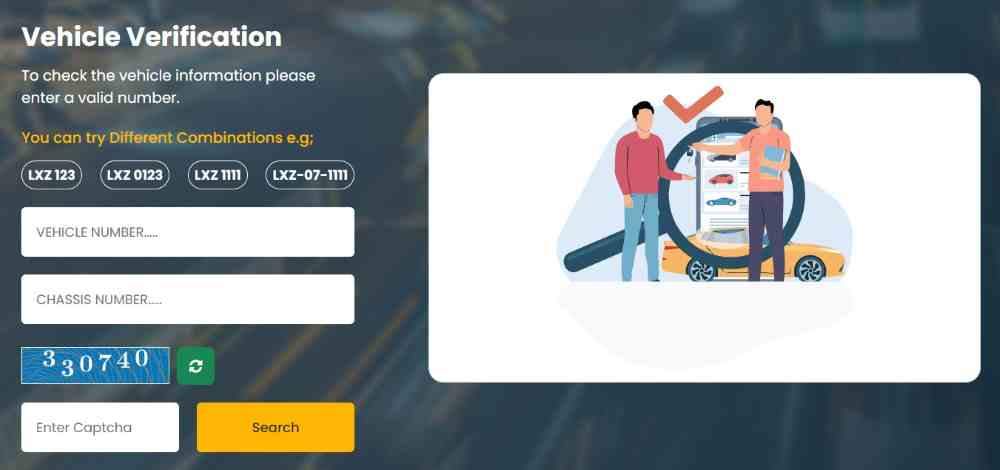
How to Perform Vehicle Verification Using the MTMIS Website (Step-by-Step)
The MTMIS web portal remains the most comprehensive verification tool, returning complete ownership history and technical specifications. Follow these steps to perform a verification:
- Open your browser and navigate to the official MTMIS Punjab website.
- Locate the vehicle verification input box on the homepage.
- Enter the complete registration number exactly as it appears on the vehicle’s number plate, including all hyphens.
- Complete the captcha verification to confirm you are a human user.
- Click the search button and wait 2-5 seconds for results.
- Review the displayed information, which includes owner name, father’s name, registration city and date, vehicle make, model, manufacturing year, color, engine number, chassis number, token tax paid status, and smart card issuance status.
The registration number format requires specific attention. Punjab vehicle numbers follow a pattern of city code (two or three letters), a hyphen, two-digit registration year, another hyphen, and a 3-4 digit serial number. For example, LEA-26-1234 is correct; LEA261234 or LEA 26 1234 will return no results. If the physical number plate shows a different format, always consult the vehicle’s registration book for the official database format.
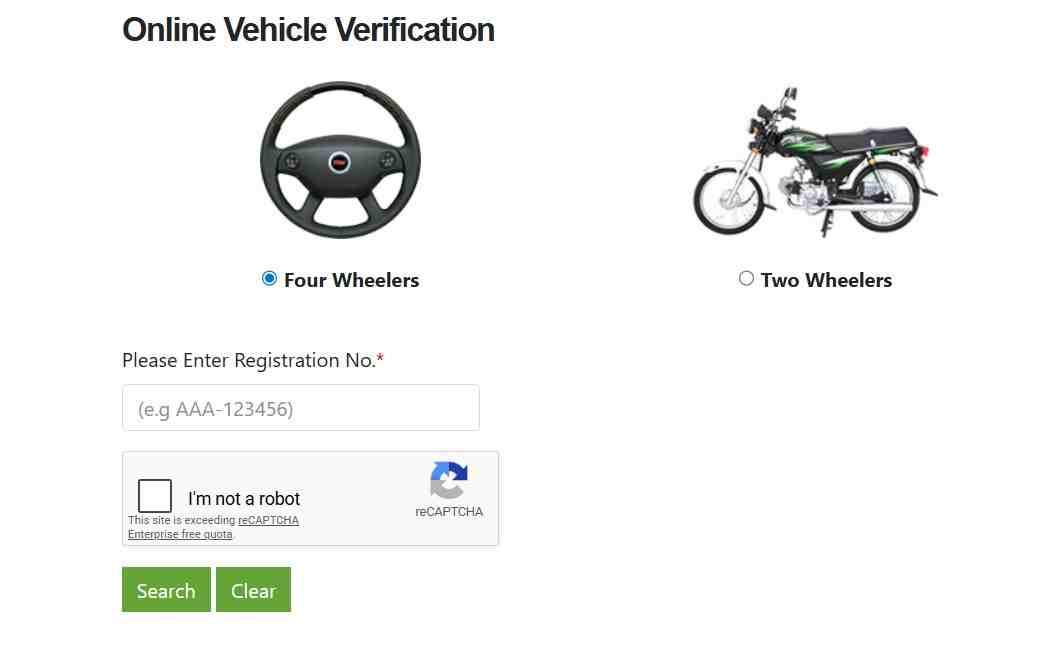
How to Check Vehicle Registration by CNIC in Punjab
Contrary to common misconception, Punjab does offer CNIC-based vehicle verification, but only through a dedicated web portal rather than SMS. To perform a CNIC search:
- Visit the Excise and Taxation Department’s CNIC verification portal.
- Select the vehicle type from the dropdown menu (four-wheeler for cars, two-wheeler for motorcycles).
- Enter the complete CNIC number without any spaces or hyphens.
- Complete the captcha verification.
- Click search to view a list of all vehicles registered against that CNIC.
The results display each vehicle’s registration number, make, model, registration date, and token tax status. This feature is particularly useful for checking your own registered vehicles, verifying a seller’s claimed ownership across multiple vehicles, or conducting due diligence on a family member’s vehicle holdings. Unlike registration number searches, CNIC searches do not display engine or chassis numbers for privacy reasons. For full technical details, you must perform a separate registration number search for each vehicle.
Can Overseas Pakistanis Use the CNIC Verification Portal from Abroad?
Yes, the CNIC verification portal is fully accessible from anywhere in the world. Overseas Pakistanis can enter their NICOP number (which follows the same format as a CNIC) to view all vehicles registered under their name in Punjab. No VPN or special access is required. The portal works identically for international users, though page load times may vary based on connection speeds.
How to Verify a Motorcycle Registration Online in Punjab
Motorcycle verification follows the exact same process as car verification. Enter the bike’s registration number on the MTMIS portal using the same format: city code, hyphen, registration year, hyphen, serial number. The results include the owner’s name, engine number, chassis number, make, model, registration date, and token tax status. Motorcycle registration numbers typically use a shorter serial number sequence compared to cars, but the hyphenated format remains identical.
How to Verify a Commercial Vehicle’s Fitness Certificate Online
Commercial vehicles such as trucks, buses, taxis, and delivery vans require a valid fitness certificate in addition to standard registration. The MTMIS verification results include a dedicated “Fitness Certificate Validity” field showing the expiration date. Operating a commercial vehicle with an expired fitness certificate is illegal and results in fines, impoundment, and potential legal action. Buyers of used commercial vehicles should verify both registration and fitness certificate validity before purchase.
Mobile Applications for Vehicle Verification in Punjab
Mobile apps provide convenient on-the-go access to vehicle verification without requiring a computer. The government offers official apps, while several third-party applications also connect to the MTMIS database.
What Is the Official e-Pay Punjab App and How Does It Verify Vehicles?
The e-Pay Punjab app, available on the Google Play Store, serves as the official government application for tax payments and vehicle-related services. The app includes a built-in vehicle verification feature that displays owner name, registration status, token tax details, and pending challans. To use this feature:
- Download and install e-Pay Punjab from Google Play.
- Open the app and navigate to the “Vehicle Services” section.
- Select “Vehicle Verification.”
- Enter the vehicle’s registration number.
- View the results instantly, with the same data accuracy as the MTMIS website.
The app also allows users to pay token tax, clear e-challans, and generate payment receipts, all from a single interface. No separate vehicle verification app exists from the Punjab government; the e-Pay Punjab app is the only official mobile tool for this purpose.
What Is the PAK-ID App and How Does It Handle Biometric Vehicle Verification?
The PAK-ID app, launched in early 2026, represents a significant advancement in vehicle verification technology. Developed by NADRA in collaboration with the Punjab Excise and Taxation Department and the PITB, the app enables fully digital biometric authentication for vehicle registration and ownership transfers.
Users can download PAK-ID from official app stores, log in using their CNIC or NICOP, and complete biometric verification using either fingerprint scanning (on compatible devices) or facial recognition technology. The Face ID feature is particularly beneficial for senior citizens whose thumb impressions may have faded or changed over time. Once biometric verification and transfer fee payment are completed, the ownership transfer is finalized within 48 hours, eliminating the need for physical visits to excise offices or embassies.
How Does the Vehicle Verification Process Work Using Third-Party Apps?
Several third-party applications, including “Vehicle Verification Pakistan” and “Pak Wheels Verification,” provide MTMIS access through unofficial interfaces. These apps typically query the same public database as the official portals, so accuracy generally matches government sources. However, users should exercise caution regarding data privacy and permissions. Third-party apps may display advertisements, request unnecessary permissions, or charge for features that are free on official portals. The official e-Pay Punjab and PAK-ID apps remain the safest and most reliable options.
SMS Vehicle Verification Service (Method 8785) for Users Without Internet
The SMS verification service provides a critical lifeline for users in rural areas, during network outages, or for those without smartphone access. This service uses the same official database as the web portal but returns abbreviated information due to SMS character limits.
How to Use the SMS 8785 Service for Vehicle Verification
To verify a vehicle using SMS, follow this simple process:
- Open the SMS application on any mobile phone.
- Compose a new message containing only the vehicle’s registration number in the standard hyphenated format.
- Send the message to 8785.
- Within 10-30 seconds, receive a reply SMS containing the owner’s name, father’s name, city, vehicle make, model, registration date, and token tax paid status.
The service works on all mobile networks in Pakistan and costs the standard SMS rate (typically 0.50 to 1 rupee per message). The reply SMS is free. Motorcycles, cars, and commercial vehicles all work with the same process. The SMS service does not support CNIC-based searches; only registration numbers are accepted.
What Information Is Missing from the SMS Verification Compared to the Web Portal?
Due to the 160-character limit of standard SMS messages, the SMS service omits several details that appear on the web portal:
- Engine number and chassis number are typically not included.
- Pending e-challan information may be truncated or omitted.
- Smart card status is not displayed.
- Complete ownership history (previous owners) is unavailable.
For thorough due diligence, especially before purchasing a used vehicle, users should supplement SMS verification with a web portal check whenever possible. The SMS service is best suited for quick spot checks or initial screening.
Troubleshooting Common MTMIS Verification Errors
Users frequently encounter error messages or missing records when attempting online verification. Understanding the root causes of these issues saves time and frustration.
Why Does MTMIS Show “No Record Found” for a Valid Vehicle?
The “No Record Found” error occurs for several distinct reasons:
- The registration number was entered incorrectly, missing hyphens, or containing spaces.
- The vehicle is registered in Sindh, KPK, Islamabad, or another province rather than Punjab.
- The ownership transfer was recently processed and the database has not yet been updated (allow 7-14 days).
- The vehicle’s registration has been cancelled or blocked due to legal proceedings.
- The number plate displayed on the vehicle is counterfeit or does not match official records.
To resolve the issue, first verify the registration number using the vehicle’s original registration book rather than the number plate. Then confirm the vehicle’s province of registration. If the vehicle is indeed Punjab-registered and the number is correct, wait 48 hours and try again. Persistent errors require contacting the Excise and Taxation Department helpline.
What Is the Correct Format for Entering a Vehicle Number in MTMIS Punjab?
Punjab registration numbers follow a strict format that must be replicated exactly in the search field:
- City code: 2-3 uppercase letters (e.g., LEA for Lahore, RIA for Rawalpindi, FSD for Faisalabad, MUL for Multan, GJR for Gujranwala)
- Hyphen: Required separator
- Registration year: Two digits representing the year of registration
- Hyphen: Required separator
- Serial number: 3-4 digits unique to the vehicle
Examples of correct entries include LEA-26-1234, RIA-25-5678, and FSD-24-9012. Examples of incorrect entries include LEA261234 (missing hyphens), LEA 26 1234 (using spaces instead of hyphens), and lea-26-1234 (using lowercase letters, though the portal may accept this).
How Long Does It Take for Ownership Details to Update After a Transfer?
Standard processing time for ownership transfers is 7-14 working days from the date the Excise Department receives all required documents and fees. During periods of high volume, processing may extend to 30 days. The MTMIS database updates automatically once the transfer is officially recorded. If after 30 days the previous owner’s name still appears, the buyer should visit the excise office where the transfer was processed with their acknowledgment receipt for follow-up.
What Should I Do If the Owner’s Name Is Incorrect on the MTMIS Portal?
An incorrect owner name indicates a data entry error in the Excise Department’s master database. This error cannot be corrected online. The vehicle owner must:
- Visit the district Excise and Taxation office where the vehicle was originally registered.
- Bring original CNIC and the vehicle’s registration book.
- Submit a written application requesting a database correction.
- Provide any supporting documents that demonstrate the correct information.
Processing corrections typically takes 7-14 days. After the correction, MTMIS will display the accurate owner name.
Biometric Verification System Using PAK-ID App
The launch of the PAK-ID app in February 2026 marks a fundamental shift in how vehicle ownership verification and transfer are conducted in Punjab. The system eliminates physical visits to excise offices, NADRA centers, and for overseas Pakistanis, even embassy visits.
Is Biometric Verification Required for Simple Online Vehicle Verification?
No. Biometric verification through PAK-ID is mandatory only for vehicle registration, ownership transfers, and certain high-security operations. Basic online verification using MTMIS, SMS 8785, or the CNIC portal remains accessible to all users without any biometric authentication. The two systems serve different purposes: MTMIS provides public data lookup, while PAK-ID handles identity confirmation for legal transactions.
How Does the PAK-ID App Work for Biometric Vehicle Verification?
The PAK-ID app integrates directly with NADRA’s biometric database and the Excise Department’s vehicle records. The process for a typical ownership transfer involves:
- Both buyer and seller download the PAK-ID app from official app stores.
- Each party logs in using their CNIC or NICOP credentials.
- The seller initiates the transfer request within the app, entering the vehicle’s registration number and chassis number.
- The buyer receives a notification to verify the transaction.
- Both parties complete biometric authentication using either fingerprint scanning or facial recognition.
- The app submits the verified data to the Excise Department.
- The buyer pays the transfer fee through the e-Pay Punjab app.
- The Excise Department processes the transfer and updates MTMIS within 48 hours.
The Face ID authentication feature is especially valuable for senior citizens whose fingerprints may be faded or for individuals with certain medical conditions that affect fingerprint quality.
How Can Overseas Pakistanis Use PAK-ID for Vehicle Verification and Transfer?
Prior to the PAK-ID launch, overseas Pakistanis faced a cumbersome process requiring embassy visits, attested affidavits, and powers of attorney—a process that often took weeks. The PAK-ID app eliminates all of these requirements. NICOP holders can now complete biometric verification from anywhere in the world using their smartphone’s camera for facial recognition. The app works identically for international users as it does for domestic users. Once verification is complete and transfer fees are paid through e-Pay Punjab, the ownership transfer is finalized within 48 hours, with the overseas seller never needing to visit Pakistan or a Pakistani embassy.
Token Tax Status Check Through Vehicle Verification
Token tax is an annual or one-time vehicle tax in Punjab, depending on engine capacity. This tax liability transfers automatically to the new owner upon sale, making verification of token tax status an essential pre-purchase step.
How to Check Token Tax Status Using MTMIS Website
The token tax status appears prominently in MTMIS verification results under the field labeled “Token Paid Up-To.” This date indicates the last period for which token tax has been paid. If the date has passed the current month, the vehicle has outstanding token tax dues. The buyer becomes responsible for these unpaid dues upon purchase unless the seller clears them beforehand. For vehicles with unpaid tax, the buyer can either negotiate a price reduction equal to the owed amount or require the seller to pay the tax before finalizing the transaction.
What Are the Token Tax Rates for Different Vehicle Categories in Punjab?
Punjab’s token tax structure distinguishes between vehicles based on engine capacity and vehicle type:
- Motorcycles and scooters pay a one-time lifetime token tax of approximately 1,500 rupees at registration.
- Cars with engine capacity up to 1000cc pay a one-time lifetime token tax of 20,000 rupees.
- Cars with engine capacity above 1000cc pay annual token tax calculated as 0.2% of the vehicle’s invoice value.
- Commercial vehicles follow a separate annual rate structure based on seating capacity and vehicle weight.
The Excise Department has confirmed that token tax rates remained unchanged for 2026, with no increases implemented. A 10% discount is available for early payment of annual token tax.
How to Pay Token Tax Online Using e-Pay Punjab
Paying token tax online requires only a few minutes and a bank account:
- Download and open the e-Pay Punjab app.
- Select “Token Tax for Vehicle” from the Excise and Taxation section.
- Enter the vehicle’s registration number.
- The system displays the owed amount based on engine capacity and payment history.
- Generate a 17-digit PSID.
- Pay the PSID through any partner bank’s mobile app, ATM, or over-the-counter.
- Download the payment receipt as a PDF for your records.
The MTMIS database updates automatically upon successful payment confirmation, typically within 24 hours.
Does the Online Verification System Show Pending Traffic Challans?
Yes. MTMIS verification results include a section for pending e-challans recorded by the Punjab Safe Cities Authority (PSCA) camera system or issued by traffic police. Pending challans appear with the violation date, location, and amount. These challans must be cleared before a vehicle transfer can be completed, as unpaid fines are attached to the vehicle rather than the driver. To pay a pending challan, users can select “E-Challan” in the e-Pay Punjab app, enter the vehicle number, and pay the generated PSID. Payment clears the challan from both the PSCA and MTMIS databases simultaneously.
Vehicle Smart Card in Punjab: Status Check and Download
The Punjab vehicle smart card is a QR-code-enabled digital registration card that replaces the traditional paper registration book. The card contains encrypted ownership and vehicle data that police and excise officials can scan for instant verification.
What Is an MTMIS Punjab Smart Card and Why Is It Important?
The smart card represents a significant security upgrade over paper registration books. Each card features a unique QR code that encodes the vehicle’s registration number, owner name, chassis number, engine number, and token tax status. When scanned with the official excise app, the QR code displays the current database record, allowing officials to instantly detect discrepancies between the card and the central database. This makes forgery substantially more difficult compared to paper books. All new registrations and ownership transfers now issue smart cards exclusively.
How to Check Vehicle Smart Card Status Online
To check the status of a smart card application or track delivery:
- Visit the official E-Registration Card portal.
- Enter the vehicle’s registration number in the first field.
- Enter the vehicle’s chassis number in the second field.
- Complete the captcha verification.
- Click search to view the current status.
The portal displays one of several status indicators: “Processing” (application received, card being manufactured), “Printed” (card complete, ready for dispatch), “Dispatched” (card sent via Pakistan Post), or “Delivered” (card received by the owner). Once the status shows “Printed,” users can download a PDF copy of the smart card’s front and back images for temporary use while waiting for physical delivery.
How to Download Smart Card PDF Without Waiting for Physical Card
When the online status shows “Printed,” the download option becomes available on the tracking portal. Users can click the download button to save a PDF file containing both sides of the smart card. This digital copy serves as proof of registration for personal records and may be accepted for certain official purposes, though the physical card remains required for vehicle transfers and police checks.
Physical Vehicle Verification at Police Khidmat Markaz
Online verification confirms registration and tax status but does not detect criminal records, theft history, or involvement in FIRs. Physical verification at a Police Khidmat Markaz provides this additional layer of security.
How to Verify If a Vehicle Is Stolen or Has a Police Record
The police verification process requires an in-person visit with the actual vehicle:
- Locate the nearest Police Khidmat Markaz in your district.
- Bring the vehicle for physical inspection.
- Provide original CNIC, original registration documents, and a copy of the owner’s CNIC.
- Police officers examine the chassis number and engine number for tampering.
- The officers query the national stolen vehicle database.
- Upon confirmation of clean record, officers issue a verification certificate.
This certificate is the only official document that confirms a vehicle has no criminal record in Punjab. Serious buyers, especially for high-value vehicles, should never skip this step. The verification fee is nominal, typically 100-200 rupees, and the process takes 30-60 minutes.
What Is the Difference Between Excise Verification and Police Verification?
Excise verification (online) confirms registration authenticity, ownership, and tax compliance. Police verification (physical) confirms no criminal record, theft history, or FIR involvement. Both are necessary for complete due diligence. Excise verification can be completed in seconds from anywhere. Police verification requires a physical visit but provides protection against criminal liability. For used car purchases, perform both.
Punjab vs. Sindh vs. Islamabad: How Vehicle Verification Differs Across Provinces
Vehicle verification methods vary significantly by province due to separate database systems and different technological implementations. Understanding these differences prevents confusion when verifying vehicles from other provinces.
Can I Verify a Sindh-Registered Vehicle on the Punjab MTMIS Portal?
No. The Punjab MTMIS portal contains only data for vehicles registered within Punjab province. To verify a Sindh-registered vehicle, use the Excise Sindh web portal or send the vehicle registration number to 8147 via SMS. KPK-registered vehicles require SMS to 9966 or the KPK Excise portal. Islamabad-registered vehicles require SMS to 8521 or the Islamabad Excise portal. The federal government has announced plans for a national integrated vehicle database, but as of now, each province maintains separate systems.
How Does CNIC-Based Verification Differ Between Punjab and Sindh?
Sindh offers CNIC-based verification via SMS: users send their CNIC number to 8147 and receive a list of all vehicles registered against that CNIC. Punjab does not offer CNIC-based SMS verification; CNIC searches in Punjab are only available through the Excise Department’s web portal. This difference often causes confusion, with users incorrectly believing Punjab has no CNIC verification capability at all. Both provinces offer CNIC searches, but Punjab’s version requires internet access while Sindh’s works via SMS.
Future of Vehicle Verification in Punjab
The digital transformation of vehicle verification continues to accelerate, with several significant developments expected in the coming years.
Will Vehicle Verification by CNIC Become Available Nationwide?
Yes. The federal government, through NADRA, is working on a national vehicle registration database that will allow CNIC-based verification across all provinces from a single portal. The PAK-ID biometric system represents an early phase of this integration. Once fully implemented, users will be able to verify any vehicle registered in Pakistan using either the registration number or the owner’s CNIC, regardless of province of registration.
How Will AI and Machine Learning Improve Verification Accuracy?
Artificial intelligence will enhance verification systems in several ways: automated detection of fraudulent documents using pattern recognition, anomaly identification for vehicles with suspicious transfer histories, predictive analytics for tax compliance, and natural language processing for customer service chatbots that can answer verification queries without human intervention.
What Is the Plan for QR Code-Based Instant Verification on Smart Cards?
The QR codes on vehicle smart cards will increasingly enable instant verification through any smartphone camera. Users will be able to scan a vehicle’s smart card QR code, automatically navigate to the verification portal, and view current database records without manually entering registration numbers. Police officers already use this capability during traffic stops. Expansion to public access is expected.
Frequently Asked Questions About Online Vehicle Verification in Punjab
Can I verify a vehicle in Punjab using only a CNIC?
Yes, use the Excise Department’s CNIC portal at excise.gos.pk. Enter the CNIC without hyphens and select vehicle type to see all registered vehicles.
Why is MTMIS Punjab not showing my vehicle details?
Common causes include incorrect registration number format, vehicle registered in another province, or database update delay after recent transfer.
How can I check if a vehicle is registered in my name using my CNIC?
Use the CNIC portal described above. Enter your CNIC and select vehicle type to view your complete vehicle portfolio.
Which official website is used for vehicle verification in Punjab?
MTMIS Punjab at mtmis.excise.punjab.gov.pk for registration number searches. CNIC portal at excise.gos.pk for CNIC-based searches.
What information is provided during an online vehicle verification?
Owner name, father’s name, city, registration date, vehicle make and model, color, engine number, chassis number, token tax status, and pending challans.
Does MTMIS Punjab show the engine and chassis numbers of a vehicle?
Yes, both engine and chassis numbers appear in standard MTMIS verification results for registration number searches.
How can I check the token tax status of my car online in Punjab?
Perform an MTMIS verification. The “Token Paid Up-To” field shows the last paid date. A current date means tax is paid.
Is there a mobile app for vehicle verification in Punjab?
Yes, the e-Pay Punjab app includes verification features. The PAK-ID app handles biometric verification for transfers.
How do I verify a motorcycle or bike registration online in Punjab?
Same as cars: enter the motorcycle’s registration number on MTMIS Punjab using the same hyphenated format.
Why does MTMIS show “No Record Found” for my vehicle?
Check registration number format, confirm vehicle is Punjab-registered, and allow 7-14 days after recent transfers for database updates.
How long does it take for ownership details to update after a transfer?
Typically 7-14 days, up to 30 days during peak periods. Contact Excise if no update after 30 days.
Can I verify a commercial vehicle’s fitness certificate online?
Yes, MTMIS displays fitness certificate validity under the “Vehicle Status” field for commercial vehicles.
Is biometric verification required for simple online vehicle verification?
No. Biometric verification is only for registration, ownership transfer, and high-security operations, not for basic lookup.
How can I verify if a vehicle is stolen or has a police record in Punjab?
Send chassis number to 8521 for police stolen status. Visit a Police Khidmat Markaz for complete physical verification.
What is the correct format for entering a vehicle number in MTMIS Punjab?
City code-hyphen-two digit year-hyphen-number. Example: LEA-26-1234.
Can I check my driving license status on the MTMIS Punjab portal?
No. Driving licenses are separate. Check on the Punjab Driving License portal.
How do I track the delivery status of my vehicle’s smart card?
Visit the E-Registration Card portal with registration and chassis numbers.
Does the online verification system show pending traffic challans?
Yes, pending e-challans appear in MTMIS results and must be cleared before vehicle transfer.
Can overseas Pakistanis verify their vehicles online?
Yes, MTMIS and CNIC portals are globally accessible. PAK-ID allows biometric verification from anywhere using NICOP.
How can I pay my vehicle’s token tax online using e-Pay Punjab?
Download e-Pay Punjab, select “Token Tax for Vehicle,” enter registration number, generate PSID, pay via any bank.
What documents are needed for physical vehicle verification at a Khidmat Markaz?
Original CNIC, original registration documents, copy of owner’s CNIC, and the vehicle itself for inspection.
How can I verify a vehicle’s original file and registration book?
Visit Excise office with the registration book and your CNIC for official authenticity confirmation.
Is there an SMS service for vehicle verification in Punjab?
Yes, send the vehicle registration number to 8785. Reply includes owner name, make, and token tax status.
Can I verify a vehicle using only its engine or chassis number?
Yes, use the Excise portal’s chassis number verification feature to retrieve the registration number.
What should I do if the owner’s name is incorrect on MTMIS?
Visit the Excise office where the vehicle was registered with correct documents to request database correction.
How can I check if a vehicle has been biometrically transferred?
MTMIS does not explicitly indicate biometric transfer status. The owner name displayed is the definitive result.
Does MTMIS show the original price of the vehicle?
No, MTMIS displays registration and tax information only, not purchase price.
Where can I find the nearest NADRA e-Sahulat center for biometric verification?
Check the NADRA website for locations. The PAK-ID app eliminates physical center visits for most users.

Add a Comment