
You have just bought a new car or motorcycle in Punjab, but the paperwork seems overwhelming. Vehicle registration in Punjab is now fully digital, yet many people still struggle with the online process, causing delays and penalties. This guide walks you through every step – from biometric verification using the Pak-ID app to paying token tax via ePay Punjab, checking vehicle history on MTMIS, and even bidding for fancy number plates through the e-auction system.
What you will learn in this guide:
- How to register a new car or motorcycle without visiting an Excise office.
- Step-by-step biometric verification using your smartphone.
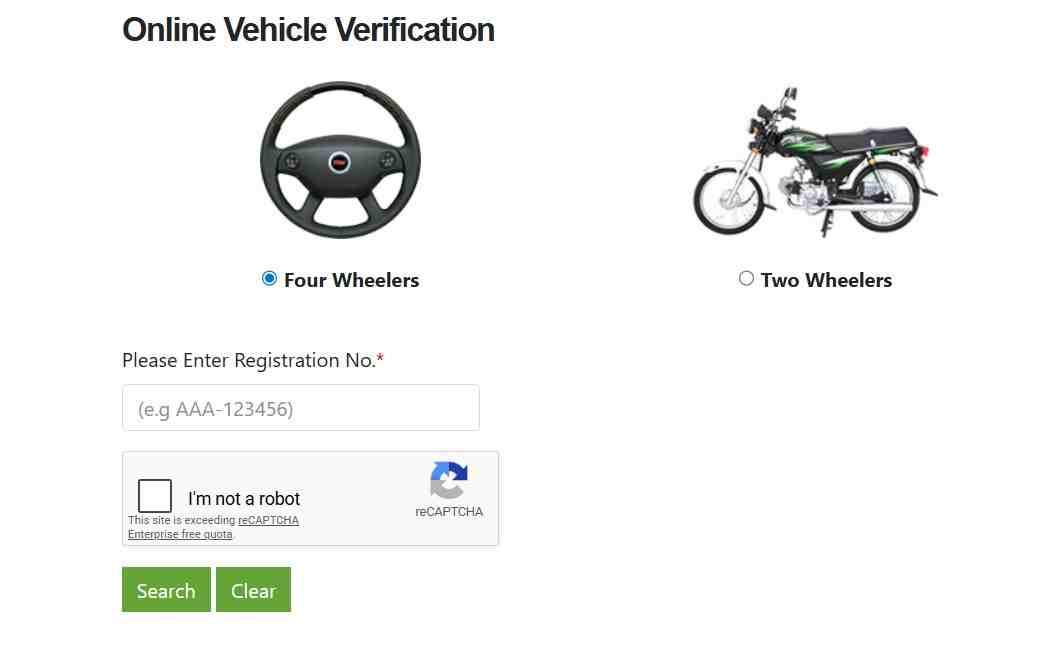
- Real-time vehicle verification by CNIC or registration number.
- Complete fee breakdown for 70cc, 1000cc, 1300cc, and larger vehicles.
- How to transfer ownership online in under 48 hours.
- Tracking your smart card and downloading the digital registration card.
- Participating in e-auctions for personalized number plates.
Key Takeaways
- Digital Registration is Mandatory: All new vehicle registrations must go through the Dealer Vehicle Registration System (DVRS) or the Excise online portal. No more paper files.
- Biometric Verification from Home: The Pak-ID app allows fingerprint and facial recognition for vehicle transfers and registration, eliminating physical visits.
- 48-Hour Ownership Transfer: Both buyer and seller complete biometrics via app; the system updates ownership within two days.
- Free Motorcycle Registration: The Punjab government has waived all registration and transfer fees for motorcycles, plus fuel subsidies.
- Instant Digital Registration Card (ERC): Download your e-registration card immediately after payment and biometrics – valid legal proof of ownership.
- Late Registration Penalties: Register within 30 days of purchase, or face escalating fines up to PKR 8,000.
- Read More: Islamabad Number Plate Check (Check By CNIC)
- Read More: Vehicle Registration Check Islamabad (Check By CNIC)
- Read More: Online Vehicle Verification In Punjab (Check By CNIC)
Vehicle Registration In Punjab | Car & Motorcycle Registration Online
Table of Contents
1. What is MTMIS Punjab and Why Does It Matter?
MTMIS Punjab stands for Motor Transport Management Information System. It is the central digital database that stores every registered vehicle’s details, ownership history, tax payments, and legal status. The system is accessible online at mtmis.excise.punjab.gov.pk and also via SMS.
Core functions of MTMIS:
- Vehicle verification – Check if a car or motorcycle is legally registered before buying.
- Ownership tracking – View all previous owners of a used vehicle.
- Tax compliance check – Confirm whether token tax is paid and if any fines are due.
- Application status – Track your registration or smart card application in real time.
- Stolen vehicle alert – Cross-match engine and chassis numbers against police databases.
Why MTMIS is non-negotiable:
No vehicle sale, purchase, transfer, or registration can be legally completed without an MTMIS clearance. The system automatically flags issues like unpaid taxes, incorrect documents, or reported theft. If MTMIS shows a problem, the transaction stops.
How to access MTMIS services:
| Method | Action |
|---|---|
| Web portal | Visit mtmis.excise.punjab.gov.pk from any browser. |
| SMS | Type your registration number and send to 8785. |
| Mobile apps | Use Pak-ID or ePay Punjab for integrated services. |
Coverage: MTMIS manages data for over 26 million vehicles – private cars, motorcycles, commercial trucks, buses, and heavy transport vehicles. Updates happen daily from Excise offices, dealers, and police.
2. How to Register a New Car or Motorcycle Online in Punjab
Vehicle registration in Punjab follows two main paths: the Dealer Vehicle Registration System (DVRS) for brand-new vehicles purchased from authorized dealers, and the Excise office route for used or imported vehicles.
2.1 What is the Dealer Vehicle Registration System (DVRS)?
DVRS is a real-time online portal that allows authorized vehicle dealers to register new cars and motorcycles instantly at the point of sale. When you buy a new vehicle, the dealer logs into DVRS, enters your CNIC and vehicle details, and initiates the registration request immediately.
Step-by-step DVRS registration process:
- Dealer submits owner’s CNIC and vehicle invoice into DVRS.
- System generates a 17-digit PSID for fee payment.
- Buyer pays registration fees and taxes via ePay Punjab app or bank.
- Biometric verification is completed using Pak-ID app or at dealer location.
- Registration number is generated instantly.
- E-Registration Card (ERC) is issued digitally.
- Physical number plates are dispatched to your address within 7–14 days.
Vehicles eligible for DVRS:
All brand-new cars, motorcycles, and commercial vehicles sold by authorized dealerships in Punjab.
2.2 Self-Registration for Used or Imported Vehicles
If you buy a used vehicle from a private seller or import a reconditioned car, you must register through your local Excise and Taxation Office.
Self-registration steps:
- Obtain a No Objection Certificate (NOC) from the originating province if the vehicle comes from outside Punjab.
- Gather required documents: Form-F, sale agreement, CNIC copies.
- Visit an e-Khidmat Markaz or Excise office in your city.
- Submit documents and undergo biometric verification.
- Pay registration fees and token tax via ePay Punjab.
- Receive digital E-Registration Card within 24–48 hours.
2.3 Documents Required for New Vehicle Registration
Missing or incorrect documents are the number one reason for registration delays. Prepare this checklist:
For a new vehicle:
- Application for Registration (Form-F) – signed and thumb-impressed.
- Original Sales Certificate from manufacturer or dealer.
- Original Sales Invoice showing price, model, engine and chassis numbers.
- Copy of owner’s CNIC (computerized national identity card).
- Proof of fee payment (ePay Punjab receipt).
- Biometric verification confirmation from Pak-ID app.
For a used vehicle (additional):
- Transfer Order (T.O.) Form from previous owner.
- Sale agreement between buyer and seller.
- Original registration book or smart card of previous owner.
- NOC from the original Excise office (if inter-province).
- Police 15 report for security verification.
2.4 Penalty for Late Registration
How long do you have?
Registration must be completed within 30 days of vehicle purchase or import.
What happens if you delay?
Penalties increase progressively:
| Delay period | Penalty (car) | Penalty (motorcycle) |
|---|---|---|
| 1–30 days | No penalty | No penalty |
| 31–60 days | PKR 500 | PKR 200 |
| 61–90 days | PKR 2,000 | PKR 500 |
| 91–180 days | PKR 5,000 | PKR 1,000 |
| Beyond 180 days | PKR 8,000+ | PKR 2,000+ |
Important: A vehicle with delayed registration cannot be sold or transferred until the penalty is paid in full.
3. Biometric Verification Using the Pak-ID App (Complete Walkthrough)
Biometric verification is now mandatory for all vehicle registration and ownership transfers in Punjab. The Pak-ID app, developed by NADRA and the Punjab Information Technology Board (PITB), enables fingerprint and facial recognition from anywhere in the world.
3.1 What is the Pak-ID App?
Pak-ID is a mobile application that provides biometric authentication services for vehicle registration, ownership transfer, and verification. It connects directly to the Excise Department’s MTMIS database and NADRA’s identity records, ensuring real-time, secure verification.
Key features of Pak-ID app:
- Fingerprint authentication using your smartphone’s sensor.
- Face ID verification for users with faded fingerprints (seniors, laborers).
- Remote access for overseas Pakistanis (no embassy visit required).
- Multi-vehicle management under one CNIC.
- Transaction history of all verifications and transfers.
3.2 Step-by-Step: How to Use Pak-ID for Vehicle Biometrics
Step 1 – Download and install
Search for “Pak ID” on Google Play Store or Apple App Store. Install the official app.
Step 2 – Register your CNIC
Enter your 13-digit CNIC number and the mobile number linked to NADRA. You will receive an OTP for verification.
Step 3 – Complete initial verification
Follow in-app prompts to scan your fingerprint or face. This links your identity to the app.
Step 4 – Navigate to vehicle section
Select “Vehicle Verification” or “Vehicle Transfer” from the main menu.
Step 5 – Enter vehicle details
Input the registration number or chassis number as required for your transaction.
Step 6 – Perform biometric scan
Place your finger on the sensor or position your face for the camera. The app matches your live scan with NADRA records.
Step 7 – Receive confirmation
A success message appears instantly, and the MTMIS database is updated.
3.3 How Face ID Helps When Fingerprints Fail
Fingerprints can fade due to age, manual labor, or medical conditions. The Pak-ID app detects multiple failed fingerprint attempts and automatically switches to Face ID authentication. This ensures that senior citizens and workers can still complete vehicle transactions without visiting an Excise office.
3.4 Benefits for Overseas Pakistanis
Before the Pak-ID app, overseas Pakistanis needed to send authority letters certified by embassies to Pakistan for vehicle transfers – a process taking weeks or months. Now, they can:
- Complete biometric verification from their current location instantly.
- Transfer ownership of vehicles in Pakistan without coming back.
- Register new vehicles purchased for family members.
- Pay token tax and track applications online.
No embassy visits, no affidavits, no power of attorney required.
3.5 Alternative Biometric Locations
If you do not have a smartphone or internet access, you can complete biometric verification at:
- e-Khidmat Markaz centers in all major cities.
- Authorized dealer showrooms for new vehicle purchases.
- Excise and Taxation offices for walk-in applicants.
4. Paying Vehicle Registration Fees and Token Tax Online via ePay Punjab
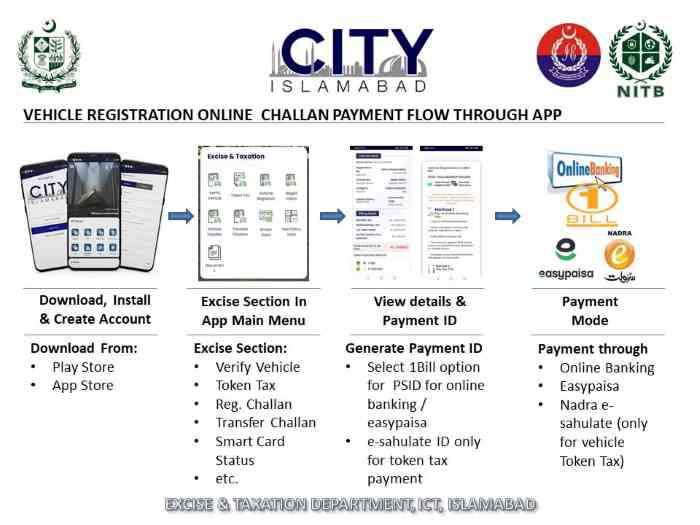
ePay Punjab is the official digital payment gateway for all government fees in the province. It generates a unique 17-digit PSID for each transaction, which you can pay through multiple channels.
4.1 How to Pay Annual Motor Vehicle Token Tax Online
Step-by-step token tax payment:
- Open ePay Punjab app or visit the web portal.
- Select “Excise & Taxation” → “Motor Vehicle Token Tax.”
- Enter your vehicle registration number.
- System displays the amount due (based on engine capacity and filer status).
- Click “Generate PSID” – a 17-digit number appears.
- Choose payment channel (mobile banking, internet banking, ATM, over-the-counter).
- Complete payment and save the receipt.
Deadline: Token tax must be paid by March 31 each year. Late payments incur a penalty of PKR 100 per month for motorcycles and PKR 500 per month for cars.
4.2 How to Pay Registration and Transfer Fees
Same process applies:
- Select “Motor Vehicle Registration” or “Vehicle Transfer” in ePay Punjab.
- Enter CNIC or application ID.
- Generate PSID.
- Pay via any supported channel.
Supported payment channels:
| Channel | Examples |
|---|---|
| Mobile banking | JazzCash, Easypaisa, Sadapay |
| Internet banking | All major bank portals |
| ATM | 1Link network ATMs |
| Over-the-counter | Any bank branch |
| Telecom agents | Jazz, Zong, Telenor outlets |
4.3 Complete Fee Breakdown for Motorcycles and Cars
Motorcycle registration fees (waived under current relief package):
| Engine capacity | Standard registration fee | Current waiver |
|---|---|---|
| Up to 70cc | PKR 1,000 | 100% waived |
| 71–100cc | PKR 1,500 | 100% waived |
| 101–125cc | PKR 2,000 | 100% waived |
| 126–150cc | PKR 2,500 | 100% waived |
Additional benefits for motorcycle owners:
- Monthly fuel subsidy of PKR 2,000.
- Discounted petrol at PKR 100 per liter (up to 20 liters/month).
Car registration fees (based on invoice value):
| Engine capacity | Registration fee (% of invoice) | Example (PKR 2.5M invoice) |
|---|---|---|
| Up to 1000cc | 1% | PKR 25,000 |
| 1001–2000cc | 2% – 3% | PKR 50,000 – 75,000 |
| Above 2000cc | 4% | PKR 100,000+ |
Annual token tax rates:
| Vehicle type | Engine capacity | Annual token tax |
|---|---|---|
| Motorcycle | Up to 250cc | PKR 400 – 800 |
| Car | Up to 1000cc | PKR 3,000 – 6,000 |
| Car | 1001–1800cc | PKR 8,000 – 15,000 |
| Car | Above 1800cc | PKR 15,000 – 30,000 |
4.4 Filer vs Non-Filer: What’s the Difference?
The Federal Board of Revenue (FBR) classifies taxpayers as “filer” (those who file annual income tax returns) and “non-filer” (those who do not). Non-filers pay significantly higher rates:
- Withholding tax on car purchase: Filers pay 1%; non-filers pay 2% to 3%.
- Professional tax: Non-filers pay an additional PKR 1,000–5,000 annually.
- Registration fee difference: Up to 50% higher for non-filers.
Tip: File your income tax return before buying a vehicle to save thousands of rupees.
4.5 Electric Vehicle (EV) Registration Benefits
The Punjab government promotes EVs with substantial fee reductions:
- 50% reduction in one-time registration fee.
- 100% waiver on annual token tax for the first three years.
- 50% reduction on token tax for subsequent years.
- Priority processing at Excise offices.
- Exemption from certain environmental levies.
Note: Non-filer withholding tax rates still apply to EVs.
4.6 Online Registration Calculator
The Excise Department provides an online calculator on the MTMIS portal. Enter:
- Vehicle type (car, motorcycle, commercial).
- Engine capacity (CC).
- Invoice value (or customs-assessed value for imports).
- Filer or non-filer status.
- City of registration.
The calculator returns the exact total cost instantly.
5. How to Verify Vehicle Registration Status Online (CNIC or Plate Number)
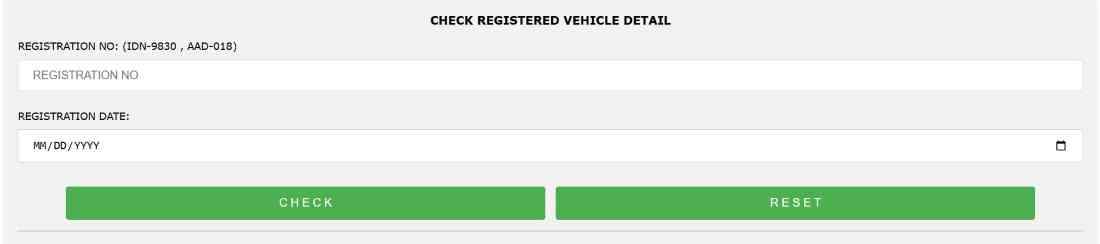
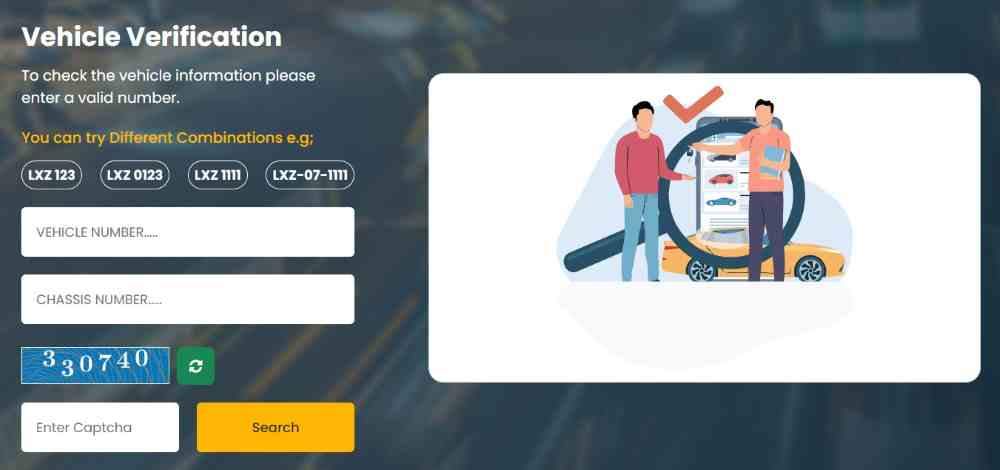
Verifying a vehicle’s registration status is essential before buying a used car or motorcycle. MTMIS provides three verification methods.
5.1 Verification by Registration Number (Number Plate)
- Go to mtmis.excise.punjab.gov.pk.
- Enter the full registration number (e.g., LEA-1234).
- Click “Verify.”
- The system displays:
- Owner’s full name and CNIC.
- Vehicle make, model, year, color.
- Engine and chassis numbers.
- Registration date and expiry.
- Token tax paid status and last payment date.
- Any outstanding e-challans or fines.
- Stolen vehicle report (if applicable).
5.2 Verification by CNIC
- On the MTMIS portal, select “Verify by CNIC.”
- Enter the 13-digit CNIC number.
- The system lists all vehicles registered under that CNIC, along with each vehicle’s current status.
Use case: Buyers can verify that the seller actually owns the vehicle they are selling.
5.3 SMS Verification
- Open your phone’s messaging app.
- Type the vehicle registration number (e.g., LEA1234 – no dash).
- Send to 8785.
- Within seconds, you receive an SMS with:
- Owner name.
- Vehicle model.
- Token tax validity.
- Any outstanding fines.
Cost: Standard SMS rates apply (approximately PKR 2–5).
5.4 What Information Does MTMIS Verification Show?
The verification report is comprehensive:
| Field | Details |
|---|---|
| Owner information | Full name, CNIC, address |
| Vehicle specifications | Make, model, year, color, engine number, chassis number |
| Registration details | Original registration date, current number, city |
| Tax compliance | Token tax paid status, last payment, next due date |
| Financial liabilities | Outstanding e-challans, unpaid taxes |
| Legal status | Stolen report, court cases, accident history |
5.5 Checking Engine and Chassis Numbers Online
MTMIS displays the registered engine and chassis numbers for every vehicle. When buying a used vehicle:
- Physically check the engine number (stamped on the engine block).
- Physically check the chassis number (stamped on the chassis frame).
- Compare with MTMIS data.
Any mismatch indicates:
- Tampering.
- Stolen vehicle with fake documents.
- Illegal registration.
Do not proceed with the purchase if numbers do not match.
5.6 Checking e-Challan (Traffic Fine) Status
MTMIS is integrated with Punjab Police’s e-challan system. When you verify a vehicle, any unpaid traffic fines linked to that registration number appear automatically.
Important: Unpaid e-challans transfer with the vehicle ownership. Buyers should insist that sellers clear all fines before the sale. You can check fines by entering the registration number on MTMIS or sending an SMS to 8785.
6. Smart Card vs E-Registration Card (ERC): What’s the Difference?
The Excise Department issues two types of registration documents. Both are legally valid proofs of ownership.
6.1 E-Registration Card (ERC) – Digital Document
What it is: A PDF document available for immediate download after successful registration.
How to get it:
- After registration, visit vrcentpunjab.com.
- Enter registration number and chassis number.
- Download the ERC instantly.
Validity: Legally valid as proof of ownership. Can be printed or stored on your phone.
Advantages:
- Instant availability – no waiting.
- Free to download multiple times.
- No risk of loss – you can always re-download.
6.2 Physical Smart Card – PVC Card
What it is: A durable, credit-card-sized PVC card delivered to your address.
Issuance time: 7 to 14 days after registration.
How to track delivery:
- Visit MTMIS portal → “Smart Card Status.”
- Enter tracking number or CNIC.
- View status: Processing → Dispatched → Out for Delivery → Delivered.
Replacement fee: PKR 500 to PKR 1,500 if lost or damaged.
6.3 Comparison Table
| Feature | Smart Card (Physical) | E-Registration Card (Digital) |
|---|---|---|
| Format | PVC plastic card | PDF document |
| Issuance time | 7–14 days | Instant |
| Legal validity | Yes | Yes |
| Replacement cost | PKR 500–1,500 | Free re-download |
| Durability | Weatherproof | Requires printing or digital storage |
| Best for | Daily use, glovebox | Immediate proof, backup |
6.4 What to Do If You Lose Your Original Registration Book
If you lose your physical registration book or smart card:
- File a police report (FIR) if stolen.
- Visit your local Excise office with:
- Written application explaining the loss.
- Copy of your CNIC.
- FIR copy (if stolen).
- Pay duplicate issuance fee (PKR 500–1,500).
- Complete biometric verification.
- Receive a duplicate smart card within 7–14 days.
Note: The original registration is invalidated in the MTMIS database to prevent fraud.
7. How to Transfer Vehicle Ownership Online (Complete Process)
Vehicle ownership transfer in Punjab is now fully digital. Both buyer and seller complete biometric verification using the Pak-ID app, and the system updates ownership within 48 hours.
7.1 Can You Transfer Without the Seller Present?
No – both parties must complete biometric verification. But this can be done remotely from anywhere in the world. Neither party needs to visit an Excise office or be physically together.
7.2 Step-by-Step Online Transfer Process
Step 1 – Buyer pays transfer fee
- Buyer logs into ePay Punjab app.
- Select “Vehicle Transfer.”
- Enter vehicle registration number.
- System calculates fee based on engine capacity.
- Generate PSID and pay.
- Save the transaction ID.
Step 2 – Initiate transfer request
- Either buyer or seller opens Pak-ID app.
- Navigate to “Vehicle Transfer.”
- Enter vehicle details and the CNIC of both parties.
- Submit request.
Step 3 – Buyer biometric verification
- Buyer receives notification in Pak-ID app.
- Completes fingerprint or Face ID scan.
- System confirms success.
Step 4 – Seller biometric verification
- Seller receives notification in Pak-ID app.
- Completes fingerprint or Face ID scan.
- System confirms success.
Step 5 – Finalization
- MTMIS database updates ownership instantly.
- Transfer is finalized within 48 hours.
- New E-Registration Card issued in buyer’s name.
- Buyer can download ERC immediately.
7.3 Transfer Fee Structure
Car transfer fees:
| Engine capacity | Transfer fee |
|---|---|
| Up to 1000cc | PKR 3,025 |
| 1001–1800cc | PKR 6,050 |
| Above 1800cc | PKR 12,100 |
Motorcycle transfer fees:
Completely waived under the relief package. Free transfer for all motorcycles.
7.4 Registering a Vehicle in Punjab with a Sindh CNIC
Yes, you can register a vehicle in Punjab even if your CNIC is from Sindh. The process requires additional steps:
- Obtain a No Objection Certificate (NOC) from the Sindh Excise Department.
- Submit the NOC to the Punjab Excise Department.
- Provide vehicle clearance certificate (no outstanding taxes in Sindh).
- Submit police 15 report for security verification.
- Complete biometric verification at a Punjab Excise office.
- Pay inter-province transfer fee (additional PKR 2,000–5,000).
- Receive new Punjab registration number.
Result: The previous Sindh registration is cancelled, and the vehicle gets a new Punjab number plate.
8. Special Registration Cases: Imported, Commercial, and Electric Vehicles
8.1 Registering an Imported (Reconditioned) Car
Importing and registering a reconditioned car involves customs clearance, inspection, duty payment, and then standard Excise registration.
Step-by-step process:
- Customs clearance – Submit all import documents to Pakistan Customs. Pay applicable import duties (varies by engine size and age).
- Vehicle examination – Have the vehicle physically inspected at the port or at an Excise inspection center.
- Gather import documents – Customs clearance certificate, bill of lading, commercial invoice, and certificate of origin.
- Visit Excise office – Submit import documents along with standard registration forms.
- Biometric verification – Complete fingerprint or Face ID scan via Pak-ID.
- Pay registration fees – Fees calculated based on customs-assessed value (not the purchase price abroad).
- Receive registration – E-Registration Card issued with new Punjab registration number.
Additional requirements for imported cars:
- Must be left-hand drive (or converted to left-hand drive). Exceptions for vintage vehicles over 30 years old.
- Must pass emissions and roadworthiness tests at an authorized center.
- All customs duties and taxes must be fully paid with receipts.
8.2 Commercial Vehicle Registration
Commercial vehicles – taxis, buses, trucks, delivery vans – can be registered online through MTMIS and DVRS, but with additional requirements and higher taxes.
Additional requirements:
- Fitness certificate – Vehicle must pass a commercial fitness inspection (brakes, lights, emissions, load capacity).
- Route permit – Required for public service vehicles operating on fixed routes.
- Commercial driving license – Owner or operator must hold a valid commercial driving license.
- GPS tracking – Mandatory for certain vehicle types (e.g., school vans, passenger buses).
Commercial vehicle fee structure:
| Vehicle type | Registration fee | Annual token tax |
|---|---|---|
| Light Transport Vehicle (LTV) | PKR 10,000 – 25,000 | PKR 15,000 – 30,000 |
| Heavy Transport Vehicle (HTV) | PKR 25,000 – 50,000 | PKR 40,000 – 80,000 |
| Public Service Vehicle (PSV) | PKR 15,000 – 35,000 | PKR 25,000 – 50,000 |
8.3 Electric Vehicle (EV) Registration Details
Benefits:
- 50% reduction in one-time registration fee.
- 100% waiver on annual token tax for first 3 years.
- 50% reduction on token tax for subsequent years.
- Priority processing at Excise offices.
- Exemption from environmental levies (e.g., air quality fee).
Documents required for EV registration:
- Standard registration documents (Form-F, CNIC, invoice).
- Manufacturer’s certificate confirming electric powertrain.
- Battery warranty and specifications document.
- Charging equipment certification (if provided with the vehicle).
Tax example: For an EV with invoice value of PKR 4 million, registration fee would be 1% (PKR 40,000) instead of 4% (PKR 160,000) for a comparable petrol car.
9. Personalized and Fancy Number Plates via E-Auction
The Excise Department holds periodic e-auctions where citizens can bid for attractive or personalized registration numbers. The entire process – registration, bidding, payment – is online.
9.1 How to Apply for a Personalized Number Plate
- Wait for the auction announcement on the Excise Department website or e-auction app.
- Register as a bidder using your CNIC and mobile number.
- Browse the list of available numbers.
- Place bids during the active auction period.
- If you win, pay the amount via ePay Punjab within the deadline.
- The fancy number is assigned to your vehicle, and new plates are manufactured.
9.2 How to Participate in a Punjab Excise E-Auction
Step-by-step:
- Download the e-auction app – Search “Punjab Excise E-Auction” on app stores or visit the web portal.
- Register – Create an account using your CNIC and mobile number. Pay a refundable security deposit (typically PKR 10,000 for cars, PKR 2,000 for motorcycles).
- Browse numbers – View numbers by category (motorcycle, private car, commercial vehicle). Numbers are displayed with reserve prices.
- Select your number – Click on the number you want to bid on.
- Place your bid – Enter your bid amount. The system shows the current highest bid.
- Monitor the auction – Receive notifications when you are outbid. Increase your bid if desired.
- Win the auction – If your bid is highest when the auction closes, you are declared the winner.
- Pay the winning amount – Use ePay Punjab to pay within 7 days. The security deposit is adjusted against the final price.
- Receive the number – The fancy number is assigned to your vehicle, and new number plates are dispatched within 2–3 weeks.
Key dates: The February auction typically opens in early February and closes on March 2. Successful bidders are displayed on the app and portal.
9.3 Base Prices for Premium Numbers
| Number category | Reserve price (minimum bid) |
|---|---|
| Single-digit (1, 3, 9, etc.) | PKR 100,000 |
| Double-digit (12, 33, 55, 78, etc.) | PKR 50,000 |
| Triple-digit (123, 333, 456, etc.) | PKR 25,000 |
| Special number (786) | PKR 100,000 |
| Special number (999) | PKR 75,000 |
| Special number (111) | PKR 75,000 |
9.4 What Happens If a Successful Bidder Fails to Pay?
If the winner does not pay the full amount within the specified deadline:
- The security deposit is forfeited.
- The number is re-auctioned in the next cycle.
- The bidder may be temporarily banned from future e-auctions.
9.5 How Long to Receive Official Number Plates in Lahore?
After winning and paying for an e-auction number:
- Plates are manufactured at centralized facilities.
- Dispatched via courier to the registered address.
- Delivery time: 2 to 3 weeks on average.
- Tracking available through the e-auction portal.
10. Tracking Applications, Checking Status, and Updating Records
10.1 How to Track Your Registration Application
- Visit mtmis.excise.punjab.gov.pk.
- Click “Application Tracking.”
- Enter your application number or tracking number.
- Enter the vehicle’s chassis number (last 5 digits).
- Click “Verify.”
Status meanings:
| Status | Meaning |
|---|---|
| Submitted | Application received, pending document check. |
| Documents Verified | All papers approved. |
| Biometric Pending | Awaiting fingerprint or face scan. |
| Payment Due | Fees not yet paid. |
| Under Processing | All requirements met, being processed. |
| Registration Number Issued | Registration complete. |
| Card Dispatched | Smart card sent via courier. |
| Delivered | Smart card delivered. |
10.2 How to Check Vehicle Smart Card Status Online
- Visit vrcentpunjab.com or the MTMIS smart card section.
- Enter registration number or CNIC.
- View status: Processing → Printing → Dispatched → Delivered.
10.3 How to Check Vehicle Registration Status by CNIC
- On MTMIS portal, select “Verify by CNIC.”
- Enter owner’s CNIC.
- View all vehicles registered under that CNIC, with each vehicle’s current status.
10.4 How to Update Your Mobile Number in the Excise Database
Why it matters: You will miss SMS alerts for token tax deadlines, smart card delivery, and transfer requests if your number is outdated.
How to update:
- Visit your nearest e-Khidmat Markaz or Excise office.
- Bring your CNIC and vehicle registration documents.
- Submit a written application for mobile number update.
- Complete biometric verification (for security).
- The update reflects in MTMIS within 48 hours.
Online method: Some users can update via the Excise Department’s online portal, but in-person biometric verification may still be required.
10.5 What to Do If MTMIS Shows Incorrect Owner Information
Immediate action:
- Visit your local Excise and Taxation Office.
- Bring:
- Original vehicle registration documents.
- Copy of your CNIC.
- Proof of purchase (sales invoice, sale agreement).
- Any previous registration books or smart cards.
- Submit a written application explaining the discrepancy.
- Excise officer verifies documents and cross-checks MTMIS.
- Correction request is submitted.
- Typically corrected within 7–14 days.
Do not ignore incorrect data – it can prevent you from selling the vehicle or paying token tax online.
Frequently Asked Questions (FAQ)
1. How can I register my car online in Punjab?
Use the Dealer Vehicle Registration System (DVRS) for new cars through an authorized dealer. For used cars, visit an Excise office after completing biometrics via Pak-ID and paying fees via ePay Punjab.
2. What is the ePay Punjab app used for in vehicle registration?
It is used to pay all vehicle registration fees, token tax, transfer fees, and e-auction payments by generating a 17-digit PSID. Payment can be made via mobile banking, internet banking, ATMs, or bank over-the-counter.
3. What documents are required for new car registration in Punjab?
Application for Registration (Form-F), original sales certificate, original sales invoice, copy of owner’s CNIC, proof of fee payment, and biometric verification confirmation.
4. How do I verify my vehicle registration status online (MTMIS)?
Enter your registration number at mtmis.excise.punjab.gov.pk or send your registration number via SMS to 8785. You will receive owner details, tax status, and outstanding fines.
5. Can I register a vehicle in Punjab if I have a Sindh CNIC?
Yes, after obtaining a No Objection Certificate (NOC) from the Sindh Excise Department and completing registration at a Punjab Excise office with biometric verification.
6. How do I pay my annual motor vehicle token tax online?
Generate a PSID through the ePay Punjab app or MTMIS portal, then pay via mobile banking, internet banking, ATM, or bank over-the-counter. Payment reflects instantly.
7. What is the Dealer Vehicle Registration System (DVRS)?
DVRS is a real-time online portal that allows authorized dealers to register new vehicles instantly at the point of sale, including document submission, fee generation, and biometric verification.
8. How can I track the delivery of my smart card?
Visit the MTMIS portal, navigate to “Smart Card Status Check,” and enter your tracking number or CNIC to view dispatch and delivery status.
9. What is the penalty for late vehicle registration in Punjab?
Registration must be completed within 30 days of purchase. Delays incur penalties from PKR 500 to PKR 8,000, increasing progressively each month.
10. Can I check the engine and chassis number online via MTMIS?
Yes, MTMIS displays the registered engine and chassis numbers. Always physically verify these numbers on the vehicle before buying.
11. How do I calculate the total registration cost for a hybrid car?
Total cost includes registration fee (percentage of invoice based on engine capacity), token tax (annual), income tax (filer vs non-filer), and professional tax. Use the online calculator on MTMIS for exact amounts.
12. How can I verify if a vehicle has any outstanding traffic fines?
MTMIS displays e-challan status and outstanding fines. Unpaid fines must be cleared before ownership transfer or token tax renewal.
13. What is the procedure for registering an imported (reconditioned) car?
Complete customs clearance, pay import duties, undergo vehicle inspection, submit import documents at an Excise office, complete biometric verification, and pay registration fees based on customs-assessed value.
14. Can I transfer vehicle ownership without the seller being present?
Both parties must complete biometric verification using the Pak-ID app, but this can be done remotely. Physical presence is not required.
15. How do I use the Pak Identity app for vehicle biometrics?
Download the Pak ID app, register with your CNIC, navigate to “Vehicle Verification,” and complete fingerprint or facial recognition as prompted.
16. What is the difference between a smart card and an e-registration card?
The smart card is a physical PVC card delivered within 7–14 days. The e-registration card (ERC) is a digital PDF available for immediate download and printing. Both are legally valid.
Disclaimer
This guide provides general information about vehicle registration in Punjab. Fees, taxes, and procedures are subject to change by the Punjab Excise, Taxation and Narcotics Control Department. Always verify current requirements with official government sources before completing any transaction.

Add a Comment