
FESCO Online Bill Check by 14-Digit Reference Number provides Faisalabad Electric Supply Company consumers with instant access to electricity bills, duplicate copies, payment status, and consumption details through secure digital platforms. This in-depth guide explains every aspect of managing your FESCO electricity bill efficiently, from locating your reference number to advanced saving strategies.
Here are the key learnings you will gain:
- ✅ Precise steps to check and download your FESCO bill instantly using the 14-digit reference number
- ✅ Detailed explanations of current electricity unit rates, protected vs unprotected categories, and realistic bill estimates
- ✅ Multiple authentic payment options including mobile wallets, banking apps, and official channels
- ✅ How to access old bills, payment history, and verify paid status
- ✅ Practical tips for reducing consumption during peak hours and identifying high-usage appliances
- ✅ Official mobile app features, SMS services, and troubleshooting common issues
- Read More: PESCO Online Bill Check by 14-Digit Reference Number
- Read More: MEPCO Online Bill Check by 14 Digit Reference Number
- Read More: EOBI Pension Check Login – Step-by-Step Guide To Check
FESCO Online Bill Check by 14-Digit Reference Number
What is FESCO and What is a FESCO Bill?
FESCO, Faisalabad Electric Supply Company, serves as a leading electricity distribution company in Pakistan, responsible for reliable power supply to millions across Punjab regions. A FESCO bill is the monthly invoice detailing your electricity consumption in units (kWh), applicable charges, taxes, and total payable amount.
This official document ensures transparency in billing under NEPRA regulations.
- Includes current meter reading, previous reading, units consumed
- Lists energy charges, fixed charges, GST (17%), electricity duty, PTV fee (Rs. 35), fuel price adjustments
- Shows due date to avoid late payment surcharges
Why Check FESCO Online Bill? (Benefits, Convenience, No Paper Bill Needed)
Checking your FESCO online bill delivers immediate convenience, eliminating dependency on physical delivery which can be delayed or lost. Digital access allows real-time viewing of due dates, amounts, and breakdowns from any device.
Key advantages include eco-friendly paperless process, quick duplicate generation, and easy sharing for records.
- Access anytime, anywhere with internet
- Instant duplicate bill for payments
- Track consumption patterns to control costs
- Receive timely reminders via SMS or email
Overview of the 14-Digit Reference Number: What It Is and Why It’s Essential
The 14-digit reference number acts as your unique account identifier for all FESCO digital services, combining consumer ID with verification codes for secure bill retrieval.
This number is mandatory on official and authorized portals, ensuring accurate and private access.
- Prevents errors in bill lookup
- Required for payments, history, and complaints
- Differentiates from shorter 10-digit consumer ID
Where is the FESCO Reference Number Located on Your Bill?
Your 14-digit reference number appears prominently in the top-left corner of any bill copy, often in a highlighted box for easy spotting.
It is printed without spaces or dashes.
- Usually near consumer name, address, and meter details
- Check any previous paid bill if current copy is unavailable
- Example format: Continuous 14 digits
Difference Between 14-Digit Reference Number and 10-Digit Consumer ID/Customer ID/Consumer Number
The 14-digit reference number is the complete, preferred identifier for online checks, while the 10-digit consumer ID (or customer ID) is a shorter version sometimes accepted on portals.
Both link to the same account, but reference number offers higher accuracy.
- 14-digit: Full code with check digits for validation
- 10-digit: Shorter account reference
- Use 14-digit for reliability on most sites
What is a CA Number, Meter Number, or Consumer File Number on FESCO Bill?
CA number (Consumer Account), meter number, and consumer file number serve as supplementary identifiers on your bill for verification during complaints or new connections.
They support internal tracking but are not primary for online bill viewing.
- CA number: Account linkage code
- Meter number: Device-specific serial
- Consumer file number: Filing reference
How to Find FESCO Reference Number if You Lost Your Bill?
Retrieve your lost reference number by calling FESCO helpline (UAN 118 or 0800-66554), visiting a customer service center with CNIC, or checking registered SMS/email alerts.
Authorized portals may allow lookup with consumer ID.
- Helpline provides instant details after verification
- Office visit requires identity proof
- Register mobile for future alerts
How to Check FESCO Online Bill by 14-Digit Reference Number?
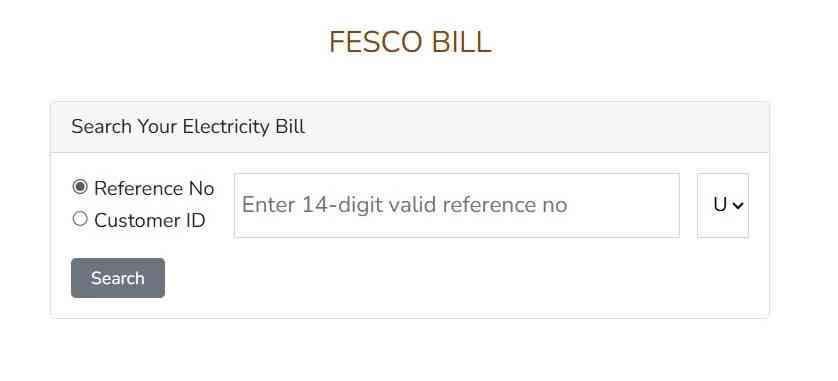
Yes, checking your FESCO online bill is straightforward and instant by entering the 14-digit reference number on trusted portals. This displays current amount, due date, units consumed, and full breakdown.
Reliable platforms ensure fast, secure access.
Step-by-Step Guide to FESCO Online Bill Check by 14-Digit Reference Number
Visit a user-friendly FESCO bill portal, enter your 14-digit reference number without spaces, and submit to view details immediately.
Process takes under 10 seconds.
- Navigate to the bill check section
- Input exact 14-digit reference
- Submit query
- View summary (amount, due date)
- Access full bill view or download
How Can I View Full FESCO Bill Details After Entering Reference Number?
Click “View Full Bill” or similar to see comprehensive details including slab-wise charges, taxes, adjustments, and meter readings.
This reveals consumption trends.
- Energy charges by slab
- Government taxes and surcharges
- Previous adjustments applied
How to Check FESCO Bill Online Without Downloading It?
Use preview or summary mode on portals to see key info like amount and due date without full PDF download.
Perfect for quick mobile checks.
- Saves mobile data
- Instant reference
- No storage needed
Common Errors When Entering 14-Digit Reference Number and How to Fix Them
Errors often stem from spaces, typos, or outdated numbers.
Verify and retry.
- Invalid format → Remove spaces, ensure 14 digits
- Bill not found → Confirm current cycle or use consumer ID
- Technical issue → Try alternative portal or refresh
How to Download, Print, and View FESCO Duplicate Bill Online?
Downloading and printing a FESCO duplicate bill is official and free after viewing. This digital copy serves as valid proof for payments.
How to Download FESCO Online Bill PDF?
Select download option post-view to save PDF with all details.
Creates permanent record.
- Full breakdown included
- Official format
- Easy sharing
Step-by-Step: Print Your FESCO Bill Online for Payment
View full bill, use Ctrl+P (or print icon), select printer, and print clear copy.
Adjust for readability.
- Open complete bill
- Initiate print command
- Choose settings
- Print physical copy
How to Get FESCO Duplicate Bill if Original is Lost?
Generate duplicate instantly via portal with reference number.
No office visit required.
- Immediate access
- Valid for banks/agents
- Free service
Benefits of Downloading Duplicate FESCO Bill Online
Offers convenience, security, and environmental benefits while preventing late fees.
- Always available digitally
- Backup against loss
- Quick for urgent payments
How to Check FESCO Previous Month Bill or Old Bill History?
Access up to 12 months of previous FESCO bills and history directly online. Portals display paid/unpaid status, units, and amounts.
How Do I Get My Old FESCO Bill Online?
Enter reference number and select history section for past cycles.
Download as needed.
- 12-month archive
- Detailed records
- Useful for audits
How to Check FESCO Online Bill Check Previous Month?
Choose prior month from dropdown after initial view.
Instant load.
- Compare monthly changes
- Verify past payments
- Budget planning aid
How to Access FESCO 12-Months Bill History and Payment Records?
Navigate to history tab for charts, lists, and status.
Track long-term patterns.
- Monthly summaries
- Paid indicators
- Consumption graphs
How to Check FESCO Previous Month Electricity Bill?
Use same reference and select cycle.
Simple retrieval.
- No extra registration
- Historical insights
How to Check if FESCO Bill is Paid or Not?
Verify FESCO bill paid status via history or payment confirmation. Updates reflect quickly post-transaction.
How Do I Check My FESCO Paid Bill Status?
Review history for “Paid” markers or zero balance.
Bank receipts confirm.
- Visual indicators
- 12-month log
- Real-time updates
How to View FESCO Bill Payment History Online?
Access dedicated history for dates, amounts, methods.
Comprehensive log.
- Transaction proof
- Adjustments noted
- Dispute support
How Do I Know if My Bill is Paid or Not?
Look for status flags or SMS confirmations.
Avoid surcharges.
- Green/paid icons
- Balance zero
- Bank verification
What Info is in FESCO Bill Payment History?
Details include dates, amounts paid, methods, balances, and notes.
Full transparency.
- Method (wallet/bank)
- Adjustments/refunds
- Historical trends
Can I Check FESCO Electricity Bill by CNIC Number?
No, direct FESCO bill check by CNIC number is not available online. Official systems require the 14-digit reference number for privacy and accuracy.
CNIC aids registration only.
How to Check FESCO Bill by CNIC Number Online?
Not supported directly.
Use reference number alternative.
- Privacy-focused
- Reference mandatory
Is FESCO Bill Check by CNIC Number Possible Officially?
Official portals do not support CNIC-only checks.
Helpline fallback.
- Security measure
- Accurate matching
Alternatives if You Don’t Have Reference Number (Helpline, Office Visit, etc.)
Contact UAN 118, visit center with CNIC, or check old SMS.
Get reference quickly.
- Verification process
- In-person help
- Mobile registration
How to Register or Update CNIC with FESCO for Better Services?
Update CNIC on portal or app for alerts and linking.
Enhances access.
- Online submission
- Verification steps
- Improved notifications
FESCO Electricity Unit Rates and Bill Calculation
FESCO follows NEPRA-approved slab-based tariffs with protected (low consistent use) and unprotected categories. Rates remain stable with minor adjustments.
Protected benefits low users.
What is the Rate of 1 Unit in Electricity for FESCO?
Rates vary: Protected 1-100 units ~Rs. 10.54, up to 200 ~Rs. 13.01; unprotected starts ~Rs. 22.44, rising to ~Rs. 47+ for high slabs.
Taxes extra.
- Protected lower base
- Unprotected progressive
- Subject to NEPRA
Latest FESCO Tariff Rates for Residential, Commercial, and Industrial Consumers
Residential A-1: Protected slabs low, unprotected higher. Commercial/industrial: Fixed + variable, TOU options.
Updated per government.
- Residential protected: Subsidy benefits
- Minimum charges apply
- Industrial TOU savings
What is the Bill for 500 Units of Electricity in Pakistan (FESCO)?
Unprotected 500 units: Approximately Rs. 15,000–25,000+ after slabs and 17% GST.
Higher slabs dominate.
- Major energy portion
- Taxes add 20-30%
- Estimate tools accurate
How Much Bill for 700 Units, 1000 Units, 200 Units, or 300 Units in FESCO?
200 units protected: ~Rs. 3,000–5,000 300 units: ~Rs. 6,000–10,000 700 units: ~Rs. 25,000+ 1000 units: Much higher top slabs.
- Slab progression key
- Protected savings
- Calculator recommended
How Much Bill for 1 Hour AC Usage in Pakistan?
1-2 ton AC uses 1-2 units/hour, costing Rs. 30–100 depending on slab.
Daily 8 hours adds significantly.
- Peak costlier
- Efficient models help
- Monitor usage
What Uses the Most Electricity at Home? Tips to Reduce Your FESCO Bill
Top consumers: Air conditioners, refrigerators, water pumps, heaters, irons.
Tips: LED bulbs, off-peak usage, regular maintenance.
- Unplug idle devices
- Insulate rooms
- Energy-efficient appliances
How to Use FESCO Bill Calculator for Estimated Bill Amount?
Input units in online calculators for slab-based estimate with taxes.
Close to actual.
- Select category
- Include GST
- Plan ahead
How to Pay FESCO Electricity Bill Online?
Pay FESCO bills securely online via multiple channels for instant confirmation. Avoid queues.
How to Pay FESCO Bill Online? (Best Methods)
Mobile wallets (Easypaisa, JazzCash) or bank apps top choices.
Convenient and trackable.
- 24/7 access
- SMS receipts
- Low/no fees
How to Pay FESCO Electricity Bill Online via Banking Apps (e.g., myABL, GPay)?
Log in, select bill pay, choose FESCO, enter reference, confirm with OTP.
Secure process.
- Allied Bank myABL
- Other banks supported
- Instant update
How to Pay FESCO Bill on Easypaisa, JazzCash, or Other Mobile Wallets?
App: Select utility, FESCO, reference, pay with PIN.
Agent cash deposit option.
- Easy registration
- Wide network
- No bank needed
Best Way to Pay FESCO Bills Online Without Bank Account?
Mobile wallets like Easypaisa/JazzCash with cash deposit.
Accessible for all.
- Simple setup
- Agent locations
- Secure
Can I Pay FESCO Bill Through Mobile App?
Yes, via official FESCO apps or wallets.
Integrated convenience.
- Bill pay feature
- Usage monitor
- Notifications
Which App is Best for FESCO Bill Payment?
JazzCash/Easypaisa for ease; bank apps for added security.
High success rates.
- User-friendly
- Reliable
- Reviews positive
Is There a FESCO Mobile App? How to Download and Use It?
Yes, official FESCO Light (and Smart) apps facilitate bill checks, complaints, and more. Download from Google Play.
Is There an Official FESCO Mobile App?
FESCO Light by PITC is official for consumer facilitation.
Updated regularly.
- Billing details
- Load schedules
- Complaints
How to Download FESCO Light or FESCO Smart App?
Search “FESCO Light” or “FESCO Smart” on Play Store, install free.
Android primary.
- Official developer
- Safe download
- Easy install
How to Check FESCO Bill Using Mobile App?
Register with reference, view current/history.
Similar to web.
- Push alerts
- Offline some features
- User-friendly
Features of FESCO Mobile App (Bill Check, Complaints, Load Management, etc.)
Bill view, duplicate, complaints tracking, load shedding info.
All-in-one.
- Schedule alerts
- Usage monitor
- New connection apply
Other Ways to Check or Receive FESCO Bill
Multiple channels like SMS, email ensure bill access. Reliable backups.
How to Check FESCO Bill via SMS (8334 Short Code)?
Type “pitc” space 14-digit reference, send to 8334.
Receive summary.
- No internet required
- Quick due date
- Register first
How to Check KE Bill on WhatsApp? (Comparison with FESCO)
KE uses WhatsApp; FESCO prefers SMS/portals.
Different DISCO approaches.
- FESCO SMS primary
- Both convenient
- Portal focus
How to Get FESCO Bill via Email Alerts?
Register email on portal for automatic monthly delivery.
Eco-friendly.
- Archive easy
- No manual search
- Timely
How to Check Electricity Bill Online in Punjab (FESCO Specifics)?
Use FESCO portals for Punjab-specific tariffs/services.
Tailored accuracy.
- Regional details
- Local support
- Updated rates
Understanding FESCO Bill Components and Additional Services
Bills break down into energy, fixed, taxes for transparency. Know to manage.
What Does Each Part of FESCO Bill Mean? (Units, Taxes, GST, PTV Fee, etc.)
Units: Consumption GST: 17% PTV: Rs. 35 Others: Duty, quarterly adjustments.
Clear explanation.
- Energy main cost
- Fixed minimum
- Taxes mandatory
What is FESCO Peak Hours and How to Save Money?
Peak: Higher TOU rates evenings.
Shift usage off-peak.
- Significant savings
- Avoid AC/heaters
- Schedule wisely
How to Check Electricity Usage Online with FESCO?
App/portal history for patterns.
Monitor effectively.
- Daily/monthly
- High-use alerts
- Budget tool
What Does FESCO Do? Overview of Faisalabad Electric Supply Company
Distributes power, maintains infrastructure, bills, low losses.
High performance.
- Serves 26M+ population
- Textile hub focus
- Reliable supply
FESCO Coverage Areas and Service Districts
Faisalabad, Sargodha, Jhang, Toba Tek Singh, etc.
8+ districts.
- Urban/rural
- Industrial areas
- Punjab key
Common Questions and Troubleshooting
Solve frequent issues quickly. Smooth experience.
How to Check Electricity Bill by CNIC Number Online (Other Companies like LESCO, IESCO)?
FESCO no; others vary.
Reference primary.
- Company differences
- Mostly reference
- Helpline
How to Find Electricity Bill Without Reference Number?
Office/helpline with CNIC.
Temporary.
- Verification
- Get reference
What is the Cost of New FESCO Meter?
Varies by type/load; apply online/office.
Includes fees.
- Single/three phase
- Estimates given
- Process detailed
How to Check Last Month Paid Electricity Bill?
History section.
Status visible.
- Proof
- Records
How to Ask for an Electricity Bill or Get Duplicate?
Online reference or helpline.
Instant.
- Digital free
- Printed option
Frequently Asked Questions (FAQs)
What is the easiest way to check FESCO online bill by 14-digit reference number? Enter the 14-digit reference on a trusted portal for instant view of amount, due date, and details.
Can I check FESCO bill by CNIC number? No, reference number is required; CNIC not supported for direct check.
How do I download old FESCO bill? Access 12-month history with reference number and download PDFs.
What is the approximate bill for 500 units in FESCO? Unprotected: Rs. 15,000–25,000+ including slabs and taxes.
How to pay FESCO bill without bank account? Use Easypaisa or JazzCash with cash at agents.
Is there an official FESCO mobile app? Yes, FESCO Light app for bill check, complaints, load info.
How to know if my FESCO bill is paid? Check history for “Paid” status or confirm via payment receipt.

Add a Comment