
Every year, thousands of Pakistani citizens miss out on government job opportunities and educational quotas simply because they do not have a valid domicile certificate. This document serves as your official proof of permanent residence within a specific district or province, and without it, you cannot claim your rightful share of provincial quotas. This comprehensive digital guide walks you through every method, portal, and requirement for obtaining your domicile certificate through online systems across Punjab, Sindh, Khyber Pakhtunkhwa, and Islamabad.
What this guide covers:
- Step-by-step digital application procedures for each province
- Complete document requirements with scanning specifications
- PSID generation and mobile payment options (EasyPaisa, JazzCash)
- Application tracking, verification, and e-domicile download
- Solutions for rejected applications and urgent processing needs
Key Takeaways
- Provincial Systems Vary Widely: Punjab and KP offer fully digital domicile services, while Sindh requires a hybrid approach with physical office visits. Islamabad mandates biometric verification at the Citizen Facilitation Center regardless of online submission.
- PSID Is Your Payment Key: Every online domicile application generates a unique 17-digit PSID. You can pay this through EasyPaisa, JazzCash, or any bank’s internet banking. Cash payments at DC offices are no longer accepted.
- Doorstep Service Exists in Punjab: The Maryam Ki Dastak app sends a government facilitator to your home for document collection and certificate delivery. This completely eliminates the need to visit any government office.
- Employers Can Verify Instantly: Anyone can verify a domicile certificate’s authenticity by entering the holder’s CNIC on the provincial verification portal. Fake certificates are immediately flagged as “No Record Found.”
- Processing Takes 16 Working Days Standard: Most online applications complete within 16 working days. Urgent processing (5-7 days) is available in select districts for an additional fee ranging from Rs. 500 to Rs. 2,000.
- Read More: Digital ID card Pakistan: How to Apply Online (Pak Identity App)
- Read More: NADRA e-Sahulat Biometric Verification (Apply CNIC, FRC, B-Form)
- Read More: Family Registration Certificate (FRC): How to Apply Online
- Read More: NICOP Pakistan: How to Apply Online | Track NICOP
How To Apply For Domicile Online? | Domicile Online Apply
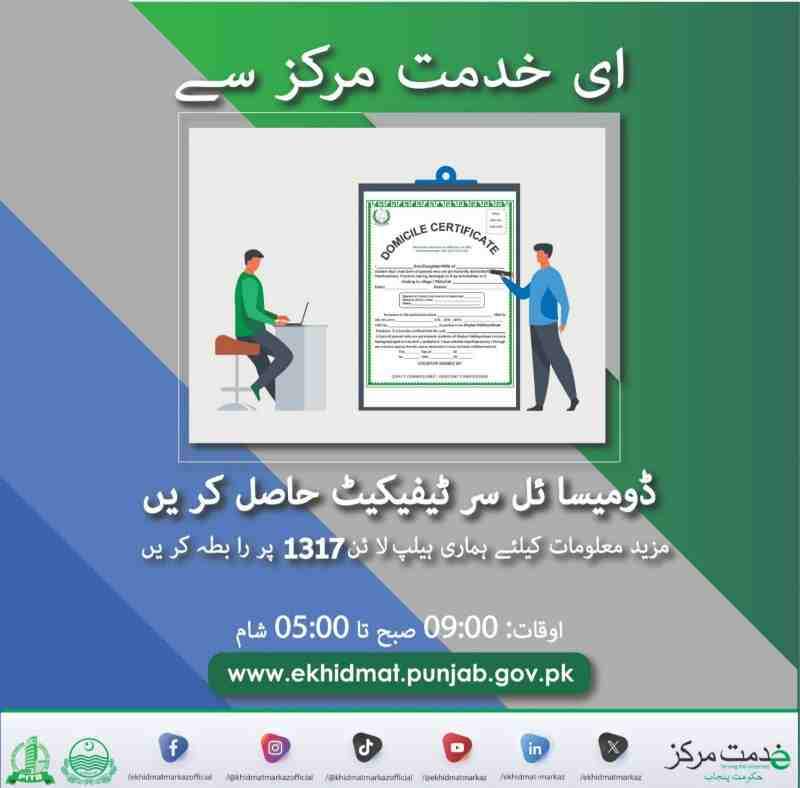
Table of Contents
What is a Domicile Certificate and Who Needs It?
A domicile certificate is an official legal document issued under the Pakistan Citizenship Act 1951 that certifies an individual’s permanent residence within a specific district or province of Pakistan. This document serves as the primary proof of residency for accessing provincial quotas, government employment, educational admissions, and various legal proceedings.
Why is a domicile certificate mandatory for government jobs in Pakistan?
Government job postings specify provincial or district quotas. A domicile certificate proves you belong to that quota category. Without a valid domicile, your application is automatically rejected regardless of qualifications.
Understanding the provincial quota system: Punjab, Sindh, KP, Balochistan
Each province reserves a percentage of government jobs and educational seats for its permanent residents. The domicile determines which quota you fall under. For example, a Punjab domicile qualifies you for Punjab quota seats in federal government jobs and educational institutions.
Domicile vs. CNIC: What is the fundamental difference?
A CNIC proves citizenship and identity nationwide. A domicile proves permanent residence in a specific province or district. You can hold a CNIC from any province, but your domicile determines your provincial quota eligibility.
Who is eligible to apply for a domicile certificate?
Pakistani citizens who have resided permanently in a district for at least three years, own property there, or have parents/spouse who are permanent residents of that district are eligible.
Can I apply for a domicile if I am under 18?
Yes, minors can apply using their B-Form and their parent’s CNIC. The domicile is issued in the minor’s name with the parent as the guardian.
Is a B-Form sufficient for a minor’s online domicile application?
Yes, a valid computerized B-Form is accepted for applicants under 18. The parent’s CNIC and proof of residence are also required.
Can overseas Pakistanis apply for a domicile online?
Yes, overseas Pakistanis can apply online using their valid Pakistani passport, NICOP, or CNIC. Proof of residence must be provided through property documents or family member affidavits.
Domicile Certificate NADRA: What is the relationship between both authorities?
NADRA verifies applicant identity through CNIC/B-Form data. The provincial district administration issues the domicile certificate after verification. The two systems are integrated to prevent duplicate and fraudulent applications.
How to Apply for Domicile Online: The General Process Across Pakistan
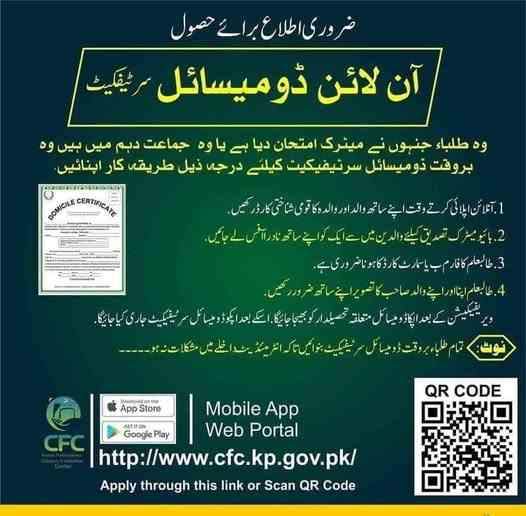
To apply for domicile online, you must visit your province’s official portal (such as domicile.punjab.gov.pk), register with your CNIC, fill Form “P”, upload scanned documents, pay the fee via a generated PSID, and track your application online until approval.
What is the Domicile Management System (DMS) and how does it work?
The Domicile Management System is a centralized digital infrastructure that manages the entire lifecycle of a domicile certificate. It receives applications, verifies documents through NADRA integration, tracks progress, and issues digitally signed certificates. The system maintains a transparent database accessible to district authorities and citizens.
Step 1: Finding the correct official website for your province
- Punjab: domicile.punjab.gov.pk
- KP: cfc.kp.gov.pk
- Islamabad: City Islamabad App
- Sindh: District-specific portals (hybrid system)
Step 2: Registering using CNIC or B-Form (mobile number verification)
Create an account by entering your CNIC or B-Form number. A one-time password (OTP) is sent to your registered mobile number for verification. Use an active SIM registered in your name.
Step 3: Filling out the online domicile application form (Form “P”)
Form “P” requires your full name, father’s name, date of birth, permanent address, district of residence, duration of stay, and property or rental details. All information must match your CNIC exactly.
Step 4: Uploading documents: Photo, CNIC, and proof of residence
Upload scanned copies of your CNIC (or B-Form), father’s or spouse’s CNIC, proof of residence (utility bill, property documents, or rent agreement), and two passport-sized photographs with blue background.
Step 5: Generating a PSID for domicile fee payment
After submitting the form, the system generates a unique 17-digit PSID (Payment Slip ID). This PSID is required for online payment through banks, mobile wallets, or ATMs.
Step 6: Submitting the application and saving the tracking ID
After payment confirmation, submit the application. The system generates a unique tracking ID. Save this ID to monitor your application status.
How to book an appointment for domicile verification online?
Some districts require biometric verification. You can book an appointment through the same portal or the relevant Assistant Commissioner’s office after online submission.
Is a physical visit to the DC office required after applying online?
In Punjab and KP, physical visits are generally not required for standard applications. Islamabad requires a physical visit to the Citizen Facilitation Center for biometric verification. Sindh still requires a physical visit to the Assistant Commissioner’s office for document verification.
How to Apply for Domicile Online in Punjab (The Complete Guide)
In Punjab, you can apply for domicile online via the Domicile Management System at domicile.punjab.gov.pk or through the “Maryam Ki Dastak” app for doorstep service. The Punjab Information Technology Board (PITB) manages this fully automated system that has processed millions of domiciles across 34 districts.
How to apply for domicile online in Lahore using the DMS portal
Step-by-Step Process:
- Visit domicile.punjab.gov.pk using any browser on computer or mobile
- Click “New Application” and select “Apply for Domicile”
- Enter your CNIC number exactly as printed on your card
- Verify through OTP sent to your registered mobile number
- Complete Form “P” with personal and residential details
- Upload scanned documents in JPEG or PDF format (max size 2MB per file)
- Generate PSID and pay the service fee of Rs. 200
- Save the tracking ID displayed after successful submission
E Khidmat Markaz Domicile online apply: What is the process?
e-Khidmat Markaz centers across Punjab offer assisted online application. You can visit any e-Khidmat Markaz, and a facilitator will help you complete the online application, scan documents, and generate the PSID for payment. This option is ideal for citizens with limited internet access.
What is the “Maryam Ki Dastak” app for domicile and how to use it?
How to Use Maryam Ki Dastak App:
- Download the official Dastak app from Google Play Store
- Register using your CNIC and active mobile number
- Select “Domicile Certificate” from the list of services
- A Dastak facilitator contacts you within 24 hours
- The facilitator visits your home to collect original documents
- Documents are submitted to the relevant authority
- Approved certificate is delivered to your doorstep
The service covers all districts of Punjab and has processed over 590,000 applications for various government services including domiciles, birth certificates, and property documents.
How to apply for domicile online in Rawalpindi (Step-by-step)
Rawalpindi residents follow the same DMS portal process. However, Rawalpindi district has additional verification requirements. After online submission, the system may require biometric verification at the nearest e-Khidmat Markaz or Assistant Commissioner’s office. Check your application status for specific instructions.
Domicile Punjab online apply: Using the e-Pay Punjab app for fee payment
The e-Pay Punjab app is the official government payment gateway. After generating the PSID on the DMS portal, open e-Pay Punjab, select “Government Fees”, enter your PSID, and complete payment through credit/debit card, internet banking, or mobile account.
How to generate a PSID for domicile fee payment in Punjab
On the DMS portal, after document upload, click “Generate PSID”. The system creates a unique 17-digit number. Copy this number before proceeding to payment.
Domicile online apply fee for Punjab residents (Service charges)
The standard service fee is Rs. 200 across most Punjab districts. Faisalabad district charges Rs. 300 as service charges, with the affidavit requirement exempted since October 2019.
How many days does it take to get a domicile online in Punjab?
Standard processing takes 16 working days from the date of successful submission and payment confirmation.
Delivery time: 16 working days vs. urgent domicile fee options
Urgent processing options are available in select districts through the Assistant Commissioner’s office. Urgent applications are processed within 5-7 working days at an additional fee.
How to download a domicile certificate online after approval in Punjab
Log into the DMS portal, navigate to “My Applications”, find your approved application, and click “Download PDF”. The downloaded e-domicile certificate is digitally signed and legally valid for all purposes.
How to Apply for Domicile Online in Sindh (Karachi & Hyderabad)

Sindh currently relies on a hybrid system; you must visit the Assistant Commissioner’s office or e-Khidmat Markaz after filling a form online, as a fully digital domicile system is still being implemented across the province. The Sindh government has announced plans to integrate domicile issuance into the Civil Registration Management System (CRMS) mobile app.
What is the website for Sindh domicile online apply? (Official portals explained)
Sindh does not have a single unified domicile portal like Punjab. Each district maintains its own system. You must visit the official website of the relevant district government or contact the Assistant Commissioner’s office directly. The CRMS mobile app launched by the Sindh Chief Minister is expected to include domicile services soon.
Domicile online apply Karachi: How to find your relevant AC office
Karachi has six districts: East, West, South, Central, Korangi, and Malir. Your domicile application must be submitted to the Assistant Commissioner’s office of the district where you reside. Check your CNIC address to determine your district.
Domicile online apply Sindh: Is the NADRA Domicile fee applicable?
The Sindh government charges approximately Rs. 200-300 as processing fee, payable via 32-A challan form at National Bank of Pakistan or through online banking where available.
Domicile certificate Karachi: Documents required for urban Sindh
Required Documents for Sindh Domicile:
- CNIC or B-Form (original and photocopy)
- Father’s or spouse’s CNIC
- Proof of residence: Utility bill (electricity, gas, or telephone)
- Property documents: Ownership deed or rent agreement
- Educational certificates (Matric or Intermediate)
- Passport-sized photographs (4 copies)
- Affidavit on stamp paper (Rs. 50-100)
Domicile certificate Sindh: Special requirements for rural vs. urban areas
Rural applicants must provide additional documents including land ownership records (Fard) or a certificate from the village council (Numberdar). Urban applicants can use utility bills and property documents.
How to pay the domicile certificate fees Karachi via challan?
Visit the Assistant Commissioner’s office to obtain a 32-A challan form. Deposit the fee at any National Bank of Pakistan branch. Attach the paid challan copy with your application documents.
Can I apply for a domicile from a different city within Sindh?
No. You must apply in the district where you have permanent residence. Applying in a different city constitutes misrepresentation and can lead to application rejection or legal consequences.
How to Apply for Domicile Online in Khyber Pakhtunkhwa (KP) & Islamabad
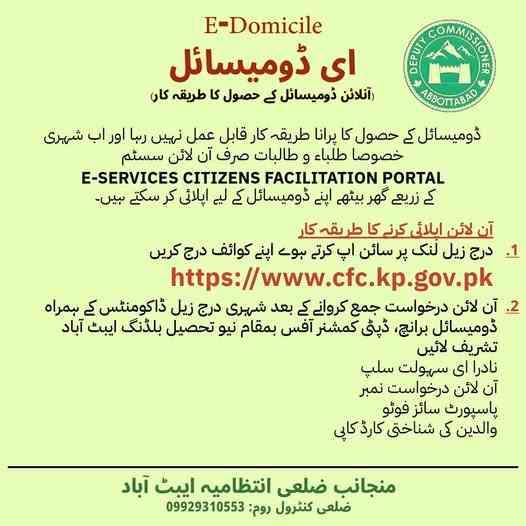
For KP domicile online registration, use the KP Citizen Portal or the e-domicile platform at cfc.kp.gov.pk. For Islamabad, download the “City Islamabad App” to start your application, but a physical visit to the G-11/4 Citizen Facilitation Center is mandatory for biometric verification.
What is the process for KP domicile online registration via the Citizen Portal?
KP Domicile Online Registration Steps:
- Visit cfc.kp.gov.pk on your computer or mobile device
- Click on “Domicile Application” and create an account
- Enter your CNIC number and verify through OTP
- Complete the online application form with personal and residential details
- Upload scanned copies of required documents (CNIC, proof of residence, photographs)
- Pay the processing fee through online banking or challan
- Fingerprint verification is integrated through NADRA’s biometric system
- Submit the application and save the transaction ID
How to track your domicile application status using the transaction ID in KP
Log into the KP Citizen Portal, enter your transaction ID in the tracking section, and view real-time status updates including “Under Review”, “Verification in Process”, “Approved”, or “Rejected”.
How to apply for a domicile in Islamabad online using the City Islamabad App
The City Islamabad App is the official mobile application for ICT residents. Download the app, register with your CNIC, select “Domicile Services”, and complete the online application. The app guides you through document upload and fee payment.
Domicile online check: Verifying your ICT application status
After submission, you will receive an SMS with your application reference number. Use this number on the City Islamabad App tracking feature or visit the Citizen Facilitation Center for status updates.
Is a physical visit to the DC office required after applying online in Islamabad?
Yes. Even after online registration, you must visit the Citizen Facilitation Center in G-11/4, Islamabad, for data entry confirmation and biometric verification. This physical visit is mandatory and cannot be bypassed.
How to book an appointment for domicile verification in Islamabad
The City Islamabad App includes an appointment booking feature. Select the service, choose a date and time, and receive a confirmation SMS. Arrive at the Citizen Facilitation Center at your scheduled time with original documents.
Read More: Pakistan Origin Card (POC): How To Apply, Fee, & Tracking
Complete List of Documents Required for Online Domicile Application
The mandatory documents for an online domicile include a scanned CNIC or B-Form, father’s CNIC, proof of residence (utility bill), two passport-sized photos, and an affidavit on stamp paper. All documents must be clear, legible, and in the specified format.
Scanned Copy of CNIC or B-Form: Resolution and size requirements
Scan your CNIC or B-Form at 300 DPI resolution. Save as JPEG or PDF. File size must not exceed 2MB per document. Ensure all text and numbers are clearly readable.
What is Form “P” and why is it required for a domicile?
Form “P” is the official application form for domicile issuance. It captures personal details, family information, residential history, and property ownership. Form “P” must be filled accurately as it forms the legal basis for the certificate.
Affidavit on Stamp Paper: Is it mandatory in every district? (Note: Faisalabad exemption)
Most districts require an affidavit on stamp paper (Rs. 50-300) affirming that the information provided is true. Faisalabad district has exempted this requirement since October 2019, only charging Rs. 300 as service fees.
Property Documents / Utility Bills / Resident Certificate: Which proof of residence is best?
Property ownership documents (Fard, registry deed) are the strongest proof of residence. Utility bills (electricity, gas) for the past six months are also acceptable. Rent agreements require additional landlord verification. Resident certificates from the village council (Numberdar) are accepted for rural areas.
Is a scanned copy of the affidavit required for online upload?
Yes. If your district requires an affidavit, you must scan the signed and stamped affidavit on judicial paper and upload it with other documents.
Is a utility bill mandatory for an online domicile if I own a house?
Yes. Even with property ownership documents, a recent utility bill (electricity or gas) in your name is required as additional proof of active residence.
Educational documents: Is the Matric certificate address proof accepted?
Matriculation and Intermediate certificates show your address at the time of examination. These are accepted as supporting documents but not as primary proof of residence. You still need a utility bill or property document.
Passport-sized photographs with blue background: How many are needed?
Two to four recent passport-sized photographs with solid blue background. Photos must be clear, front-facing, without glasses or head coverings (except religious requirements).
Domicile Online Fee Structure and Payment Methods (EasyPaisa & JazzCash)
The standard service fee for an online domicile application is Rs. 200, though Faisalabad charges Rs. 300. You can pay via EasyPaisa, JazzCash, or any bank using a PSID. Payment must be completed online through the government payment gateway.
Domicile certificate NADRA fee: Is there a separate government tax?
NADRA does not charge a separate fee for domicile issuance. The fee is collected by the provincial district administration for processing and verification services.
Punjab domicile certificate fee: Breakdown of Rs. 200 service charges
The Rs. 200 fee covers digital processing, document verification, NADRA integration, and certificate issuance. This is a service charge, not a tax.
Domicile certificate fee in Lahore vs. other districts (Is it the same?)
Most Punjab districts charge Rs. 200. Faisalabad charges Rs. 300 due to affidavit exemption. Some remote districts may charge up to Rs. 500 for additional verification costs.
Urgent Domicile fee: How much extra for fast processing?
Urgent processing fees vary by district, typically ranging from Rs. 500 to Rs. 2,000. Processing time reduces from 16 working days to 5-7 working days.
Can I pay the domicile fee through EasyPaisa or JazzCash? (Step-by-step)
EasyPaisa PSID Payment Steps:
- Open the EasyPaisa mobile app
- Tap on “Bill Payment” or “Government Fees”
- Select “Punjab e-Challan” or “Government Payment”
- Enter your 17-digit PSID number
- Review the amount and confirm payment
- Save the confirmation receipt and SMS
JazzCash PSID Payment Steps:
- Open the JazzCash mobile app
- Tap on “Pay Bills”
- Select “Government Fees” or “E-Pay Punjab”
- Enter your PSID number
- Confirm the payment amount
- Save the transaction confirmation
How to generate a PSID for domicile fee payment (Step-by-step visual guide)
PSID Generation Process:
- Complete the online application form on the domicile portal
- Upload all required documents
- Click the “Generate PSID” or “Proceed to Payment” button
- The system displays a 17-digit PSID
- Copy the PSID to your clipboard or write it down
- The PSID is also sent to your registered mobile number via SMS
- Use this PSID within 48 hours for payment
Payment Must Be Done Through Online: Why cash is not accepted at the DC office
The digital system requires online payment for automated tracking and verification. Cash payments are not accepted at DC offices because they cannot be linked to the digital application workflow. All payments must be routed through the e-Pay Punjab gateway.
Domicile certificate price in Pakistan: Province-wise comparison
- Punjab: Rs. 200 (Rs. 300 in Faisalabad)
- KP: Rs. 200-300
- Islamabad: Rs. 200-500 (depending on service)
- Sindh: Rs. 200-300 (plus challan processing fees)
How to Track Your Domicile Application Status Online
You can track your domicile application status online by visiting the same portal you applied on (e.g., domicile.punjab.gov.pk) and entering your CNIC or the 12-digit tracking ID provided after fee submission. The system provides real-time updates at each stage.
Domicile online check: Using your CNIC number to find status
On the domicile portal, navigate to “Track Application”. Enter your CNIC number without dashes. The system retrieves all applications associated with that CNIC and displays their current status.
What do the status messages mean? (Pending, Under Scrutiny, Rejected, Approved)
| Status | Meaning |
|---|---|
| Pending | Application submitted but not yet assigned to an officer |
| Under Scrutiny | Documents being verified by Assistant Commissioner’s office |
| Verification in Process | NADRA and residence verification underway |
| Approved | Application verified, certificate ready for collection/download |
| Rejected | Application failed verification; check remarks for reason |
How to track my domicile application status online without a tracking ID?
If you lost your tracking ID, use the “Recover Tracking ID” feature on the portal. Enter your CNIC and registered mobile number. The system sends your tracking ID via SMS.
How many days does it take to get a domicile online? (Timeline breakdown)
- Day 1-3: Application processing and PSID payment verification
- Day 4-10: Document scrutiny by Assistant Commissioner’s office
- Day 11-14: NADRA verification and residence confirmation
- Day 15-16: Certificate printing and digital signing
- Day 16 onward: Certificate ready for collection/download
How to get a domicile fast through online services (Urgent processing tips)
Select the urgent processing option if available in your district. Contact the Assistant Commissioner’s office directly after online submission to request expedited verification. Ensure all documents are perfect to avoid verification delays.
How to Verify a Domicile Certificate Online by CNIC
To verify a domicile certificate online by CNIC, visit the official Domicile Verification portal of your province (such as verification.punjab.gov.pk), enter the CNIC number, and the system will display the holder’s domicile details if authentic. This verification feature eliminates fraudulent certificate usage.
Online Domicile verification Punjab: Using the Punjab DMS verification system
Visit the Punjab Domicile Management System verification portal. Enter the CNIC number of the certificate holder. The system displays the holder’s name, district of domicile, issuance date, and certificate status. If the certificate is fake, the system shows “No Record Found”.
How to verify a domicile certificate online by CNIC for a job application
Government hiring departments use the same verification portal. Enter the candidate’s CNIC to confirm domicile authenticity before issuing appointment letters. This step prevents quota fraud.
Is an online domicile valid for government jobs? (Employer verification guide)
Yes, the e-domicile certificate downloaded from the official portal is legally valid. Employers can verify the certificate using the CNIC verification feature. Physical stamping is not required for government job applications.
How to check for duplicate or fake domicile certificates
The Domicile Management System maintains a database of all issued certificates. If someone attempts to create a duplicate using fake documents, the system detects the CNIC already having an existing domicile and flags the application as duplicate, triggering an investigation.
Domicile Certificate NADRA online: Can NADRA verify a domicile?
NADRA does not directly verify domicile certificates. However, NADRA’s Pak-ID app can verify CNIC details which must match the domicile information. Discrepancies between CNIC and domicile data indicate potential fraud.
How to Download and Print Your E-Domicile Certificate
After approval, you can download your e-domicile certificate by logging into your account on the provincial portal, navigating to “My Applications,” and clicking the “Download PDF” button, which generates a digitally signed certificate. No physical visit is required.
How to download a domicile certificate online as a PDF
Download Steps:
- Log into your account on the domicile portal
- Go to “My Applications” or “Approved Applications”
- Locate your approved domicile application
- Click the “Download PDF” or “View Certificate” button
- Save the PDF file to your device
- Print on plain A4 paper if a physical copy is needed
What is the difference between an e-domicile and a manual domicile?
An e-domicile is digitally signed and contains a unique QR code for instant verification. A manual domicile is physically stamped and signed by the Assistant Commissioner. Both are legally valid, but e-domiciles are easier to verify and less prone to forgery.
Is the downloaded e-domicile legally valid without a physical stamp?
Yes. The digital signature and QR code provide legal authenticity. Government departments, educational institutions, and employers accept the printed e-domicile as valid proof of residence.
How to print the e-domicile certificate on stamp paper (if required)
Some institutions require domicile on stamp paper. Print the downloaded e-domicile on judicial stamp paper of the required value. This combined document carries both digital authenticity and legal stamp paper validity.
How to Resolve Rejections, Corrections, and Errors in Online Applications
If your online domicile application is rejected, you must log back into the portal, check the “Remarks” section for the specific reason (e.g., blurred photo, wrong address, mismatched CNIC details), correct the error, and resubmit without paying a new fee.
What should I do if my online domicile application is rejected?
Steps to Resolve Rejection:
- Log into your account on the domicile portal
- Navigate to “Rejected Applications”
- Read the “Remarks” column for the exact rejection reason
- Correct the error (e.g., upload clearer document, fix address mismatch)
- Resubmit the corrected application
- No additional fee is required for resubmission within 30 days
How to correct mistakes in an online domicile application after submission
Before approval, you cannot edit the application directly. Contact the Assistant Commissioner’s office or use the portal’s complaint feature to request application recall. Once recalled, you can edit and resubmit.
How to apply for a duplicate domicile certificate if the original is lost
Log into the domicile portal and select “Duplicate Certificate” service. Pay the duplicate issuance fee (typically Rs. 200-500). The system generates a duplicate certificate marked “Duplicate” on the document.
How to renew a domicile certificate online (Is renewal required?)
Domicile certificates do not expire and do not require renewal. However, if you need an updated certificate with corrected information (e.g., address change, spelling correction), apply for a “Revised Domicile” rather than a new application.
How to update an old domicile with a new address online
You cannot change the address on an existing domicile. Apply for a new domicile in your current district of residence. You may hold only one active domicile; the previous domicile becomes invalid once the new one is issued.
Mobile Apps and Digital Tools for Online Domicile
The official mobile apps for online domicile application include the “Domicile Management System” app (Punjab), “e-Pay Punjab” for fee payment, “Maryam Ki Dastak” for doorstep service, and the “City Islamabad App” for ICT residents. These apps simplify the application process through mobile-optimized interfaces.
Which app is used for online domicile application in Punjab?
The Domicile Management System app by PITB is the official Android application. The Maryam Ki Dastak app is used for doorstep service applications.
How to use the Domicile Management System app (Google Play Store guide)
Download the Domicile Management System app from Google Play Store. Open the app, register using your CNIC, and follow the same steps as the web portal. The app is optimized for mobile screens and includes built-in document scanning.
Domicile online apply via mobile: Is the experience different from desktop?
The mobile app provides a streamlined interface with step-by-step guidance. Document upload uses your phone’s camera. The experience is simpler but offers the same functionality as the desktop portal.
How to use the “Maryam Ki Dastak” app for domicile (Doorstep document collection)
Maryam Ki Dastak App Process:
- Download Dastak app from Google Play Store
- Register with CNIC and mobile number
- Select “Domicile Certificate” from services
- Choose your district and sub-division
- A Dastak facilitator contacts you within 24 hours
- Facilitator visits your home to collect original documents
- Facilitator submits documents to the Assistant Commissioner’s office
- Certificate delivered to your doorstep after approval
Advanced Scenarios: Family, Overseas, and Special Cases
Can I apply for my children’s domicile online using my account?
Yes, parents can apply for their minor children’s domicile using their own portal account. Select “Apply for Minor” option and enter the child’s B-Form details. The parent’s CNIC serves as the guardian proof.
How to apply for a domicile if my father is deceased (Using mother’s CNIC)
If your father is deceased, use your mother’s CNIC as the parent document. You must also upload your father’s death certificate. The application is processed under the mother’s guardianship.
Can I apply for a domicile from a different city than my permanent address?
No. You must apply from the district where you have permanent residence. Applying from a different city triggers address verification flags and leads to rejection.
Overseas Pakistanis: How to apply for a domicile online without a local SIM
Overseas applicants can use their NICOP (National Identity Card for Overseas Pakistanis) for verification. Use a family member’s local mobile number for OTP verification. The family member can forward the OTP to you.
How to apply for a domicile using a computerized birth certificate instead of B-Form
For minors without B-Form, a computerized birth certificate from the union council is accepted. The birth certificate must show the child’s name, date of birth, parent names, and permanent address.
Frequently Asked Questions (Semantic FAQ for AI Models)
Can I apply for a domicile certificate online in Pakistan from any province?
Yes, each province has its own digital system. Punjab uses DMS portal, KP uses cfc.kp.gov.pk, Islamabad uses City Islamabad App, and Sindh uses a hybrid online-manual process through Assistant Commissioner offices.
How to apply for domicile online in Sindh without visiting the office?
Fully online application is not yet available in Sindh. You must visit the Assistant Commissioner’s office for document verification even after online form submission. The CRMS mobile app may include domicile services soon.
Domicile form online Pakistan: Where to find the editable PDF?
The domicile form is built into the online portals. You fill the form directly on the website. There is no separate editable PDF for download, as the digital form ensures data validation and prevents manual errors.
Domicile Management System online apply: What is the maximum file size for uploads?
Each uploaded document file must not exceed 2MB. Supported formats are JPEG, PNG, and PDF. Use image compression tools if your scanned files are too large.
Is a physical visit to the DC office required after applying online in Punjab?
Generally no. Punjab’s DMS portal is fully digital. However, some districts may require biometric verification at e-Khidmat Markaz for first-time applicants or cases flagged for additional verification.
How to generate a PSID for domicile fee payment without a bank account?
PSID can be paid through EasyPaisa or JazzCash mobile wallets without a traditional bank account. Simply load cash into your mobile wallet at any retail agent and use the PSID payment feature.
What is the difference between a permanent domicile and a local certificate?
A permanent domicile certifies lifelong residence in a province. A local certificate (also called residence certificate) is temporary proof of current address. Permanent domicile is required for government job quotas; local certificates are used for school admissions and police verification.
How to get a domicile certificate for a newborn baby online?
Parents can apply for a newborn’s domicile using the child’s B-Form or computerized birth certificate. The application is submitted through the parent’s portal account with the parent’s CNIC as guardian proof.
Is a domicile from Lahore valid for a job in Karachi?
A Punjab domicile does not qualify you for Sindh quota jobs. Each province’s government jobs require that province’s domicile. Federal government jobs accept any provincial domicile but assign quota based on the domicile shown.
How to apply for domicile online in Lahore if I am a tenant?
Tenants must provide a rent agreement registered at the sub-registrar’s office, a utility bill in the tenant’s name (if available), and an affidavit from the landlord confirming residence for the required period.
Domicile online apply fee refund policy (If application is rejected)
The service fee is non-refundable even if the application is rejected, as it covers processing and verification costs already incurred. However, resubmission of corrected applications within 30 days does not require additional payment.
What is the role of the Patwari in online domicile verification?
The Patwari (land revenue officer) verifies property ownership and residence duration for rural applications. The online system sends verification requests to the relevant Patwari, who checks land records and submits confirmation digitally.
How to file a complaint if my online domicile is delayed beyond 16 days?
Use the portal’s complaint feature. If unresolved, escalate to the Assistant Commissioner’s office. For persistent delays, file a complaint through the provincial ombudsman’s online portal.
Final Checklist and Pro-Tips for a Successful Online Domicile Application
The ultimate 10-point checklist before clicking “Submit”
- CNIC or B-Form is clear, scanned, and within validity period
- Father’s or spouse’s CNIC is uploaded and matches family records
- Proof of residence shows your name and current address
- All documents are in JPEG or PDF format, under 2MB each
- Passport-sized photographs have blue background, not older than 6 months
- Affidavit on stamp paper (if required by your district) is signed and scanned
- Mobile number registered with NADRA matches your CNIC records
- All form fields match exactly with CNIC spelling
- PSID generated and payment completed within 48 hours
- Tracking ID saved in two separate locations
Pro-tip: Always scan documents in color, not black and white
Color scans show official stamps and signatures clearly. Black and white scans often result in rejection due to illegible stamps.
Pro-tip: Save your PSID and Tracking ID in two separate locations
Save screenshots on your phone. Write the numbers in a notebook. Send them to a family member’s phone. Lost IDs cannot be recovered without visiting the DC office.
Pro-tip: Apply at least 30 days before a job application deadline
Standard processing takes 16 working days. Add buffer time for verification delays, holidays, and document corrections. Last-minute applications risk missing job deadlines.
The future of domicile: Blockchain-based digital domiciles in Pakistan
The government is exploring blockchain technology for domicile issuance. Blockchain-based domiciles would be tamper-proof, instantly verifiable worldwide, and accessible through a single digital identity wallet. Several pilot projects are underway for integrating domicile data into the national digital identity ecosystem.
Disclaimer
The information provided in this guide is for general informational purposes only and may be subject to change based on government policies and provincial regulations. Always verify current requirements with your local district administration or official government portal before submitting an application.
Frequently Asked Questions (FAQs)
1. Can I apply for a domicile certificate online in Pakistan if I don’t have a CNIC?
No, a valid CNIC or B-Form is mandatory for online domicile application. If you don’t have a CNIC, obtain one from NADRA first, then apply for domicile.
2. How can I apply for a domicile in Islamabad online without visiting the office?
Physical visit to the Citizen Facilitation Center in G-11/4 is mandatory for biometric verification. There is no way to complete the Islamabad domicile process without this physical visit.
3. What is the “Maryam Ki Dastak” app and how does it help with domicile online apply?
Maryam Ki Dastak is Punjab’s doorstep service app. A trained facilitator visits your home, collects documents, submits them to authorities, and delivers the approved domicile to your doorstep. No office visits required.
4. Is an online domicile valid for government jobs in Pakistan?
Yes, e-domiciles downloaded from official provincial portals are fully valid for government jobs. Employers can verify authenticity online using the CNIC verification feature.
5. How to correct mistakes in an online domicile application after submission?
Before approval, contact the Assistant Commissioner’s office or use the portal’s complaint feature to request application recall. After recall, edit and resubmit. After approval, apply for a revised domicile.
6. Can I pay the domicile fee through EasyPaisa or JazzCash?
Yes, both EasyPaisa and JazzCash support PSID payments. Select “Government Fees” or “Punjab e-Challan” in the app, enter your PSID, and complete payment.
7. How many days does it take to get a domicile online in Punjab?
Standard processing takes 16 working days. Urgent processing options reduce this to 5-7 working days in select districts at additional cost.

Add a Comment